Terraform state is not a cache you can casually delete. It is the mapping between configuration addresses and real infrastructure.
A dependable state design must solve four different problems:
- Coordination: prevent concurrent writers.
- Confidentiality: protect secrets and infrastructure metadata.
- Integrity: know which run changed state and detect unsafe access.
- Recovery: restore a known version without guessing during an incident.
“Remote” is only the first requirement. No backend is literally disaster-proof, so this guide uses the more honest target: recoverable and tested.
What state contains
State records resource instances, provider metadata, dependencies, outputs, and attributes Terraform needs to calculate changes. Even a value marked sensitive can exist in state.
Treat state as confidential infrastructure data. A state reader may discover resource IDs, endpoints, network layout, generated credentials, or secret values depending on the providers and resources in use.
Choose state boundaries before backends
One backend object or workspace should map to one independently operated root. Split when ownership, credentials, blast radius, or release cadence differs materially.
I do not create a state per individual resource. That creates excessive cross-state coupling. Group resources that form one lifecycle and can be safely planned together.
Azure Blob backend baseline
terraform {
  backend "azurerm" {
    use_azuread_auth     = true
    use_oidc             = true
    storage_account_name = "sttfstateprod001"
    container_name       = "tfstate"
    key                  = "network/prod.tfstate"
  }
}
I use the current HashiCorp AzureRM backend documentation as the source of truth for supported arguments. I keep backend credentials out of configuration and prefer Microsoft Entra ID with workload identity federation.
The storage baseline should include:
- Data-plane RBAC scoped as narrowly as practical
- Network controls aligned with runner connectivity
- Blob versioning and an appropriate retention policy
- Logging for data-plane access
- Resource protection that prevents casual deletion
- A separately controlled bootstrap and recovery path
I do not store the only copy of the backend deployment code inside state that depends on that same backend without documenting the bootstrap path.
S3 backend baseline
Current HashiCorp documentation supports S3-native lock files with use_lockfile = true and documents DynamoDB-based locking as deprecated.
terraform {
  backend "s3" {
    bucket       = "company-terraform-state-prod"
    key          = "network/prod.tfstate"
    region       = "eu-west-2"
    encrypt      = true
    use_lockfile = true
  }
}
Enable bucket versioning, block public access, restrict IAM to required object and lock operations, log access, and define recovery ownership. If an existing estate uses DynamoDB locking, follow HashiCorp's current migration guidance rather than deleting the table impulsively.
Locking is coordination, not backup
A lock ensures one supported writer at a time. It does not protect against:
- An authorized but destructive apply
- A compromised deployment identity
- Backend deletion
- Retention misconfiguration
- Manual state manipulation
- Provider defects
Likewise, object versioning does not prevent concurrent applies. I use both coordination and recovery controls.
For a stuck lock, follow Terraform Apply Stuck Acquiring State Lock. I never disable locking in shared automation to make a pipeline pass.
Migrate local state safely
Before migration:
- I stop every writer and scheduled plan.
- Back up the local state and record its checksum.
- I create and secure the remote backend.
- I add the backend configuration without secrets.
- I run
terraform init -migrate-stateinteractively in a controlled session. - Confirm the expected remote object or workspace exists.
- I run a complete plan and investigate every change.
- Securely remove obsolete local copies according to policy.
I do not normalize an unexpected post-migration plan by applying it. A non-empty plan can indicate the wrong backend key, workspace, credentials, or configuration.
Restrict human and pipeline access
I use separate roles:
| Role | State capability |
|---|---|
| Pull-request planner | Read state and acquire only the coordination needed for planning |
| Production apply identity | Read/write the specific production state and mutate its cloud scope |
| State recovery operator | Restore versions through a monitored, exceptional path |
| Auditor | Read logs and evidence without mutation rights |
Backend access and cloud resource access are separate privileges. I keep them separately reviewable even when one pipeline identity needs both.
Never expose state casually
I avoid these habits:
- Posting state or plan JSON in tickets
- Uploading plans as public or broadly readable CI artifacts
- Running
terraform output -jsoninto unprotected logs - Sharing full remote state when a stable provider-native lookup would do
- Keeping old local backups on developer laptops
If state is exposed, treat every potentially contained credential as compromised until proved otherwise. Rotate credentials and investigate access logs.
Test recovery without replacing production state
A restore drill must not overwrite the live state object merely to prove backups exist.
I use an isolated backend key, container, bucket prefix, or workspace:
Step 1: Select a known state version
I record the source backend, object version, timestamp, Terraform version, and responsible operator.
Step 2: Restore to isolation
Copy or restore the selected version to a new recovery location with tightly controlled access.
Step 3: Initialize against recovery state
I use the same reviewed configuration and provider lock file. I do not apply.
Step 4: Generate and inspect a plan
Confirm the recovered mapping describes the intended resources. Investigate drift and provider-version differences.
Step 5: Document the decision path
I record how the team would promote the recovered state to the live path, including approvals and rollback.
The drill proves retrievability and interpretation. A real incident still requires a decision about whether code, recovered state, or current cloud reality is authoritative.
State incident runbook
When state may be corrupt or wrong:
- Freeze applies and automation for that root.
- Preserve the current state version, lock metadata, logs, plan, commit, and cloud activity evidence.
- Confirm the backend, key/workspace, and identity.
- I check whether cloud resources changed even if state writing failed.
- I compare the latest known-good state, current state, configuration, and real resources.
- Choose restore, import, state repair, or configuration correction through peer review.
- I run a complete plan before any apply.
I avoid manual state commands until you can explain the exact address and remote object involved. Take a fresh backup before each state manipulation.
Quarterly state review
- Every state has an owner and documented purpose
- Backend permissions still follow least privilege
- Versioning and retention match recovery requirements
- Access and deletion events are logged
- Pipeline credentials are short-lived
- No local or Git-hosted state copies remain
- A restore drill succeeded in an isolated location
- Provider and Terraform versions needed for recovery are known
Reproducible evidence lab: remote state and recovery
I use a disposable directory and non-production Azure subscription when the lab reaches Azure. The proof files may contain resource IDs or plan values, so inspect them before sharing.
Create the evidence workspace
export TF_EVIDENCE_ROOT="${PWD}/.evidence/terraform-campaign"
export TF_EVIDENCE_SLUG="terraform-state-management-remote-secure-recovery"
export TF_EVIDENCE_DIR="$TF_EVIDENCE_ROOT/$TF_EVIDENCE_SLUG"
mkdir -p "$TF_EVIDENCE_DIR/proof"
cd "$TF_EVIDENCE_DIR"
date -u +"%Y-%m-%dT%H:%M:%SZ" | tee proof/run-started-utc.txt
terraform version | tee proof/terraform-version.txt
Beginner walkthrough
- I start a new evidence session with
TF_EVIDENCE_SLUG="terraform-state-management-remote-secure-recovery". - Confirm the selected subscription and run
az provider register --namespace Microsoft.Storage. - I create the resource group and storage account using the commands below. Copy the generated storage
account name into
proof/storage-account-name-private.txtand keep that file private. - I create the role assignment and container. RBAC can take several minutes. Retry this safe check every 30 seconds until it succeeds:
az storage container show --name "$TF_STATE_CONTAINER" --account-name "$TF_STATE_ACCOUNT" --auth-mode login --query name -o tsv- I create
main.tf, initialize the backend, and applyv1followed byv2. The second apply creates a new blob version because versioning is enabled. - List versions and identify the row where
isCurrentVersionis false. Copy its complete version ID from the private text file intoTF_RECOVERY_VERSION. - Download the non-current version to
recovered.tfstateand runterraform show. The selected version must parse successfully. Its output can still bev2because the backend can write multiple blob versions during one apply. - Destroy the
terraform_datastate entry, delete the resource group, then poll cleanup:
while az group exists --name "$TF_STATE_RG" | grep -q true
do
  echo "Waiting for resource group deletion"
  sleep 15
done
echo "Resource group deleted" | tee proof/resource-group-gone.txt
If backend initialization returns 403, wait for RBAC propagation and rerun terraform init -reconfigure. I do not solve the error by copying a storage account key into the backend file.
I create a dedicated backend. Storage account names must be globally unique:
export TF_STATE_RG="rg-tfstate-evidence"
export TF_STATE_LOCATION="uksouth"
export TF_STATE_ACCOUNT="tfstate$(openssl rand -hex 4)"
export TF_STATE_CONTAINER="tfstate"

az group create --name "$TF_STATE_RG" --location "$TF_STATE_LOCATION"
az storage account create --resource-group "$TF_STATE_RG" --name "$TF_STATE_ACCOUNT" --sku Standard_LRS --encryption-services blob --allow-blob-public-access false
az storage account blob-service-properties update --resource-group "$TF_STATE_RG" --account-name "$TF_STATE_ACCOUNT" --enable-versioning true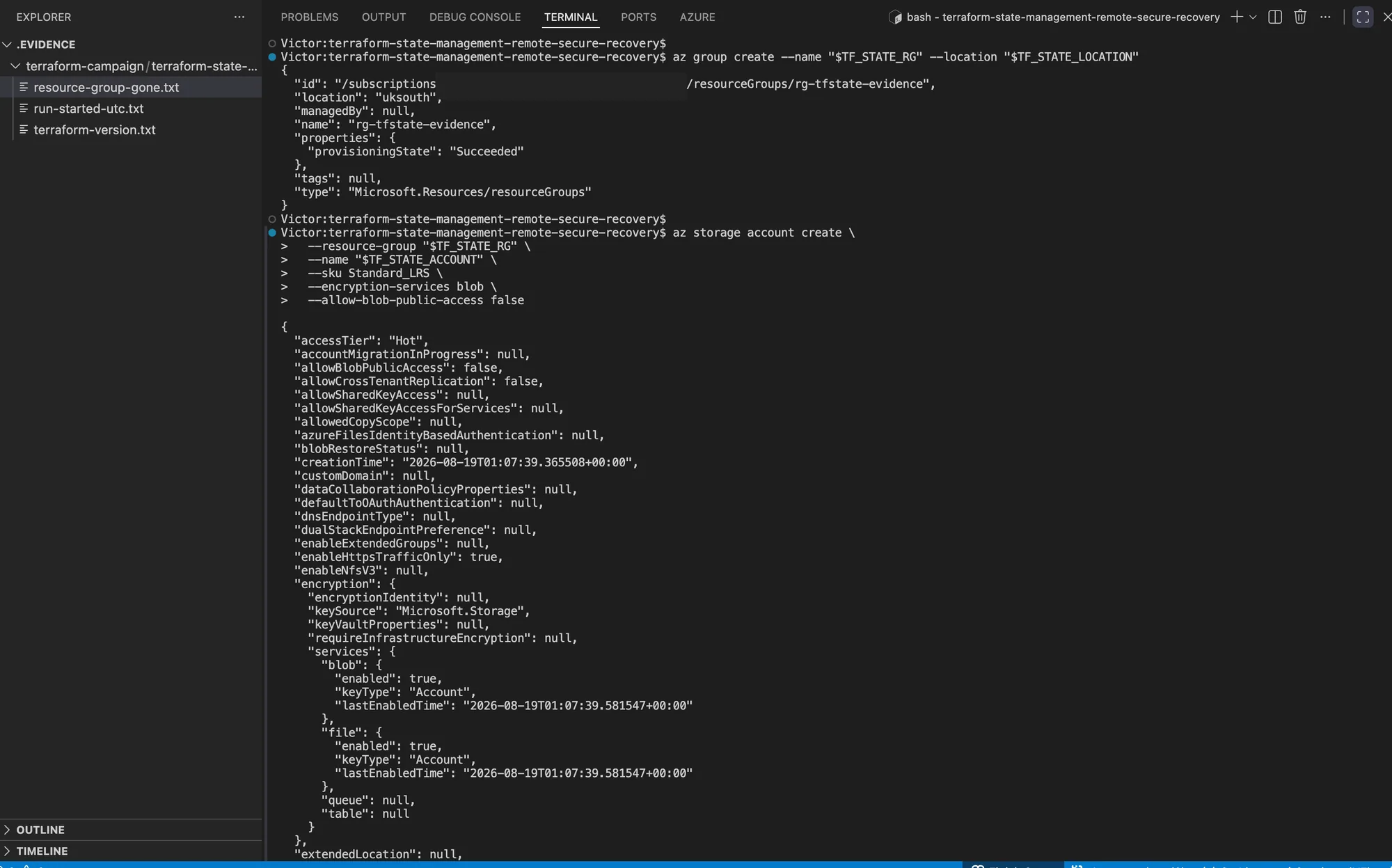
The Azure CLI returned a successful provisioning state for the Storage Account used by the remote backend.
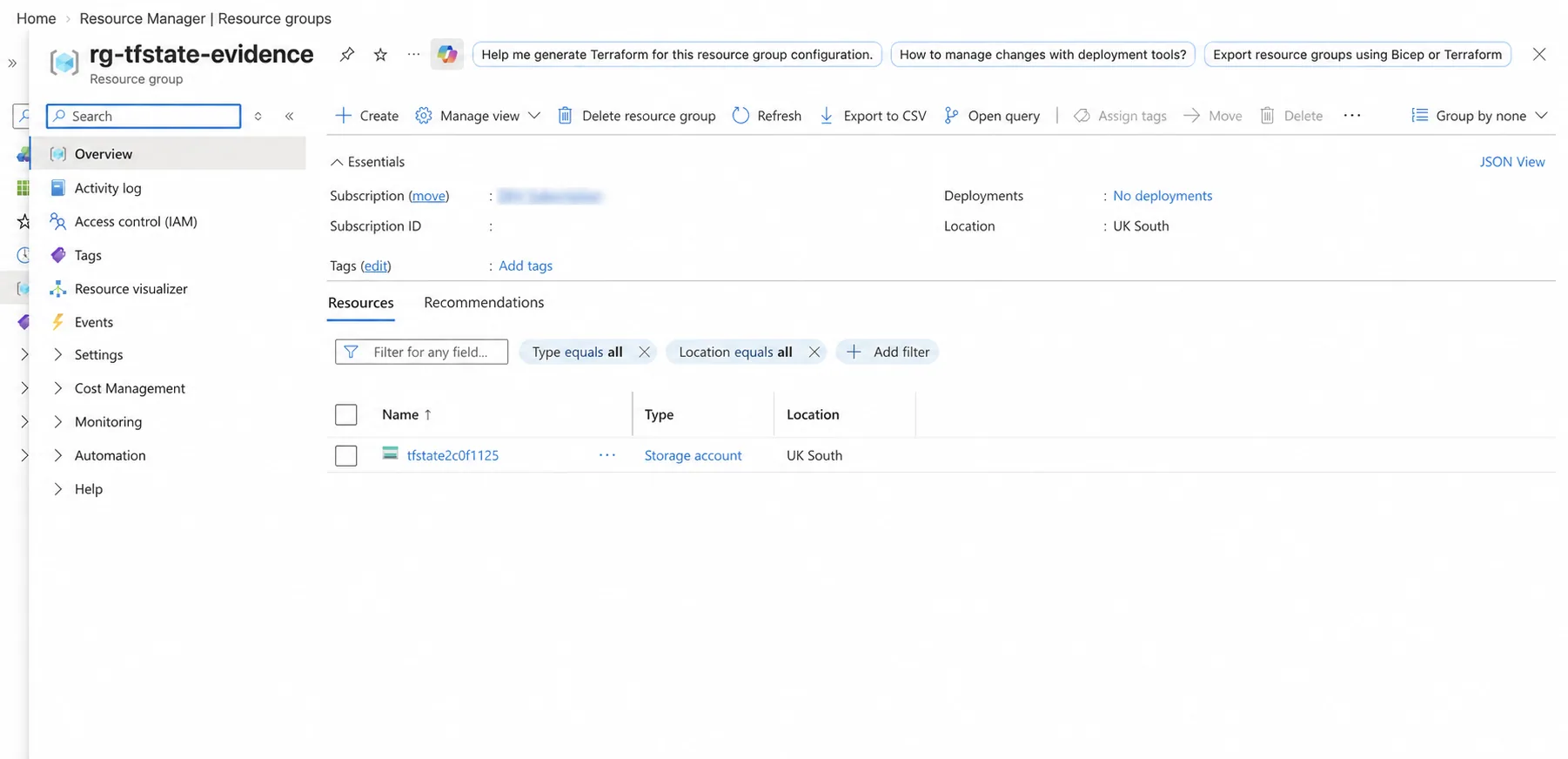
The portal inventory independently confirms that the state backend exists in the intended Resource Group and region.
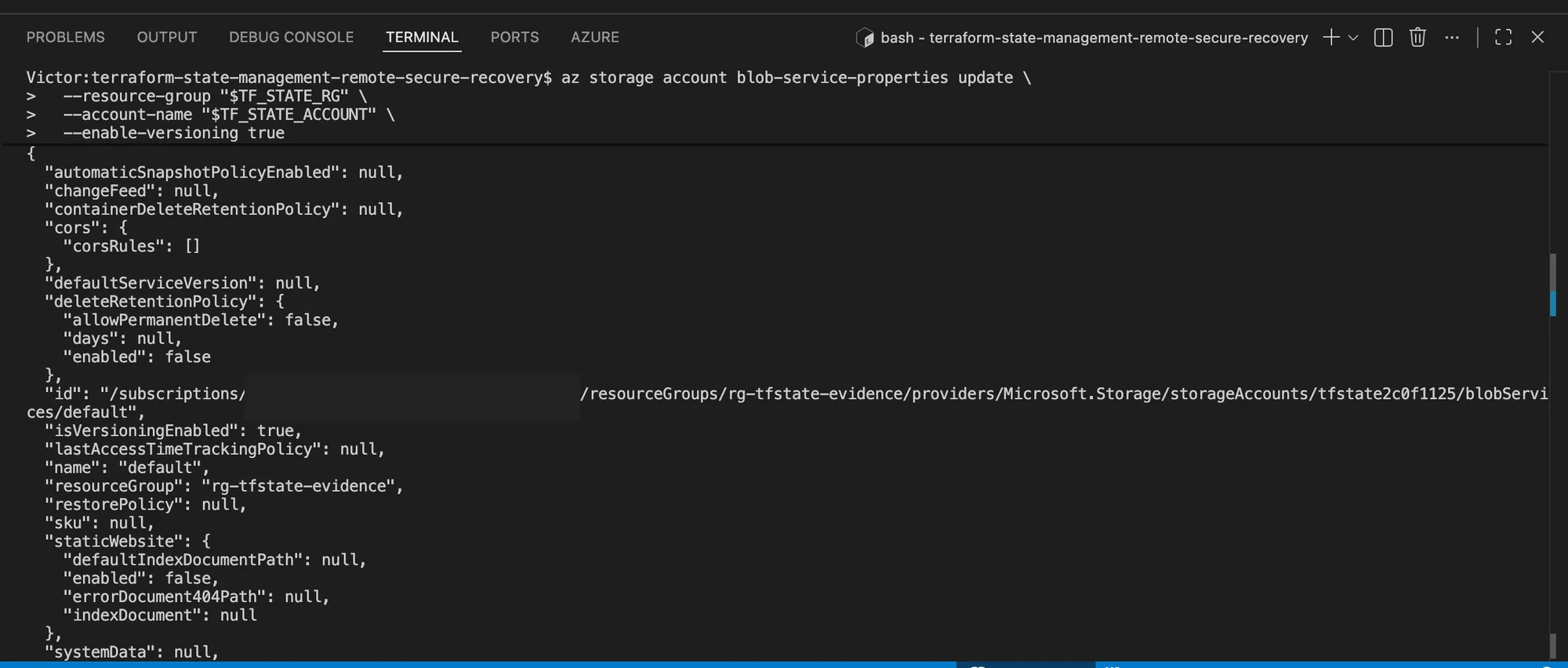
The Blob service reports isVersioningEnabled: true, which provides retained object versions for
the recovery exercise.
Grant the signed-in user data-plane access at the storage-account scope. RBAC propagation can take a few minutes:
export TF_STATE_ACCOUNT_ID="$(az storage account show --resource-group "$TF_STATE_RG" --name "$TF_STATE_ACCOUNT" --query id -o tsv)"
export TF_SIGNED_IN_OBJECT_ID="$(az ad signed-in-user show --query id -o tsv)"

az role assignment create --assignee-object-id "$TF_SIGNED_IN_OBJECT_ID" --assignee-principal-type User --role "Storage Blob Data Contributor" --scope "$TF_STATE_ACCOUNT_ID"
az storage container create --name "$TF_STATE_CONTAINER" --account-name "$TF_STATE_ACCOUNT" --auth-mode login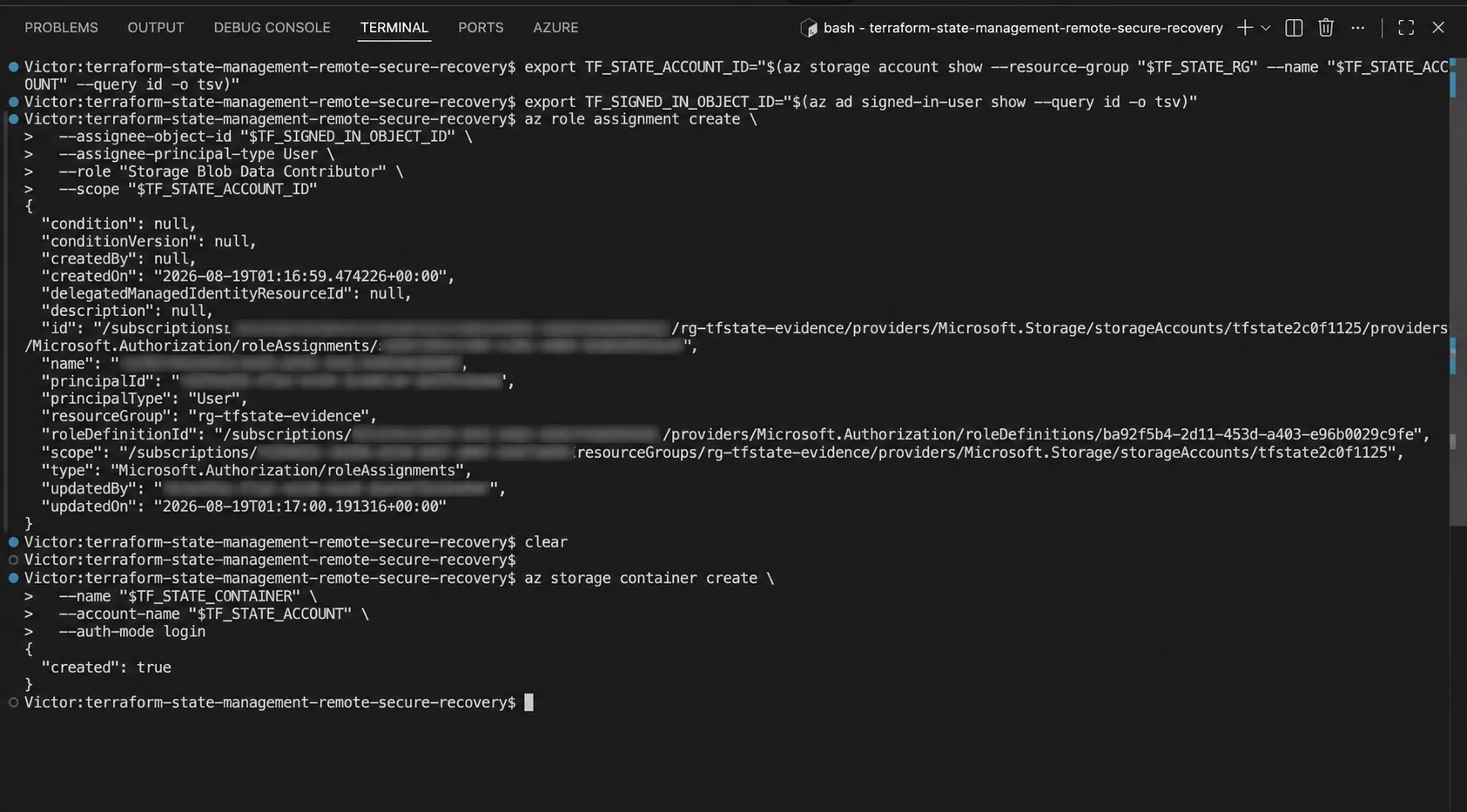
The operator receives data-plane access through Microsoft Entra ID, and the container is created
with --auth-mode login instead of a Storage Account key.
I create main.tf in the evidence directory. The terraform_data resource creates no cloud workload, but its state is written through the Azure backend:
terraform {
  required_version = ">= 1.10.0"
  backend "azurerm" {}
}

variable "state_version" {
  type = string
}

resource "terraform_data" "evidence" {
  input = var.state_version
}

output "state_version" {
  value = terraform_data.evidence.output
}
Initialize it with use_azuread_auth enabled and without placing credentials in configuration:
terraform init -reconfigure -backend-config="resource_group_name=$TF_STATE_RG" -backend-config="storage_account_name=$TF_STATE_ACCOUNT" -backend-config="container_name=$TF_STATE_CONTAINER" -backend-config="key=evidence.tfstate" -backend-config="use_azuread_auth=true"
terraform apply -auto-approve -no-color -var="state_version=v1" | tee proof/apply-v1.txt
terraform apply -auto-approve -no-color -var="state_version=v2" | tee proof/apply-v2.txt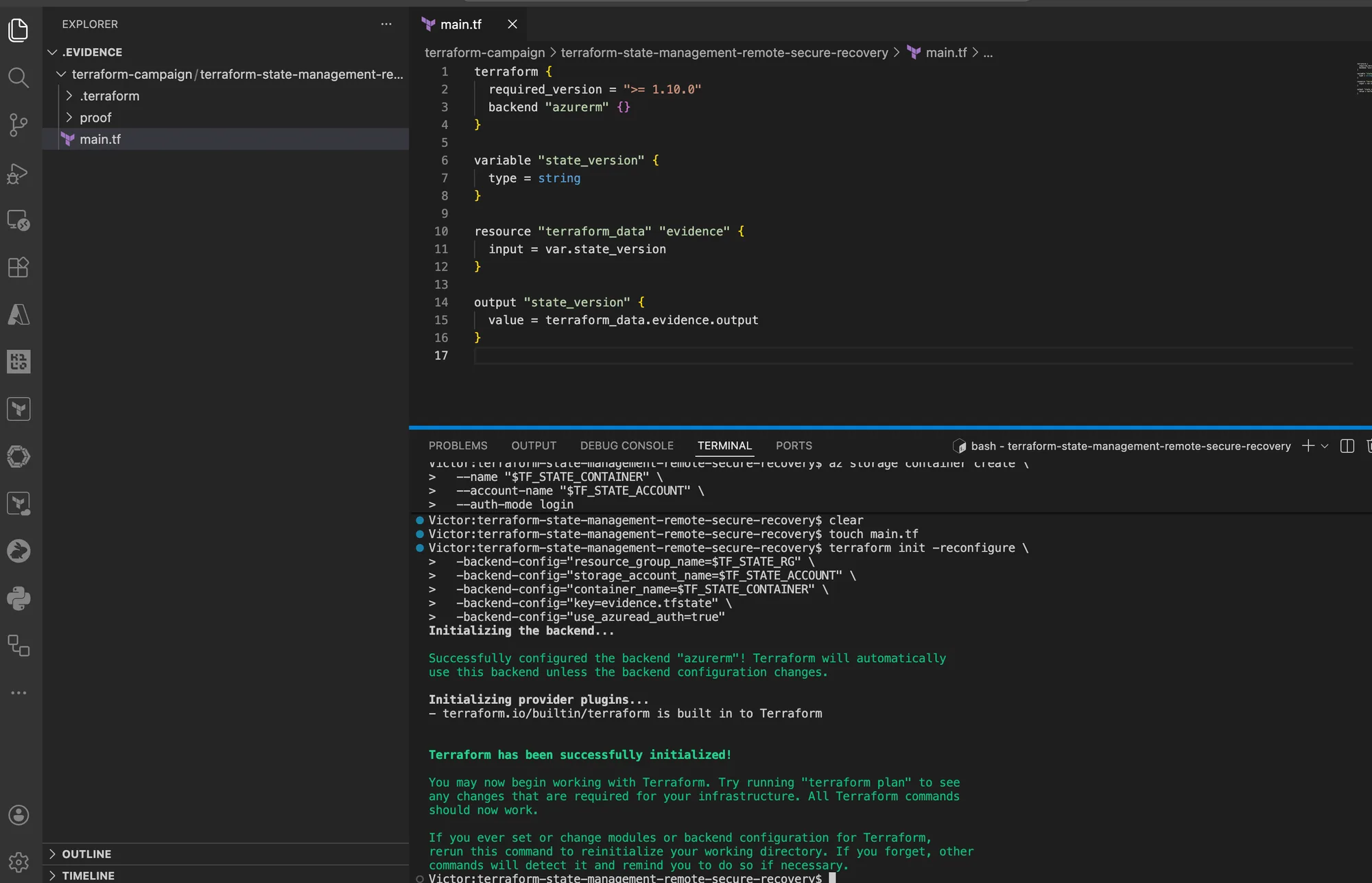
Terraform initialized the AzureRM backend before any state-writing operation ran.
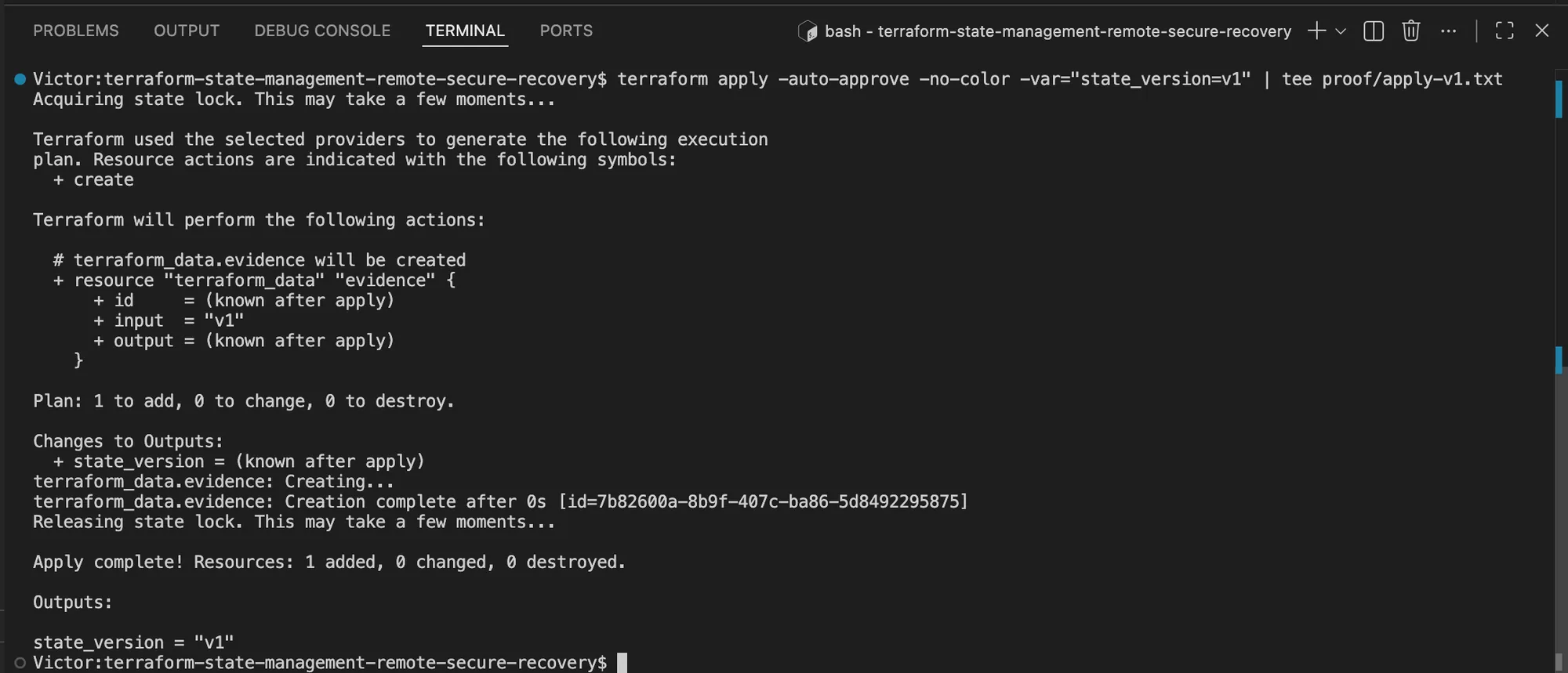
The first apply added one local terraform_data resource and persisted the v1 value through the
remote backend.
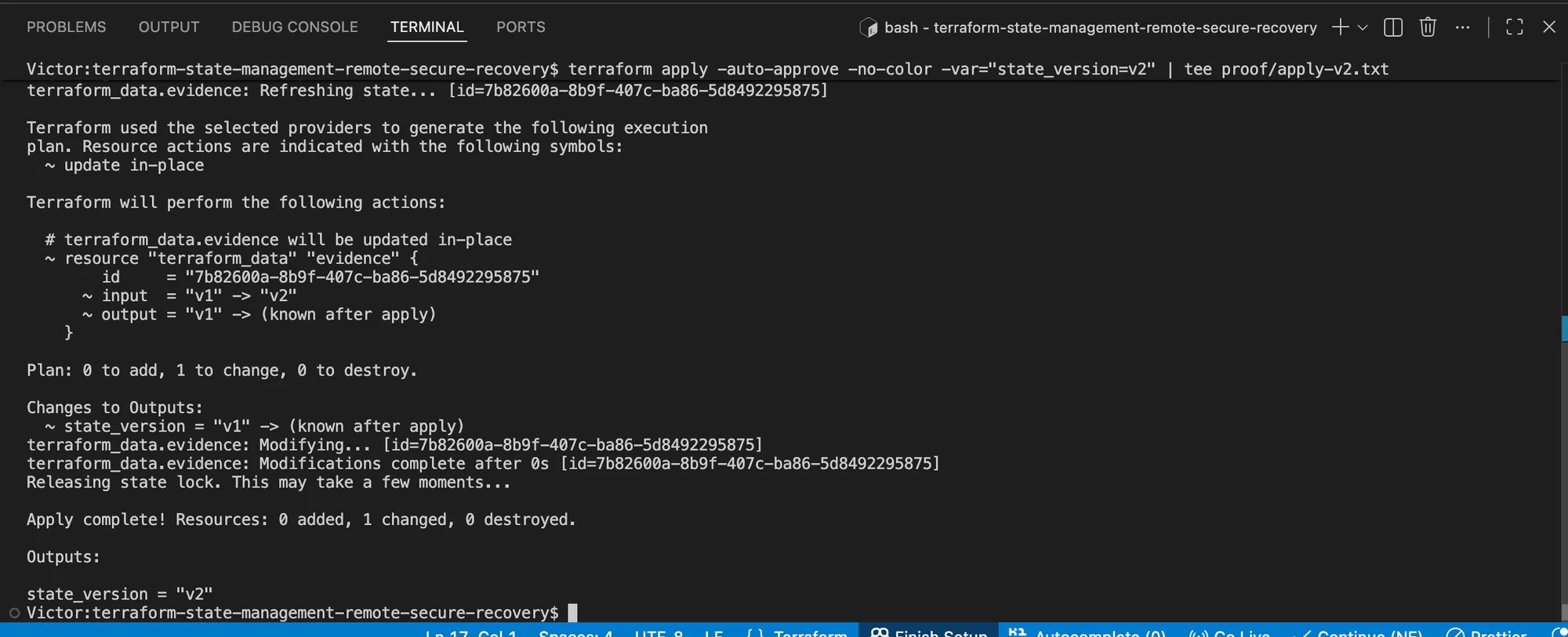
The second apply changed one state entry in place and completed with state_version = "v2".
I verify the remote object and version history:
az storage blob list --account-name "$TF_STATE_ACCOUNT" --container-name "$TF_STATE_CONTAINER" --auth-mode login --include v --query "[].{name:name,versionId:versionId,isCurrentVersion:isCurrentVersion}" --output table | tee proof/blob-versions.txt
terraform state list | tee proof/state-list.txt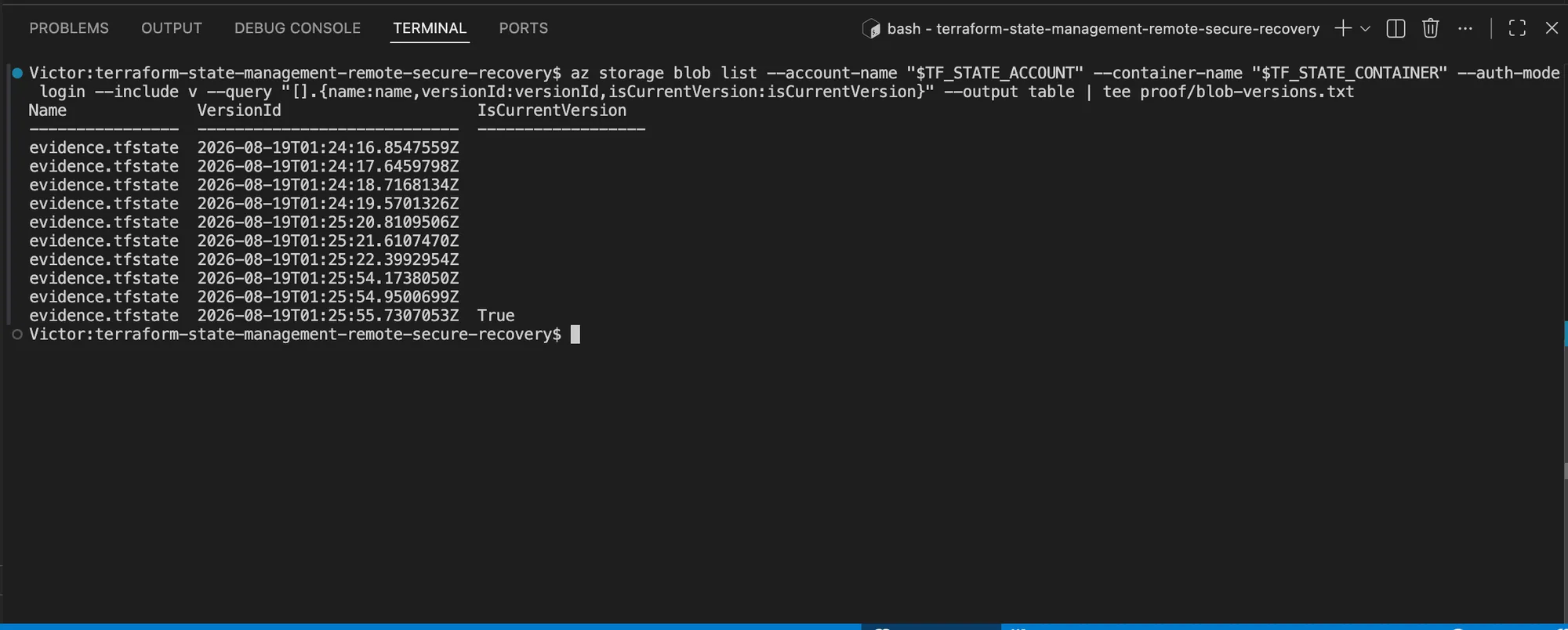
Azure Blob Storage returned several retained versions for the same evidence.tfstate object, with
one row marked as the current version.
For a recovery check, download an older version into the isolated evidence directory and inspect it without configuring Terraform to write it back:
export TF_RECOVERY_VERSION="PASTE_NONCURRENT_VERSION_ID"
az storage blob download --account-name "$TF_STATE_ACCOUNT" --container-name "$TF_STATE_CONTAINER" --name evidence.tfstate --version-id "$TF_RECOVERY_VERSION" --file recovered.tfstate --auth-mode login
terraform show -no-color recovered.tfstate | tee proof/recovered-state-readable.txt
rm -f recovered.tfstate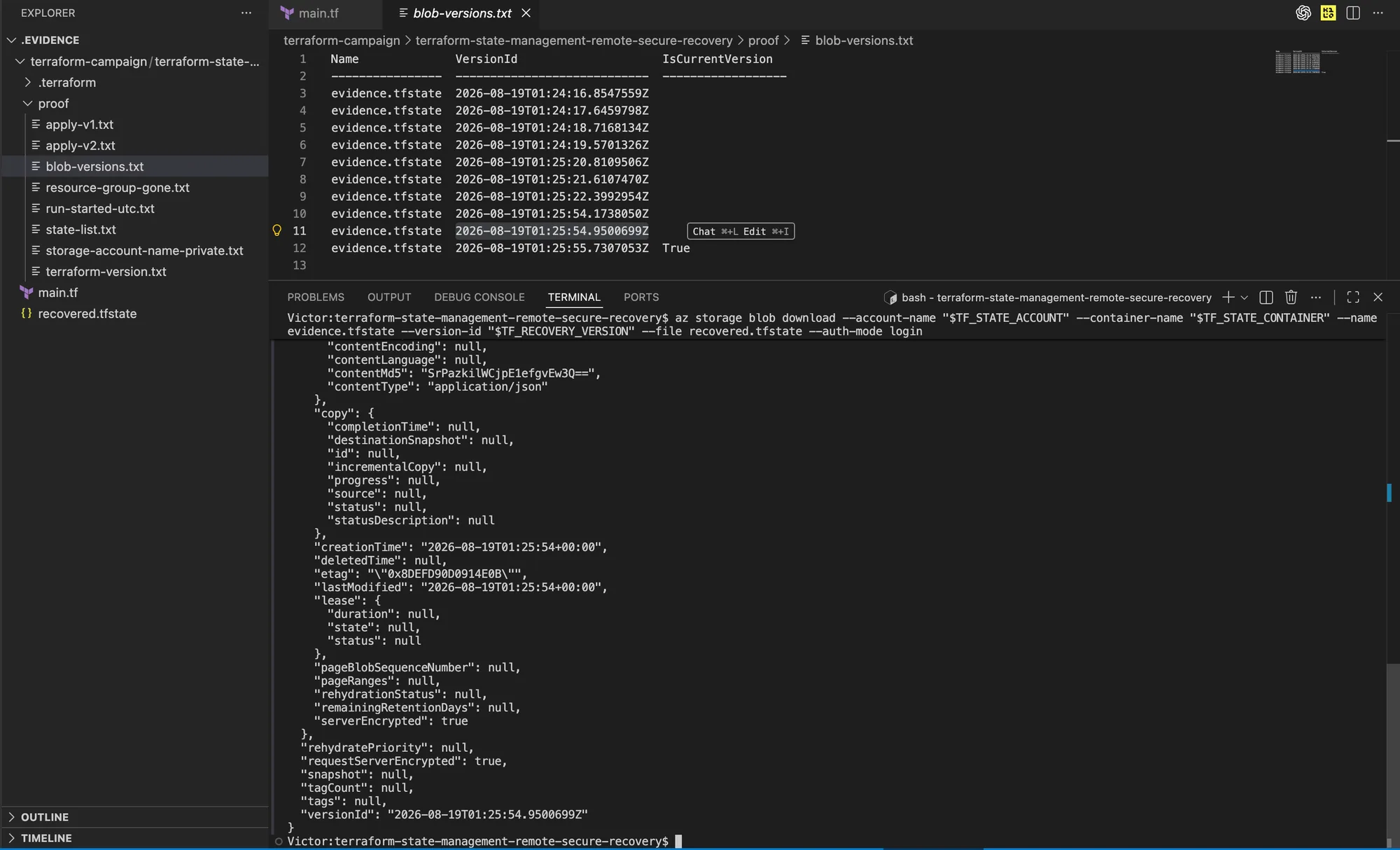
The selected row is not marked current, and Azure reports serverEncrypted: true for the
downloaded version.
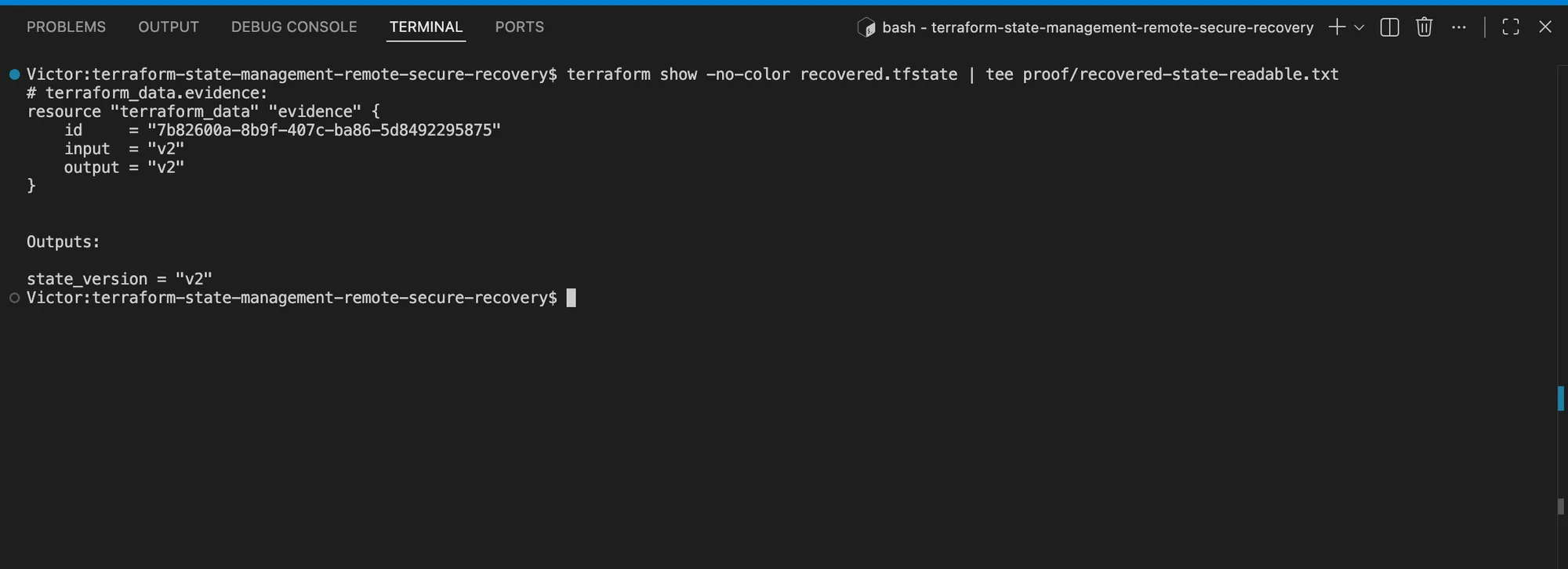
Terraform parsed the isolated historical file and returned state_version = "v2". This proves
version retrieval and interpretation, not that the selected version predates every v2 write.
Cleanup in this order:
terraform destroy -auto-approve -no-color -var="state_version=v2" | tee proof/cleanup.txt
az group delete --name "$TF_STATE_RG" --yes --no-wait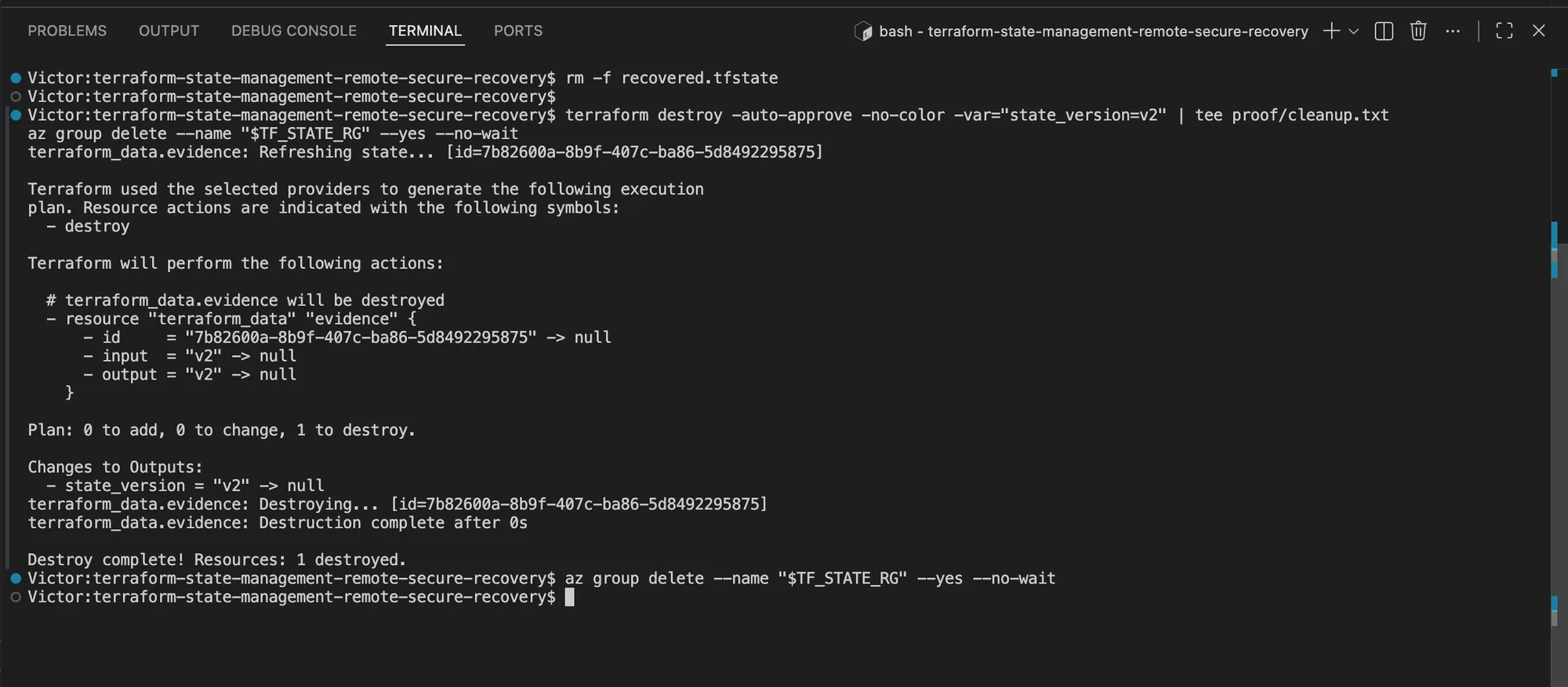
Terraform removed its evidence resource before Azure accepted the asynchronous Resource Group deletion request. The polling command above remains the independent confirmation that deletion has finished.
The durable state model
Remote state is a service boundary: protected storage, one writer, narrow access, auditable change, retained versions, and a tested recovery path.
If the team cannot answer “Who can write this state, what does it control, and how was restore last tested?”, the backend is not ready. It does not matter how reliably terraform apply works today.
To apply this state model inside a complete workload foundation, continue with the production-ready Azure Terraform environment, which connects the backend to private networking, controlled outbound access, diagnostics, verification, and cleanup.