When I troubleshoot Terraform, I classify the failure before I change anything.
An initialization error, provider authentication error, state lock, cloud API rejection, destructive plan, and slow apply need different evidence. I do not randomly delete .terraform, unlock state, or retry an apply because that can destroy the clues.
I use this page as my general runbook. For the specific message Acquiring state lock, I use Terraform Apply Stuck Acquiring State Lock.
The safe first five minutes
In the first five minutes, I collect:
terraform version
terraform providers
terraform workspace show
terraform validate
git rev-parse HEAD
I also record the working directory, backend key or workspace, active cloud account or subscription, command, exit code, timestamp, runner, and sanitized error message.
I do not post state, plan files, tokens, or unredacted debug logs in a public issue.
Fast diagnosis decision tree
| What failed? | First safe check | Do not do yet | Continue at |
|---|---|---|---|
terraform init | Provider address, network, proxy, lock file, backend location | Delete .terraform.lock.hcl | Provider installation |
terraform validate | Exact file and line, variable schema, expression, resource address | Change state or backend | Configuration and reference failures |
terraform plan | Identity, target account, workspace, backend, variable sources | Apply or import blindly | Plan, drift, replacement, and state |
terraform apply | Provider or cloud activity log, operation status, timeout details | Run the same apply again | Apply and provider failures |
| CI only | Runner identity, OIDC claims, working directory, backend permissions | Copy local credentials into CI | CI and OIDC troubleshooting |
| State lock | Active writer, lock holder, deployment queue, interrupted run | Run force-unlock | State-lock recovery guide |
I make the decision from the failed stage, not the loudest line in the log. A 403 during init
can come from the backend, while a 403 during plan can come from the provider reading a cloud API.
Those failures can involve the same identity but require different permissions and evidence.
Terraform error messages: find your fix
I use the literal message to find a starting point, then I confirm the failed stage and target before changing anything.
| Exact message or fragment | What it normally indicates | First safe check | Unsafe shortcut to avoid | Detailed path |
|---|---|---|---|---|
Error acquiring the state lock | Another writer, abandoned lock, or backend access failure | Active runs and lock holder | force-unlock before proving no writer exists | Lock guide |
Failed to query available provider packages | Registry, proxy, source address, or constraint failure | required_providers, egress, and constraints | Permanently opening outbound access | Provider installation |
Inconsistent dependency lock file | Configuration and selected provider versions disagree | terraform init and lock-file diff | Deleting the lock file | Lock-file diagnosis |
Unsupported argument | Wrong block schema, provider version, or module input | File, line, provider schema, and module interface | Guessing a similarly named argument | Validation |
Reference to undeclared resource | Address, module path, type, or local name is wrong | Exact resource address | Editing state | References |
Invalid index | A key is absent or a collection shape changed | Expression values in terraform console | Adding try() to hide an ownership error | Validation |
Invalid for_each argument | Keys are unknown, sensitive, or not a map or set of strings | Type and when keys become known | Targeted apply as a permanent workflow | Validation |
Cycle | Two or more nodes depend on each other | terraform graph and recent dependency changes | Adding more broad depends_on blocks | Dependency cycles |
Duplicate resource | Two blocks declare the same type and local name in one module | Search the current root or child module | Renaming without checking references | Modules |
Module not installed | Module cache is absent or module source changed | Run terraform init from the correct root | Copying another runner's .terraform folder | Modules |
Resource already exists | Remote object exists but this state address does not own it | Account, workspace, remote ID, and state list | Deleting the remote object | Existing resources |
Invalid address to set | Import or state command received an invalid resource address | Quoting, module path, and collection key | Trying multiple state mutations | State tools |
No valid credential sources found | Provider or backend cannot obtain the expected identity | Failed stage and runner credential source | Storing long-lived local credentials in CI | CI identity |
Error building AzureRM Client | Azure identity, tenant, subscription, or provider setup failed | az account show and CI identity variables | Switching subscriptions without recording it | Azure appendix |
Unauthorized, 401, or 403 | Wrong identity, scope, audience, token, or permission | Caller object ID, target scope, and failed operation | Granting Owner at subscription scope | Azure appendix |
context deadline exceeded | Client, provider, network, or cloud operation exceeded a deadline | Cloud operation and resource provisioning state | Immediate apply retry | Timeouts |
timeout while waiting for state to become | Provider stopped polling before the platform reached target state | Activity log and actual resource state | Assuming the remote operation failed | Timeouts |
Provider produced inconsistent result after apply | Provider returned state that contradicts the planned result | Minimal reproduction and locked provider version | Unreviewed provider downgrade | Provider inconsistency |
Backend initialization required | Backend configuration differs from cached working-directory data | Intended backend address and change record | Choosing a migration flag by trial and error | Backend changes |
Classify the failure
| Stage | Typical signal | First evidence |
|---|---|---|
| Init | Provider/module download or backend config error | CLI version, network, lock file, backend config |
| Validate | Invalid reference, type, function, or schema | Exact file/line and provider schema |
| Plan | Auth, API read, drift, replacement, unknown value | Target identity, state, full plan context |
| Apply | Quota, conflict, timeout, policy deny | Cloud activity log and resource operation |
| State | Lock, wrong backend, missing address | Backend key/workspace, active runs, state list |
| CI only | Local succeeds, runner fails | Environment, identity, paths, tool versions |
“Inconsistent dependency lock file”
The configuration and .terraform.lock.hcl disagree. I do not delete the lock file as an automatic answer.
I check whether required_providers or module sources changed:
terraform init
git diff -- .terraform.lock.hcl
For an intentional upgrade, I run:
terraform init -upgradeI review provider version and checksum changes, then commit the updated lock file with the dependency change.
“Failed to query available provider packages”
I check:
- DNS and outbound HTTPS from the runner
- Proxy and custom CA configuration
- Provider source spelling
- Registry availability
- Version constraints that have no common solution
- Platform/architecture support for the chosen provider
I do not widen firewall rules permanently just to prove the registry is reachable. I test the exact approved egress path.
Backend changes: reconfigure versus migrate-state
terraform init -migrate-state asks Terraform to copy existing state to the changed backend.
terraform init -reconfigure discards the cached backend configuration and does not migrate existing
state. These flags solve different problems.
| Situation | Safe interpretation |
|---|---|
| Backend address intentionally changed and existing state must move | Verify old and new locations, back up state, freeze writers, then use terraform init -migrate-state and review prompts |
| A clean runner already has the correct remote backend configuration | Use normal terraform init; no migration flag should be necessary |
Cached .terraform backend data is stale, but remote state did not move | After independently verifying the real backend, use terraform init -reconfigure |
| Backend key, account, container, or workspace is uncertain | Use neither flag yet; identify the authoritative state location first |
I never use -force-copy as a first diagnostic step. It suppresses migration confirmation, which is
the opposite of what I need during an uncertain recovery.
Module installation and source failures
For Module not installed, an invalid registry or Git source, a missing ref, or a private-module
authentication failure, I record the root module and module source before clearing anything.
pwd
terraform version
terraform init -input=false -no-color
git diff -- '*.tf' .terraform.lock.hcl
Remote module versions are controlled by the module version constraint when the registry protocol
supports it. I pin a deliberate Git ref rather than silently following a mutable branch. I do not
copy .terraform/modules from a developer laptop into CI. I reinitialize from the declared sources
using the runner's approved credentials.
“Reference to undeclared resource”
Terraform addresses are exact. I check the resource type, local name, module path, and whether
count or for_each makes the reference a collection.
# resource with for_each
azurerm_subnet.this["web"].id
I use terraform validate and inspect module outputs rather than reaching into a child module's
internal resource addresses.
Variables, tfvars, environment, and working directories
A plan that is correct locally but wrong in CI often loaded different values rather than different
code. I record all explicit -var-file arguments, the current root, workspace, and relevant
variable names without printing secret values.
For Terraform CLI, later and more explicit sources take priority. Command-line -var and
-var-file values override auto-loaded files; *.auto.tfvars files override terraform.tfvars;
environment variables named TF_VAR_name override defaults but lose to those files and command-line
arguments.
pwd
terraform workspace show
find . -maxdepth 1 -type f \( -name '*.tfvars' -o -name '*.tfvars.json' \) -print
env | sed -n 's/^\(TF_VAR_[^=]*\)=.*/\1=[set]/p'
The last command records names only. I deliberately do not print values. In CI, I use -input=false
so a missing required variable fails instead of waiting for a prompt that no person can answer.
Dependency cycles
Cycle means Terraform cannot order the graph because a dependency eventually points back to its
starting node. Common causes include two resources referencing each other, a module output feeding
an input back into the same module, or broad bidirectional depends_on blocks.
When Graphviz is installed, I generate a graph for diagnosis:
terraform graph -type=plan > graph.dot
dot -Tsvg graph.dot -o graph.svg
terraform graph is useful evidence, but I usually remove the false dependency or split ownership
at a real lifecycle boundary. Adding more broad depends_on declarations can make the graph less
accurate and produce more unknown values.
# Broken: each object explicitly waits for the other.
resource "terraform_data" "network" {
  depends_on = [terraform_data.application]
}

resource "terraform_data" "application" {
  depends_on = [terraform_data.network]
}
The corrected design should establish one direction only, based on a real data flow:
resource "terraform_data" "network" {
  input = "network-ready"
}

resource "terraform_data" "application" {
  input = terraform_data.network.output
}
Authentication works locally but fails in CI
My local Azure CLI credentials do not exist on a hosted runner. I configure CI to authenticate explicitly with OIDC or another approved short-lived method.
I verify tenant, subscription, client identity, federated subject or audience, Azure RBAC, and backend data-plane permission. The provider and backend can use related but distinct authentication settings.
I use the GitHub Actions Terraform pipeline for the complete pattern.
CI diagnostic matrix
Local credentials do not automatically exist on a hosted runner. I compare the local and runner context explicitly:
| Check | Evidence |
|---|---|
| Terraform and provider versions | terraform version, terraform providers, committed lock-file diff |
| Root module | Runner working directory and the files present there |
| Non-interactive execution | -input=false on init, plan, and apply workflows |
| OIDC federation | Issuer, audience, subject, repository, branch or environment, tenant, and client ID |
| Provider access | Permission for the resource operations in the plan |
| Backend access | Permission for state read, write, and lock operations at the backend |
| Concurrency | Workflow concurrency group, deployment queue, and active state writer |
| Evidence | Sanitized no-color output and action summary, never raw state or a public saved plan |
Backend authentication and provider authentication are separate diagnostic targets. A runner may be able to read Azure resources while lacking blob data-plane access to state, or it may initialize the backend successfully but lack permission to create the planned resources.
I do not copy a developer's Azure CLI cache or long-lived client secret into CI. I use the approved short-lived identity flow and inspect its exact federated claims. The GitHub Actions Terraform pipeline documents the complete repository workflow I follow.
Azure Terraform troubleshooting appendix
These Azure checks come from Microsoft Learn. I run them against the intended non-production scope first. I did not exercise them in the local lab below.
Wrong tenant or subscription
Before I change it, I record the active context:
az account show \
  --query '{tenantId:tenantId,subscriptionId:id,principal:user.name}' \
  --output jsonc
I compare it with the backend and provider configuration. I do not switch subscriptions until I have captured the original context, or I lose evidence of why the first request targeted the wrong place.
AuthorizationFailed, 401, and 403
I use the failed operation and scope from the Azure error. I confirm the caller object ID and effective role assignments at that scope. I do not grant Owner at subscription scope as a diagnostic shortcut. Microsoft documents that new role assignments can take time to become visible, so I refresh the token after the assignment propagates instead of repeatedly changing roles.
Missing subscription registration
For MissingSubscriptionRegistration or NoRegisteredProviderFound, I inspect the required namespace:
az provider show \
  --namespace Microsoft.Network \
  --query registrationState \
  --output tsv
I register only the provider namespaces the deployment needs and only with an identity permitted to perform the registration action. I also verify that the resource type and selected region are supported before assuming registration is the only problem.
Azure Policy denial
Azure Policy with a deny or denyAction effect can stop a create or update request even when RBAC
allows it. I inspect the failed deployment operation and Azure Activity Log for the policy assignment
and definition. The safe correction may be a compliant configuration change or an approved policy
exemption, not broader RBAC.
Private networking and long-running operations
For private endpoints, I confirm DNS resolution and network reachability from the runner as separate facts. For ARM operation timeouts, I inspect the Azure operation and provisioning state before retrying. A Terraform timeout, an unreachable data-plane endpoint, and a failed Azure Resource Manager request are different failure classes even when all appear during apply.
Plan, drift, replacement, and state
I treat a plan as diagnostic evidence. I read its target account, resource addresses, action symbols, and summary before I treat it as an instruction to apply.
| Incident | Symptom | Evidence to confirm | Safe action | Avoid | Verification |
|---|---|---|---|---|---|
| Existing resource | Provider reports that a named remote object already exists | Identity, subscription, workspace, remote ID, state list | Use a reviewed import when Terraform should own it | Deleting the object to make apply pass | Plan shows import and no unintended destruction |
| Unexpected replacement | Plan shows -/+ or a delete and create at related addresses | forces replacement, address changes, provider diff | Correct the immutable input or record an address refactor with moved | Applying before impact review | New plan has the intended action count |
| Widespread deletion | Many unrelated addresses are removed | Backend key, workspace, variables, account, module version | Stop and restore the correct execution context | Testing apply on a subset | Full plan matches the expected environment inventory |
| Drift | Remote settings differ from configuration | Refresh-only plan and cloud audit trail | Decide whether code or remote configuration is authoritative | Automatically applying unknown drift | Normal plan reaches the approved desired state |
“Resource already exists”
When Terraform state does not own the remote object at the address being created, I decide whether to:
- Import the existing object
- Rename the new object
- I remove an accidental unmanaged object through the approved process
- Point the configuration to the correct environment
I use configuration-driven import to make the association reviewable:
import {
  to = azurerm_resource_group.platform
  id = "/subscriptions/.../resourceGroups/rg-platform-prod"
}
I expect the first plan after import to avoid destructive change. I match configuration to the existing object before taking ownership of its lifecycle.
Terraform wants to replace a resource unexpectedly
I look for forces replacement in the plan and inspect:
- Provider upgrade behavior
- Immutable cloud API properties
- Resource address or
for_eachkey changes - Normalization of casing, IDs, or defaults
- A module default that changed
- Drift outside Terraform
I do not apply until I understand user impact. A moved block can represent a code refactor; it
cannot make an immutable cloud property mutable.
A plan shows widespread deletions
I stop and check the backend key, workspace, subscription or account, variable files, module source or version, and collection keys.
A wrong workspace or empty or wrong state can make Terraform believe it must create or delete an entire environment. I preserve evidence before changing backend configuration.
Drift appears after a portal change
I use a refresh-only plan to inspect real-world differences without proposing to change infrastructure:
terraform plan -refresh-onlyI then decide whether to update configuration to accept the change, revert the cloud resource to code, or import a new object. I do not auto-apply unknown drift.
Apply timed out but the resource exists
A client timeout does not prove the cloud operation failed. I check Azure Activity Log and resource provisioning state before retrying.
Retrying blindly can produce conflicts or a second long-running operation. Once the platform settles, I run a complete plan to see what Terraform and the provider observe.
Provider produced an inconsistent result
I capture a minimal sanitized reproduction, Terraform version, provider version, resource type, plan or apply sequence, and relevant provider logs. I check the provider's official issue tracker and upgrade notes.
Before I upgrade or downgrade a provider, I preserve the lock file and state, test outside production, and review the plan. Provider changes can alter defaults and replacement behavior.
State address and import tools
I start with read-only inspection:
terraform state list
terraform state show 'module.network.azurerm_virtual_network.this'
State mutation commands are high risk. I use configuration moved and import blocks when they
make the change reviewable. If terraform state mv, rm, or push is genuinely required, I freeze
other writers, back up state, use peer review, and run a complete plan immediately afterward.
Debug logs without leaking secrets
Terraform supports detailed logging through environment variables such as TF_LOG. I treat debug
output as sensitive because it can include values and provider requests.
I write logs only to a protected location, reproduce the smallest case, redact before sharing, and delete according to retention policy. I never turn on verbose logging globally in production CI.
The escalation package
- Exact sanitized error and command are recorded
- Terraform and provider versions are known
- Commit, root, workspace, backend key, and target are confirmed
- Cloud activity and provisioning state were checked
- A minimal reproduction was attempted safely
- State, plans, logs, and credentials were not exposed
- No concurrent writer or interrupted apply is still active
Reproducible evidence lab: troubleshooting from failure to fix
I used a disposable directory for this lab. When I run a lab that reaches Azure, I use a non-production subscription. Proof files can contain resource IDs or plan values, so I inspect them before sharing.
Create the evidence workspace
export TF_EVIDENCE_ROOT="${PWD}/.evidence/terraform-campaign"
export TF_EVIDENCE_SLUG="terraform-troubleshooting-guide"
export TF_EVIDENCE_DIR="$TF_EVIDENCE_ROOT/$TF_EVIDENCE_SLUG"
mkdir -p "$TF_EVIDENCE_DIR/proof"
cd "$TF_EVIDENCE_DIR"
date -u +"%Y-%m-%dT%H:%M:%SZ" | tee proof/run-started-utc.txt
terraform version | tee proof/terraform-version.txt
Beginner walkthrough
- I started a new evidence session with
TF_EVIDENCE_SLUG="terraform-troubleshooting-guide". - I created the working
main.tfbelow and ranterraform init -backend=falseplusterraform validatebefore introducing the problem. That baseline proved the starting file worked. - I added only the broken output below, saved the file, and ran validation with stderr captured.
- I read the first diagnostic and recorded the stage as
validate, the target asterraform_data.does_not_exist, and the hypothesis asthe output references an undeclared resource. - I compared the command, error heading, and invalid reference with the validation evidence below. It omits personal filesystem paths.
- I removed only the broken output, then ran format, validation, and plan again.
- I confirmed that validation succeeded and the plan contained the expected single resource.
- I added the exact commands and UTC time to
proof/incident-notes.md, then removed local state once I no longer needed it.
If validation still fails after I remove the block, I compare braces in main.tf and rerun
terraform fmt; formatting often exposes a missing closing brace clearly.
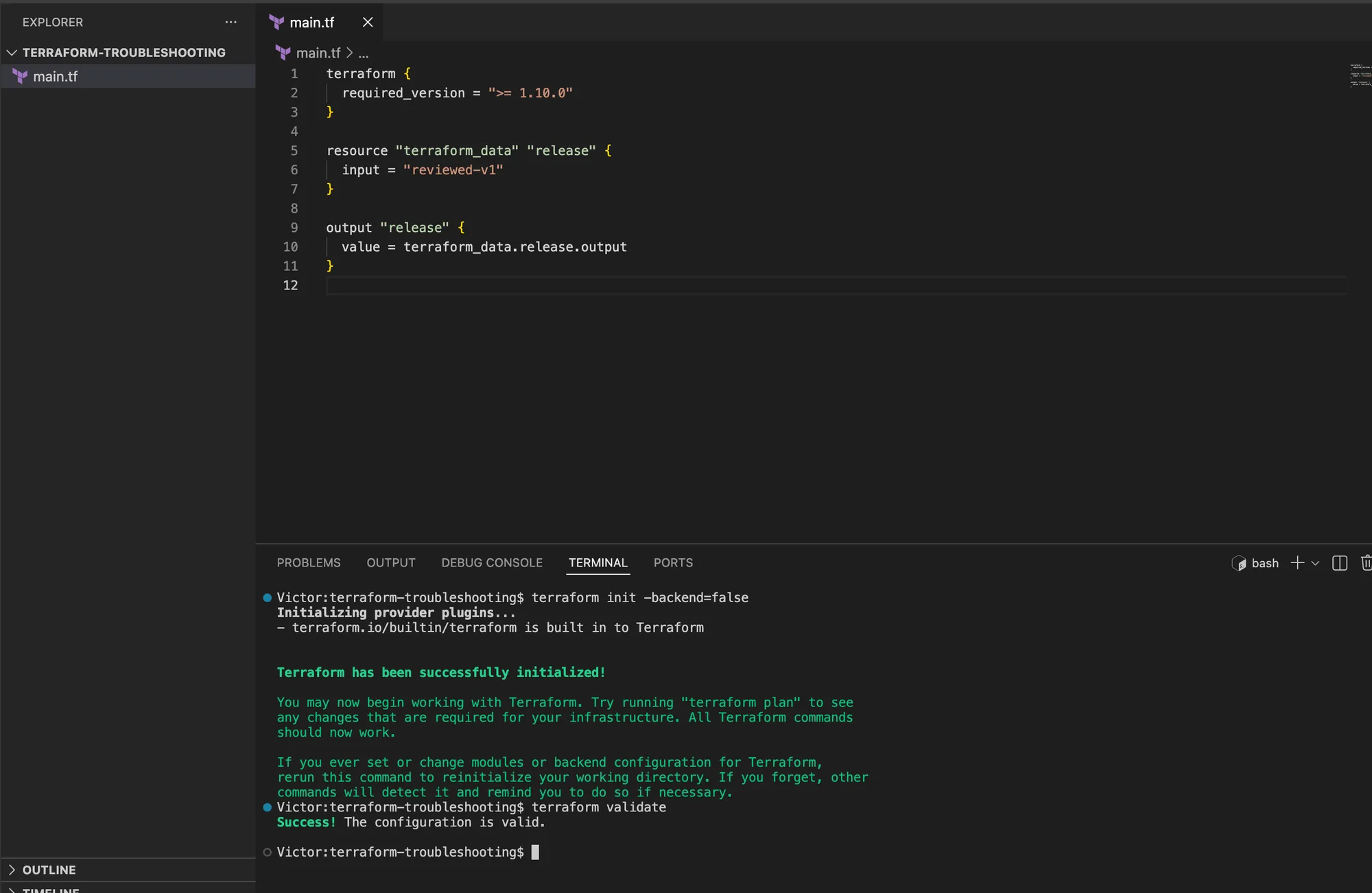
I started with this complete working main.tf:
terraform {
  required_version = ">= 1.10.0"
}

resource "terraform_data" "release" {
  input = "reviewed-v1"
}

output "release" {
  value = terraform_data.release.output
}
I ran terraform init -backend=false and terraform validate. Only after both succeeded, I appended
this controlled error to the same file:
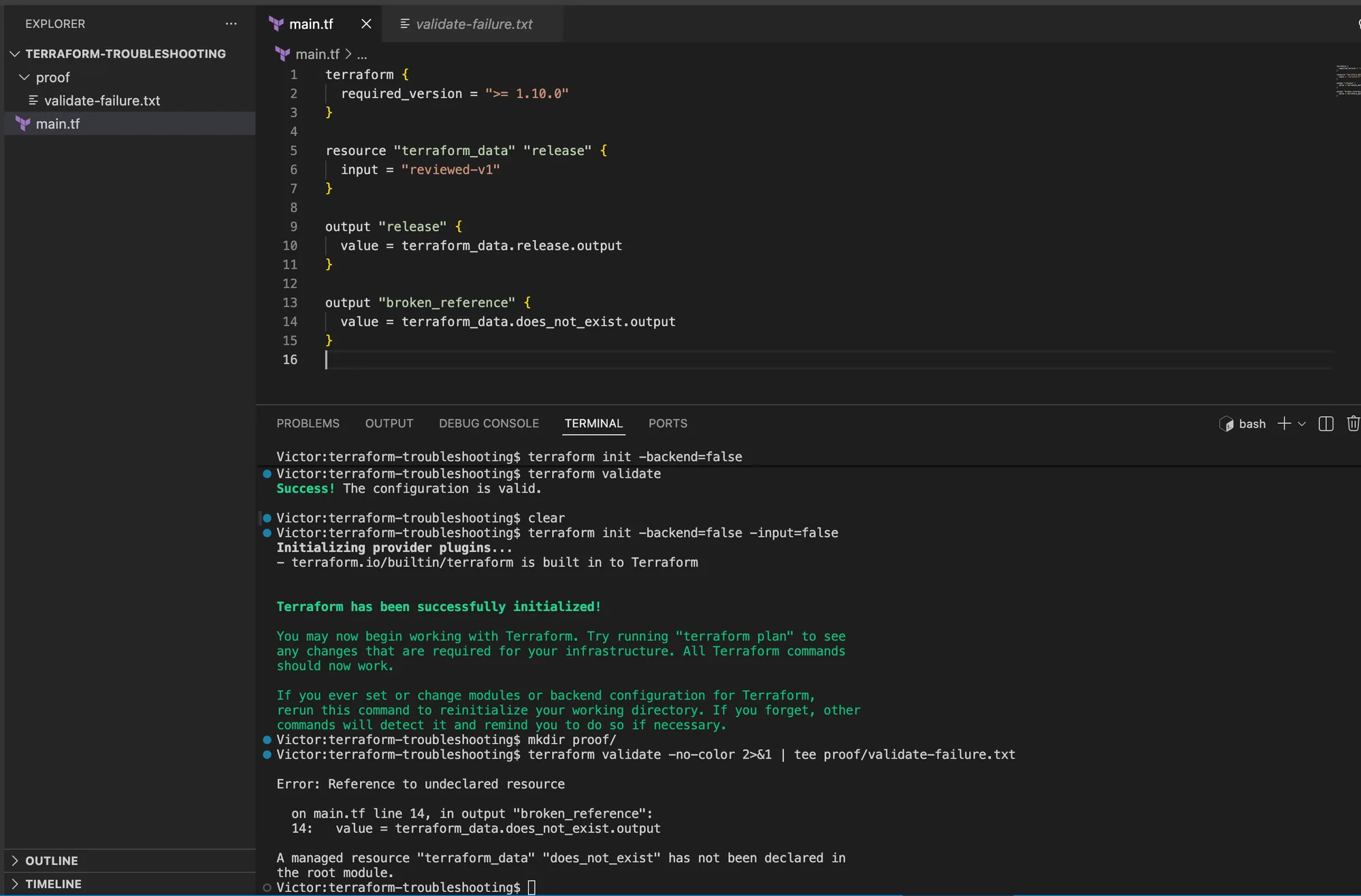
output "broken_reference" {
  value = terraform_data.does_not_exist.output
}
In my run, the baseline initialized without a backend and passed validation before I introduced the controlled error.
I then ran the validation failure:
terraform init -backend=false -input=false
terraform validate -no-color 2>&1 | tee proof/validate-failure.txt
The terminal output identifies terraform_data.does_not_exist as an undeclared resource at the
output's line in main.tf.
I recorded the stage, target, first error line, hypothesis, and fix in proof/incident-notes.md.
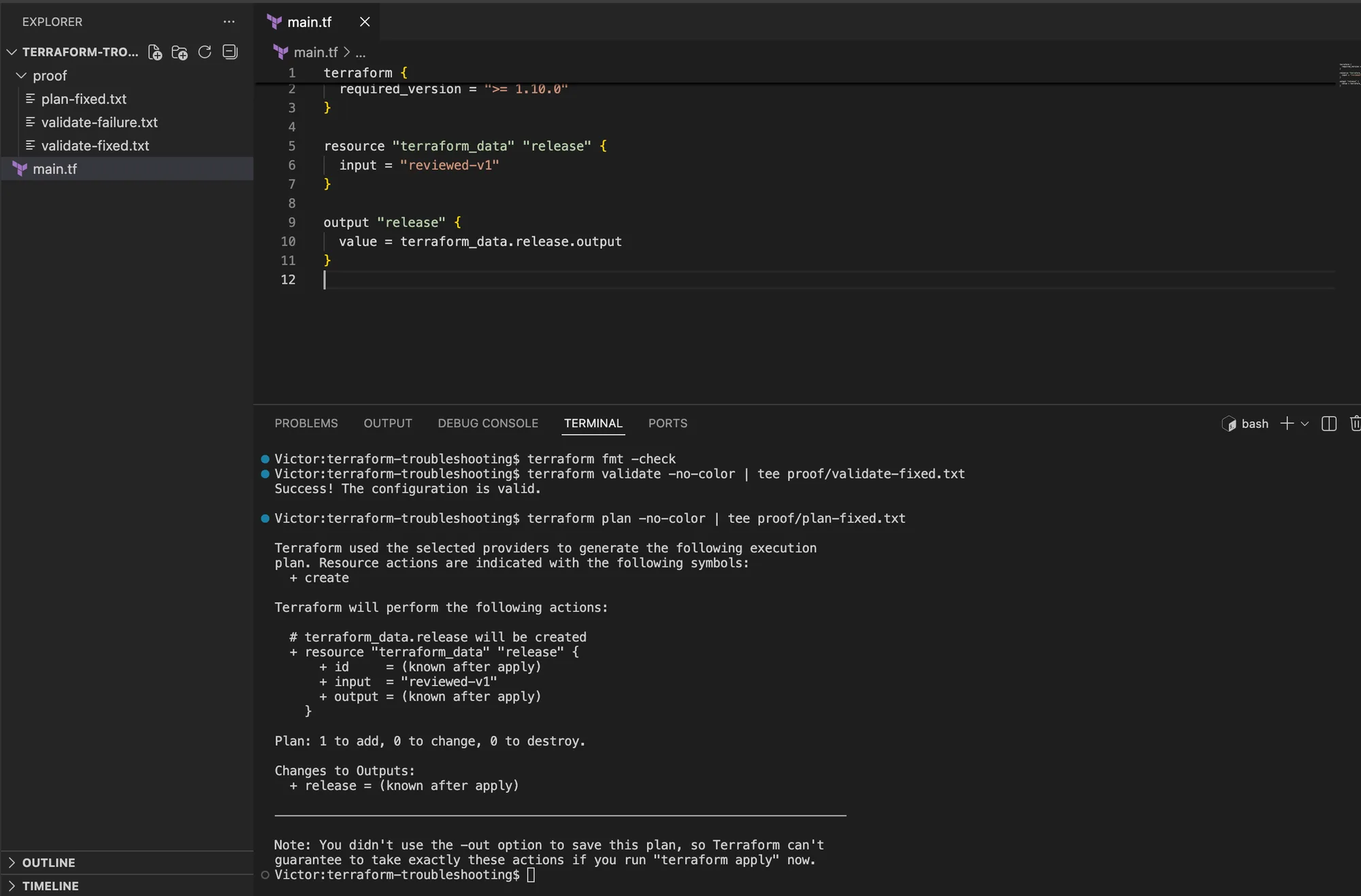
After I removed the broken output, I ran:
terraform fmt -check
terraform validate -no-color | tee proof/validate-fixed.txt
terraform plan -no-color | tee proof/plan-fixed.txt
The corrected file validated successfully, and the resulting plan proposed one local
terraform_data.release object. The screenshot below is from my run. I do not expose debug logs
unless I have reviewed them for credentials and state values.
Executed environment and claim boundary
| Component | Executed environment |
|---|---|
| Terraform CLI | 1.15.8 |
| Provider | Built-in terraform provider only |
| OS and architecture | macOS Darwin arm64 |
| Shell | zsh |
| Test date | 2026-08-26 |
| Cloud scope | None |
| Cost | No cloud resources or provider API calls |
My local run proved validation diagnosis, local-state inspection, an unsafe replacement plan, a configuration-driven address move, and cleanup. It does not prove Azure authentication, remote-state locking, provider import behavior, organizational policy, or production safety.
Focused lab: stop an accidental replacement before apply
I used this focused incident to demonstrate why a valid plan can still be unsafe. I replaced
main.tf with this complete baseline:
terraform {
  required_version = ">= 1.10.0"
}

resource "terraform_data" "release" {
  for_each = toset(["api"])

  input = "reviewed-v1"
}

output "release" {
  value = terraform_data.release["api"].output
}
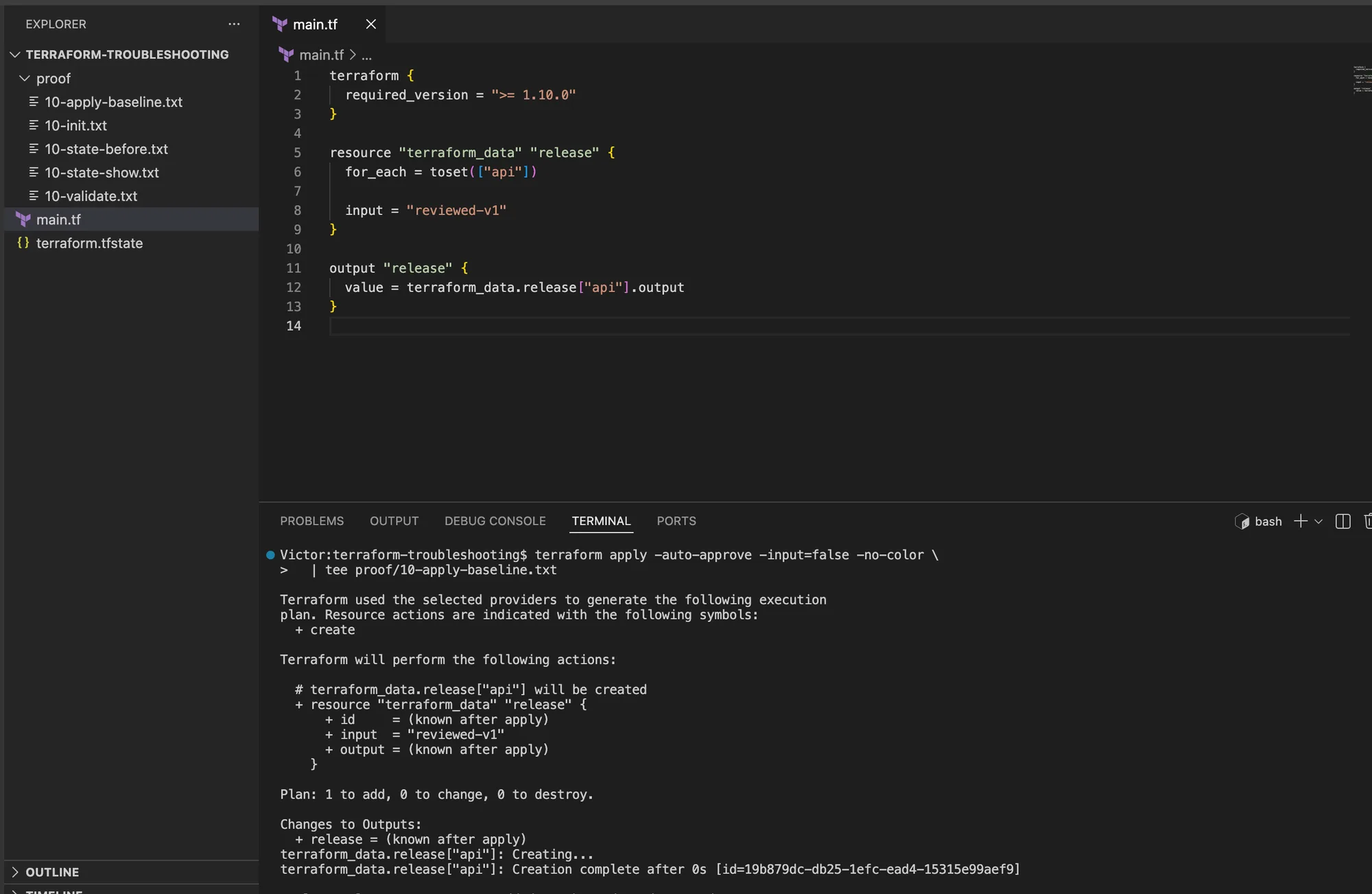
I initialized, validated, and created the disposable local object:
terraform init -backend=false -input=false -no-color \
  | tee proof/10-init.txt
terraform fmt -check
terraform validate -no-color \
  | tee proof/10-validate.txt
terraform apply -auto-approve -input=false -no-color \
  | tee proof/10-apply-baseline.txt
terraform state list \
  | tee proof/10-state-before.txt
terraform state show 'terraform_data.release["api"]' \
  | tee proof/10-state-show.txt
I expected the apply summary to be 1 added, 0 changed, 0 destroyed, and I verified that state
contained exactly:
terraform_data.release["api"]My baseline created the api instance before the address refactor.
To reproduce a realistic refactor mistake, I changed both occurrences of "api" in main.tf to
"service" without adding a moved block. The file remained valid, so validation alone could not
protect the object:
terraform fmt -check
terraform validate -no-color
terraform plan -input=false -no-color \
  | tee proof/11-unsafe-plan.txt
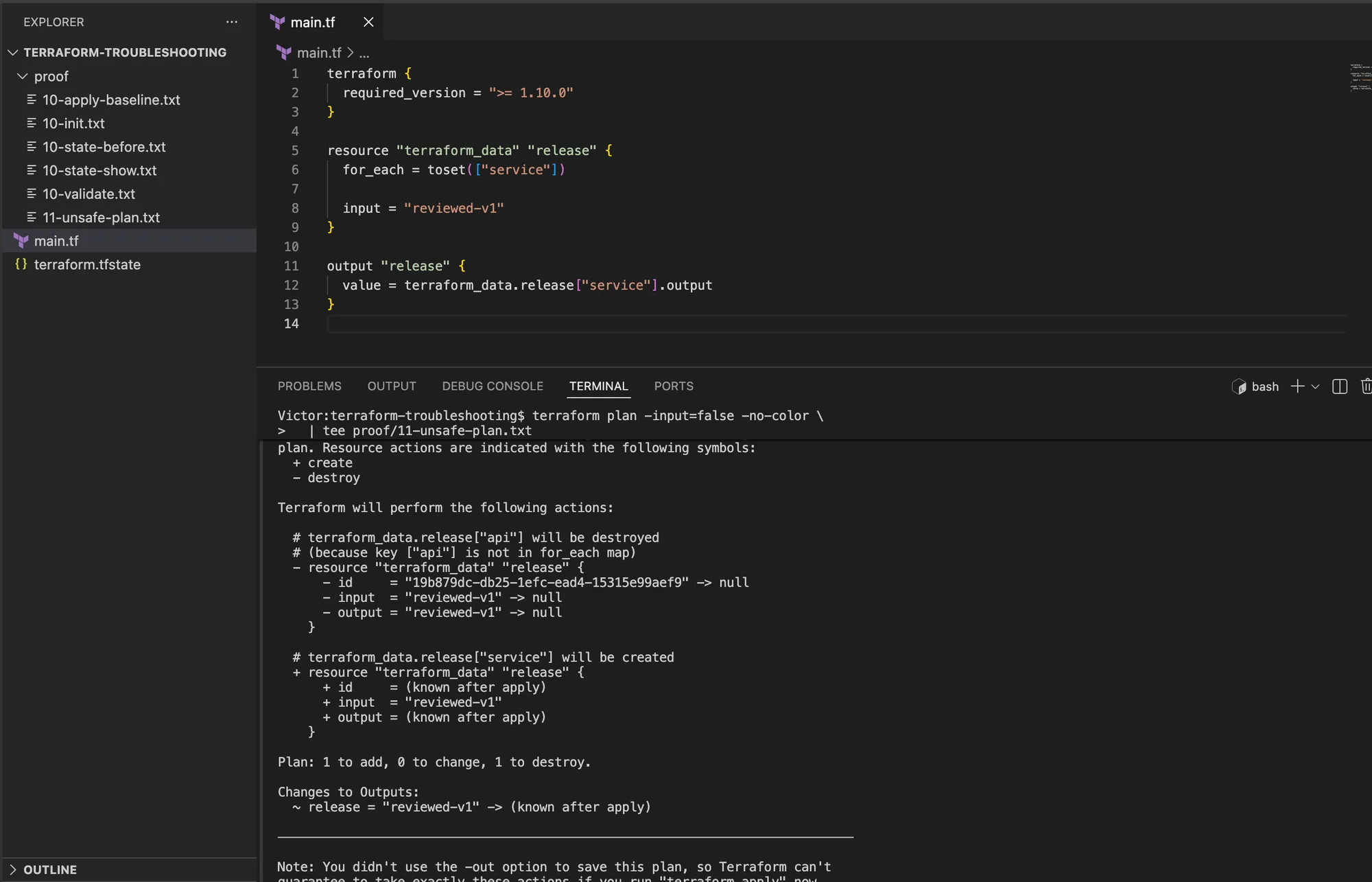
My plan contained these decisive lines:
# terraform_data.release["api"] will be destroyed
# (because key ["api"] is not in for_each map)
# terraform_data.release["service"] will be created
Plan: 1 to add, 0 to change, 1 to destroy.
I did not apply. The symptom was a delete and create after a collection-key rename. The evidence was that the old address remained in state while configuration declared the new address. I treated that as an address refactor, not a desired lifecycle replacement.
I recorded the relationship in configuration:
moved {
  from = terraform_data.release["api"]
  to   = terraform_data.release["service"]
}
I then ran the repair checks:
terraform fmt -check
terraform validate -no-color \
  | tee proof/12-validate-moved.txt
terraform plan -input=false -no-color \
  | tee proof/12-safe-plan.txt
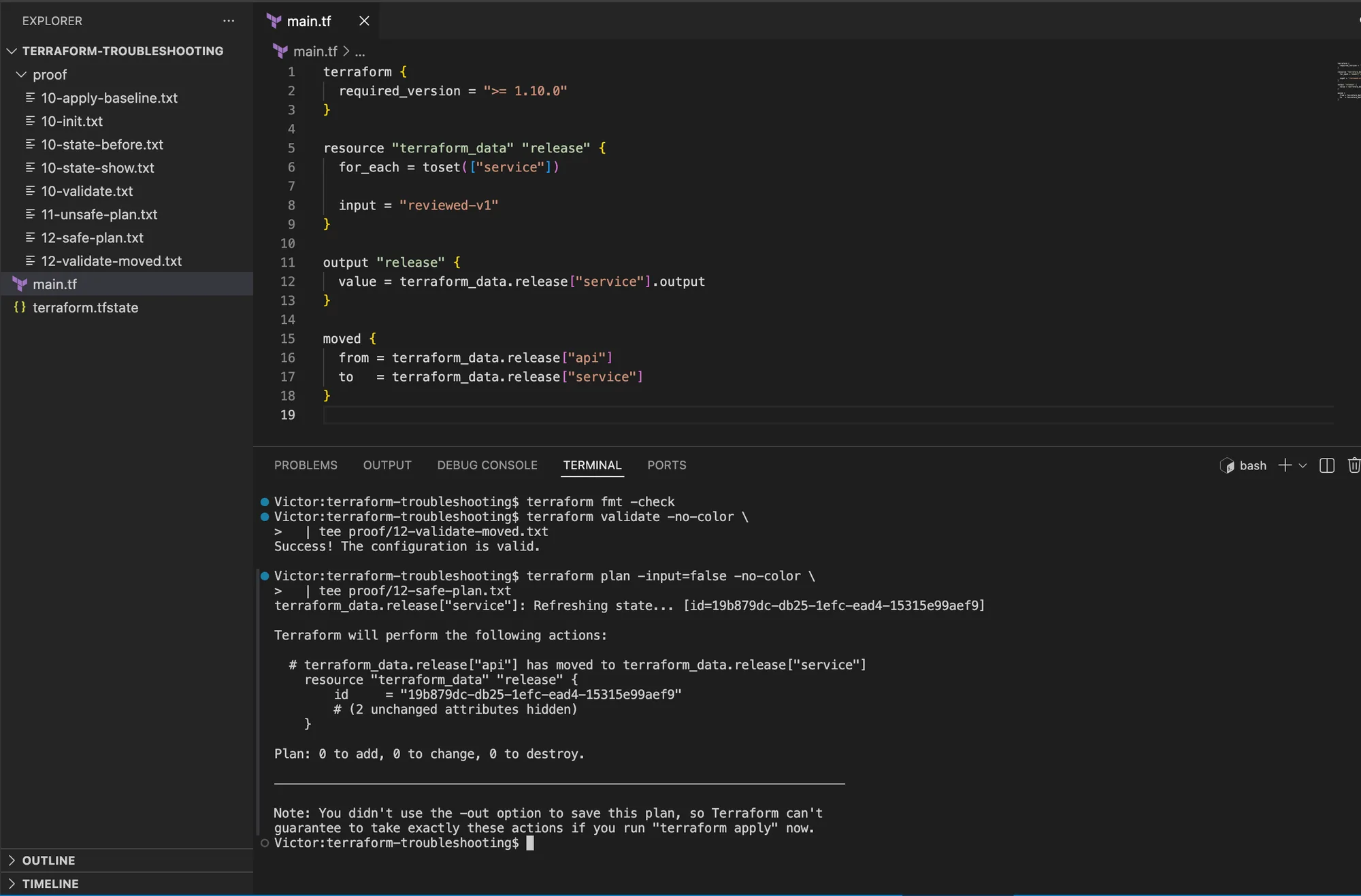
My repair produced:
# terraform_data.release["api"] has moved to terraform_data.release["service"]
Plan: 0 to add, 0 to change, 0 to destroy.
The plan recognizes the address move and reports no infrastructure changes.
I applied the reviewed no-change move and verified the new address:
terraform apply -auto-approve -input=false -no-color \
  | tee proof/13-apply-moved.txt
terraform state list \
  | tee proof/13-state-after.txt
terraform state show 'terraform_data.release["service"]' \
  | tee proof/13-state-show.txt
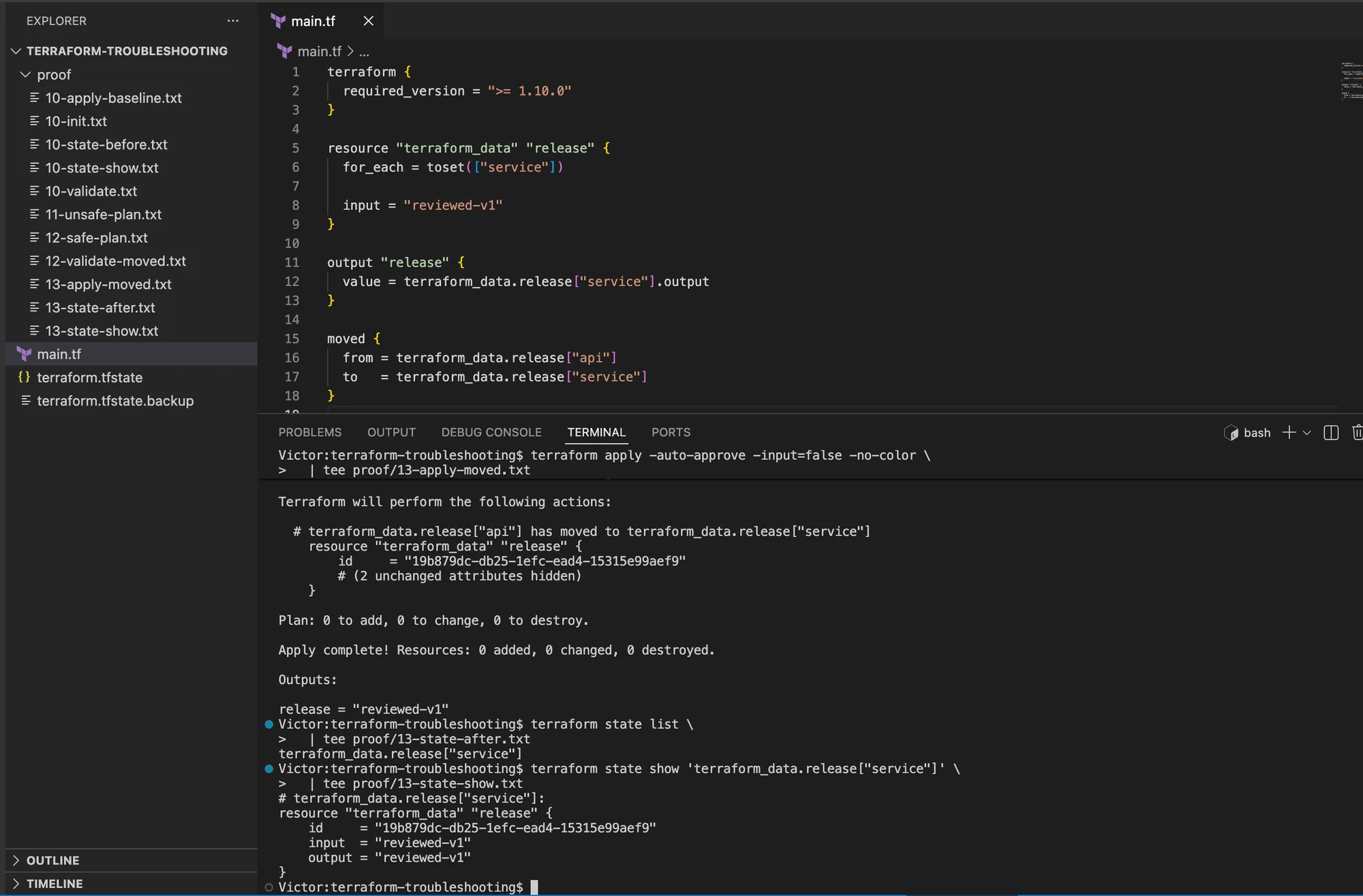
The object ID before and after the move matched. That was my independent evidence that Terraform preserved the object rather than destroying and recreating it.
My apply completed with zero resources changed, and state inspection showed the original object ID
at terraform_data.release["service"].
Lab cleanup and proof that it is gone
Before cleanup, I reviewed the destroy plan:
terraform plan -destroy -input=false -no-color \
  | tee proof/90-destroy-plan.txt
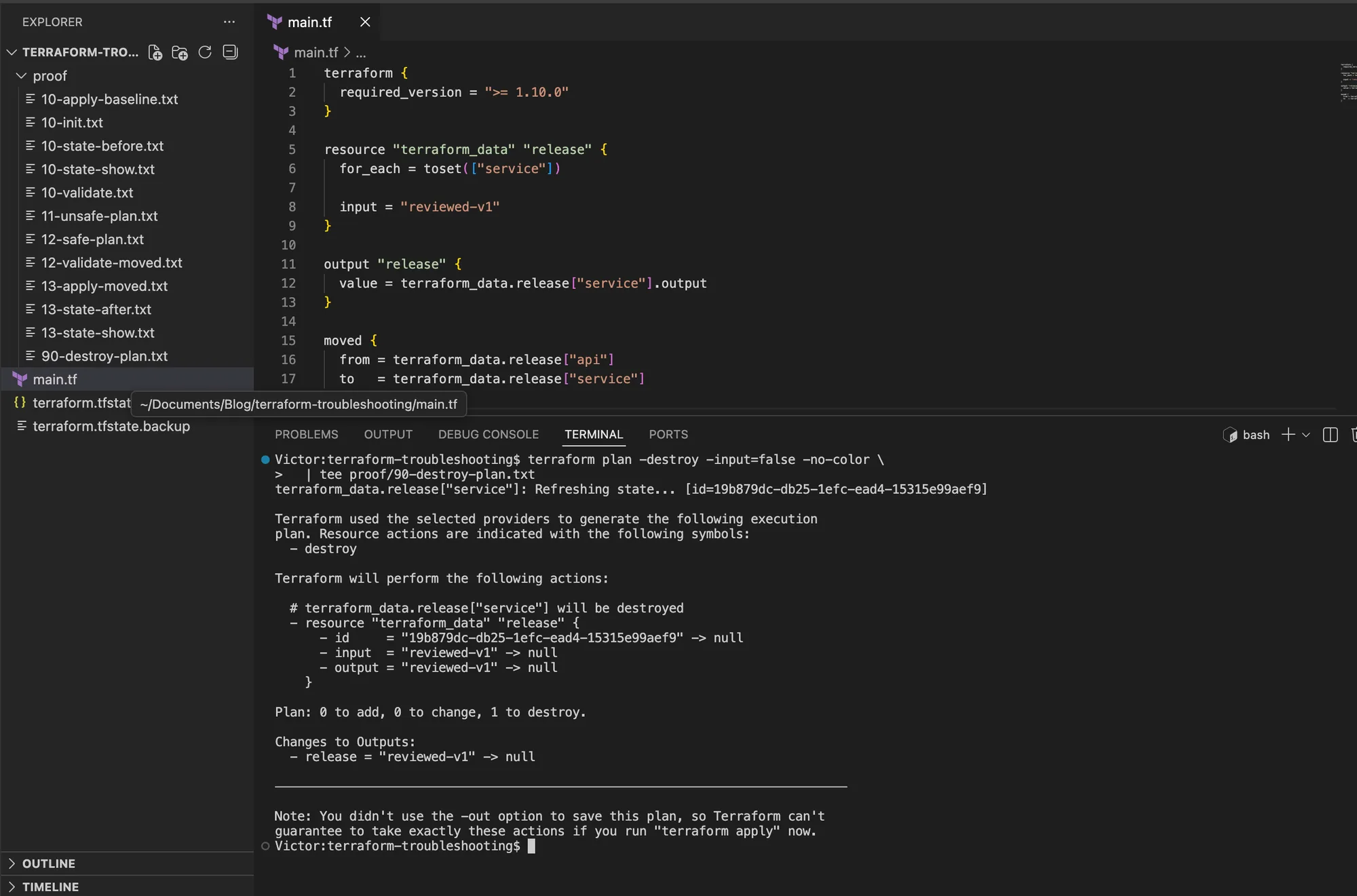
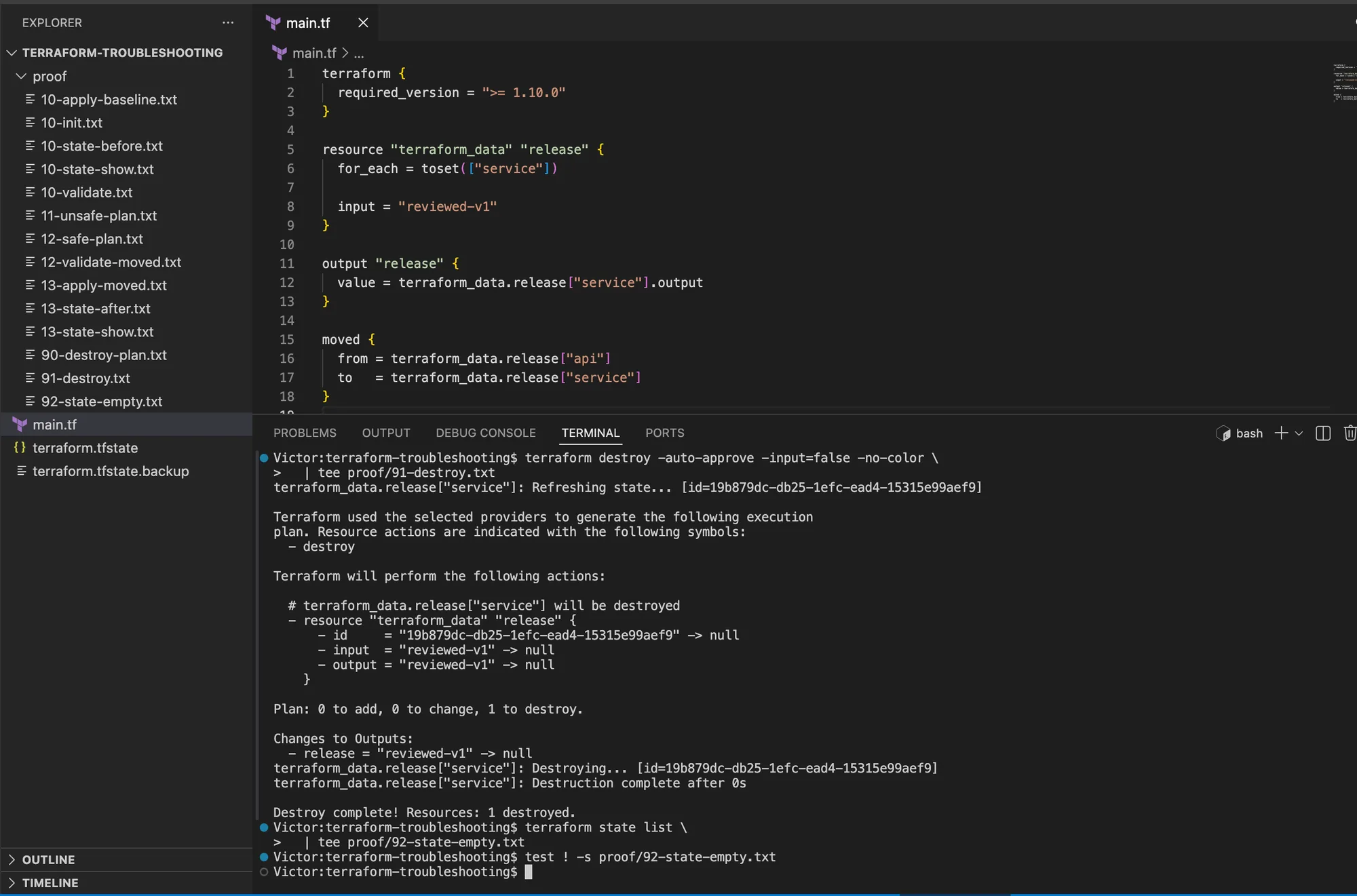
I would stop if the plan contained anything except the single local terraform_data.release["service"]
object. The reviewed destroy plan below contains one resource to destroy.
I then destroyed the object and confirmed that state was empty:
terraform destroy -auto-approve -input=false -no-color \
  | tee proof/91-destroy.txt
terraform state list \
  | tee proof/92-state-empty.txt
test ! -s proof/92-state-empty.txt
The cleanup reported 1 destroyed, and the final state list was empty. I removed the disposable
evidence directory only after retaining the sanitized proof I needed.
The final terminal output shows the single service instance being destroyed, followed by an empty
terraform state list check.
The meaningful diff for Lab 2 was small: I renamed the collection key and output reference, observed
the unsafe plan, then added one moved block that recorded the old and new addresses. I did not add a
lifecycle rule, target the new instance, or run terraform state mv merely to suppress the replacement.
The troubleshooting habit that scales
I do not begin with a fix. I begin with stage, target, identity, state, version, and evidence. Then I make one reversible change and rerun the smallest command that proves or disproves the hypothesis.
That method turns a search-engine error message into an operational diagnosis. It also keeps my troubleshooting from becoming the second incident.
References
- HashiCorp - Troubleshooting Terraform
- HashiCorp - Terraform init
- HashiCorp - Terraform providers command
- HashiCorp - Manage resource drift
- HashiCorp - Dependency lock file
- HashiCorp - Input variables and precedence
- HashiCorp - Inspect Terraform state
- HashiCorp - Terraform plan command
- HashiCorp - Import block reference
- HashiCorp - Moved block reference
- Microsoft Learn - Authenticate Terraform to Azure
- Microsoft Learn - Troubleshoot Azure RBAC
- Microsoft Learn - Azure resource provider registration errors
- Microsoft Learn - Evaluate Azure Policy impact
- Microsoft Learn - Troubleshoot Terraform on Azure