A production platform is not a list of Azure resources. It is a request path with security, identity, scaling, telemetry, and recovery designed together.
This walkthrough composes an internet-facing VM Scale Set platform from a Standard Load Balancer, health probes, subnet controls, managed identity, Key Vault, Log Analytics, and alerts. It complements the existing modular VMSS walkthrough, which contains the deeper module-by-module implementation.
Scope and claim boundary
This guide focuses on the integrated platform boundary: how traffic, health, identity, authorization, monitoring resources, and Terraform delivery controls fit around a VM Scale Set. The modular VMSS walkthrough targets a different intent: reusable modules and autoscaling design.
The disposable evidence lab in this article provisions a Standard Load Balancer, two Linux VMSS instances, a system-assigned managed identity, a Key Vault RBAC assignment, a Log Analytics workspace, an Azure Monitor metric alert, and an action group without an external receiver. It proves the load-balancer health path and a narrow one-instance continuity test.
It does not prove production readiness, automatic scaling, Key Vault secret retrieval, log ingestion, alert delivery, remote state, OIDC authentication, TLS, private networking, or a workload-specific availability target. Those controls require separate implementation and evidence in the target environment.
Architecture and request flow
The load balancer accepts only the intended frontend traffic. Its health probe removes unhealthy instances from rotation. The scale set uses managed identity to access approved Azure resources. Monitoring covers both infrastructure symptoms and the user-facing service.
Define the root as composition code
I keep the root small and make modules own coherent capabilities:
module "network" {
  source  = "./modules/network"
  name    = local.name
  address = "10.20.0.0/16"
  subnets = {
    web = "10.20.1.0/24"
  }
}

module "secrets" {
  source              = "./modules/key-vault"
  name                = "kv-${local.name}"
  resource_group_name = azurerm_resource_group.platform.name
  location            = azurerm_resource_group.platform.location
  private_endpoint_id = module.network.private_endpoint_subnet_id
}

module "web" {
  source                 = "./modules/vmss-web"
  name                   = local.name
  resource_group_name    = azurerm_resource_group.platform.name
  location               = azurerm_resource_group.platform.location
  subnet_id              = module.network.subnet_ids["web"]
  key_vault_id           = module.secrets.id
  log_analytics_id       = module.monitoring.workspace_id
  minimum_instance_count = 2
}
This is interface code, not a full provider schema. I keep the actual provider arguments in tested modules and pin their versions when modules live outside the repository.
Build the load-balanced compute layer
The VMSS module needs a frontend IP configuration, backend pool, health probe, load-balancing rule, and scale set attached to the backend pool.
resource "azurerm_lb_probe" "http" {
  loadbalancer_id     = azurerm_lb.web.id
  name                = "http-health"
  protocol            = "Http"
  port                = 80
  request_path        = "/healthz"
  interval_in_seconds = 15
  number_of_probes    = 2
}

resource "azurerm_lb_rule" "http" {
  loadbalancer_id                = azurerm_lb.web.id
  name                           = "http"
  protocol                       = "Tcp"
  frontend_port                  = 80
  backend_port                   = 80
  frontend_ip_configuration_name = "public"
  backend_address_pool_ids       = [azurerm_lb_backend_address_pool.web.id]
  probe_id                       = azurerm_lb_probe.http.id
}
I use a real application health endpoint. A TCP probe only proves that something accepted a connection; an HTTP endpoint can prove the process is ready to serve traffic. I do not make the health endpoint depend on every downstream system or a transient dependency can drain the entire fleet.
Make upgrades survivable
I use at least two healthy instances for an availability target that must tolerate one instance failure. Spread across availability zones where the region and selected SKU support them, and configure a rolling upgrade policy that maintains capacity.
Terraform expresses the desired VMSS model. Azure performs the rolling platform operation. Validate the current AzureRM provider schema and Azure VMSS upgrade documentation before selecting batch percentages and pause times.
Use NSGs as subnet intent
An NSG should describe approved flows, not compensate for an undocumented network.
For this platform:
- Permit the load balancer path to the application port.
- Permit the Azure Load Balancer health probe service tag where required.
- Deny direct internet administration.
- I use Azure Bastion, a private management path, or just-in-time access when administration is unavoidable.
- Control outbound traffic according to the workload threat model.
The Azure networking reference explains service tags, routes, and subnet design. I avoid 0.0.0.0/0 management rules even in a demo that might be copied into production.
Give the scale set an identity
identity {
  type = "SystemAssigned"
}
Grant that principal only the Key Vault data-plane role it needs. Prefer Azure RBAC for new Key Vault authorization designs and keep the vault's public network access aligned with the network architecture.
I do not retrieve an application secret into a Terraform local and then pass it into cloud-init. That value can enter the plan or state. Let the workload authenticate to Key Vault at runtime through managed identity.
Add monitoring before the first apply
Deploy telemetry as part of the platform:
- Log Analytics workspace or approved central destination
- Diagnostic settings for supported resources
- VM insights or an approved agent strategy
- CPU and instance-health alerts
- Load balancer health and data-path alerts
- Action group with an owned receiver
- Availability test or application-level synthetic check
An alert without an owner is stored noise. I add a runbook link and test the action group before launch.
Add autoscale carefully
CPU-based scaling is a useful example, not a universal production rule. Pick a metric tied to saturation. Queue depth, concurrent requests, or latency may be better.
Define minimum, default, and maximum capacity; separate scale-out and scale-in thresholds; add cooldown; and ensure the subscription has quota for the maximum. Aggressive scale-in can remove capacity during a volatile incident.
Validate the platform in layers
terraform fmt -check -recursive
terraform init
terraform validate
terraform test
terraform plan -out=tfplan
After apply:
- Confirm the backend pool has healthy instances.
- I remove one instance and confirm traffic continues.
- I verify a workload can obtain a Key Vault token without a stored secret.
- Trigger a test alert and confirm the receiver.
- I review the Activity Log and diagnostic destination.
- I inspect the next plan for zero unexpected drift.
Production gaps a demo often hides
- TLS terminates at an approved ingress layer
- Administrative access is private and audited
- The image supply chain is patched and reproducible
- Zone support and quota are verified in the target region
- Key Vault access uses identity and least privilege
- Logs, metrics, alerts, and runbooks have owners
- State backup and restore have been tested
- Rolling replacement preserves required capacity
Reproducible evidence lab: Azure VMSS platform verification
I use a disposable directory and non-production Azure subscription when the lab reaches Azure. The proof files may contain resource IDs or plan values, so inspect them before sharing.
Create the evidence workspace
export TF_EVIDENCE_ROOT="${PWD}/.evidence/terraform-campaign"
export TF_EVIDENCE_SLUG="terraform-azure-vmss-load-balancer-key-vault-monitor"
export TF_EVIDENCE_DIR="$TF_EVIDENCE_ROOT/$TF_EVIDENCE_SLUG"
mkdir -p "$TF_EVIDENCE_DIR/proof"
cd "$TF_EVIDENCE_DIR"
date -u +"%Y-%m-%dT%H:%M:%SZ" | tee proof/run-started-utc.txt
terraform version | tee proof/terraform-version.txt
Exact prerequisites and cost boundary
- Terraform 1.10 or later and Azure CLI
curl,jq, OpenSSL, OpenSSH, and permission to create resources in a disposable Azure subscription- Permission for role assignments at the lab resource-group scope
- A region with quota for two
Standard_B1svirtual machines - A 90-minute cost window and permission to delete the entire lab resource group
Authenticate, select the intended subscription, and create a lab-only SSH key:
az login
az account show --output table
ssh-keygen -t ed25519 -f "$TF_EVIDENCE_DIR/lab-key" -N '' -C vmss-evidence-lab
printf '.terraform/\n*.tfstate*\n*.tfplan\nlab-key\nlab-key.pub\nproof/\n' > .gitignore
export TF_VAR_suffix="$(openssl rand -hex 3)"
export TF_VAR_ssh_public_key_path="$TF_EVIDENCE_DIR/lab-key.pub"
I do not continue if az account show identifies a production subscription. The public IP, load
balancer, VMSS instances, Log Analytics ingestion, and monitoring resources can incur charges while
the lab exists.
Create the complete Terraform configuration
I create versions.tf:
terraform {
  required_version = ">= 1.10.0"

  required_providers {
    azurerm = {
      source  = "hashicorp/azurerm"
      version = "~> 4.0"
    }
  }
}

provider "azurerm" {
  features {}
}
I create variables.tf:
variable "location" {
  description = "Azure region used by the disposable lab."
  type        = string
  default     = "uksouth"
}

variable "suffix" {
  description = "Six lowercase hexadecimal characters used for globally unique names."
  type        = string

  validation {
    condition     = can(regex("^[a-f0-9]{6}$", var.suffix))
    error_message = "suffix must contain exactly six lowercase hexadecimal characters."
  }
}

variable "ssh_public_key_path" {
  description = "Path to the lab-only SSH public key."
  type        = string
}
I create main.tf:
data "azurerm_client_config" "current" {}

locals {
  name = "vmss-${var.suffix}"
  tags = {
    environment = "evidence-lab"
    managed_by  = "terraform"
  }
}

resource "azurerm_resource_group" "lab" {
  name     = "rg-${local.name}"
  location = var.location
  tags     = local.tags
}

resource "azurerm_virtual_network" "lab" {
  name                = "vnet-${local.name}"
  address_space       = ["10.20.0.0/16"]
  location            = azurerm_resource_group.lab.location
  resource_group_name = azurerm_resource_group.lab.name
  tags                = local.tags
}

resource "azurerm_subnet" "web" {
  name                 = "snet-web"
  resource_group_name  = azurerm_resource_group.lab.name
  virtual_network_name = azurerm_virtual_network.lab.name
  address_prefixes     = ["10.20.1.0/24"]
}

resource "azurerm_network_security_group" "web" {
  name                = "nsg-${local.name}"
  location            = azurerm_resource_group.lab.location
  resource_group_name = azurerm_resource_group.lab.name
  tags                = local.tags

  security_rule {
    name                       = "AllowHttpFromInternet"
    priority                   = 100
    direction                  = "Inbound"
    access                     = "Allow"
    protocol                   = "Tcp"
    source_port_range          = "*"
    destination_port_range     = "80"
    source_address_prefix      = "Internet"
    destination_address_prefix = "*"
  }

  security_rule {
    name                       = "AllowAzureLoadBalancerProbe"
    priority                   = 110
    direction                  = "Inbound"
    access                     = "Allow"
    protocol                   = "Tcp"
    source_port_range          = "*"
    destination_port_range     = "80"
    source_address_prefix      = "AzureLoadBalancer"
    destination_address_prefix = "*"
  }
}

resource "azurerm_subnet_network_security_group_association" "web" {
  subnet_id                 = azurerm_subnet.web.id
  network_security_group_id = azurerm_network_security_group.web.id
}

resource "azurerm_public_ip" "web" {
  name                = "pip-${local.name}"
  location            = azurerm_resource_group.lab.location
  resource_group_name = azurerm_resource_group.lab.name
  allocation_method   = "Static"
  sku                 = "Standard"
  tags                = local.tags
}

resource "azurerm_lb" "web" {
  name                = "lb-${local.name}"
  location            = azurerm_resource_group.lab.location
  resource_group_name = azurerm_resource_group.lab.name
  sku                 = "Standard"
  tags                = local.tags

  frontend_ip_configuration {
    name                 = "public"
    public_ip_address_id = azurerm_public_ip.web.id
  }
}

resource "azurerm_lb_backend_address_pool" "web" {
  name            = "web"
  loadbalancer_id = azurerm_lb.web.id
}

resource "azurerm_lb_probe" "web" {
  name                = "http-health"
  loadbalancer_id     = azurerm_lb.web.id
  protocol            = "Http"
  port                = 80
  request_path        = "/healthz"
  interval_in_seconds = 15
  number_of_probes    = 2
}

resource "azurerm_lb_rule" "web" {
  name                           = "http"
  loadbalancer_id                = azurerm_lb.web.id
  protocol                       = "Tcp"
  frontend_port                  = 80
  backend_port                   = 80
  frontend_ip_configuration_name = "public"
  backend_address_pool_ids       = [azurerm_lb_backend_address_pool.web.id]
  probe_id                       = azurerm_lb_probe.web.id
}

resource "azurerm_linux_virtual_machine_scale_set" "web" {
  name                = "vmss-${local.name}"
  location            = azurerm_resource_group.lab.location
  resource_group_name = azurerm_resource_group.lab.name
  sku                 = "Standard_B1s"
  instances           = 2
  admin_username      = "azureuser"
  upgrade_mode        = "Manual"
  tags                = local.tags

  disable_password_authentication = true
  custom_data = base64encode(<<-CLOUD_INIT
    #!/usr/bin/env bash
    set -e
    apt-get update
    DEBIAN_FRONTEND=noninteractive apt-get install -y nginx
    printf 'healthy\n' > /var/www/html/healthz
    systemctl enable --now nginx
  CLOUD_INIT
  )

  admin_ssh_key {
    username   = "azureuser"
    public_key = file(var.ssh_public_key_path)
  }

  identity {
    type = "SystemAssigned"
  }

  source_image_reference {
    publisher = "Canonical"
    offer     = "ubuntu-24_04-lts"
    sku       = "server"
    version   = "latest"
  }

  os_disk {
    caching              = "ReadWrite"
    storage_account_type = "Standard_LRS"
  }

  network_interface {
    name    = "nic-web"
    primary = true

    ip_configuration {
      name                                   = "ipconfig"
      primary                                = true
      subnet_id                              = azurerm_subnet.web.id
      load_balancer_backend_address_pool_ids = [azurerm_lb_backend_address_pool.web.id]
    }
  }

  depends_on = [azurerm_subnet_network_security_group_association.web]
}

resource "azurerm_key_vault" "lab" {
  name                       = "kvvmss${var.suffix}"
  location                   = azurerm_resource_group.lab.location
  resource_group_name        = azurerm_resource_group.lab.name
  tenant_id                  = data.azurerm_client_config.current.tenant_id
  sku_name                   = "standard"
  enable_rbac_authorization  = true
  soft_delete_retention_days = 7
  purge_protection_enabled   = false
  tags                       = local.tags
}

resource "azurerm_role_assignment" "vmss_key_vault" {
  scope                = azurerm_key_vault.lab.id
  role_definition_name = "Key Vault Secrets User"
  principal_id         = azurerm_linux_virtual_machine_scale_set.web.identity[0].principal_id
  principal_type       = "ServicePrincipal"
}

resource "azurerm_log_analytics_workspace" "lab" {
  name                = "log-${local.name}"
  location            = azurerm_resource_group.lab.location
  resource_group_name = azurerm_resource_group.lab.name
  sku                 = "PerGB2018"
  retention_in_days   = 30
  tags                = local.tags
}

resource "azurerm_monitor_action_group" "lab" {
  name                = "ag-${local.name}"
  resource_group_name = azurerm_resource_group.lab.name
  short_name          = "vmssevd"
  tags                = local.tags
}

resource "azurerm_monitor_metric_alert" "cpu" {
  name                = "high-cpu-${local.name}"
  resource_group_name = azurerm_resource_group.lab.name
  scopes              = [azurerm_linux_virtual_machine_scale_set.web.id]
  description         = "Evidence-only CPU alert with no external receiver."
  severity            = 3
  frequency           = "PT1M"
  window_size         = "PT5M"
  enabled             = true
  tags                = local.tags

  criteria {
    metric_namespace = "Microsoft.Compute/virtualMachineScaleSets"
    metric_name      = "Percentage CPU"
    aggregation      = "Average"
    operator         = "GreaterThan"
    threshold        = 80
  }

  action {
    action_group_id = azurerm_monitor_action_group.lab.id
  }
}
I create outputs.tf:
output "resource_group_name" {
  value = azurerm_resource_group.lab.name
}

output "vmss_name" {
  value = azurerm_linux_virtual_machine_scale_set.web.name
}

output "public_ip_address" {
  value = azurerm_public_ip.web.ip_address
}

output "load_balancer_name" {
  value = azurerm_lb.web.name
}

output "key_vault_name" {
  value = azurerm_key_vault.lab.name
}

output "log_analytics_workspace_name" {
  value = azurerm_log_analytics_workspace.lab.name
}
Beginner walkthrough
-
Set a cost window before starting. I record the UTC start time and a maximum lab duration, such as 90 minutes. I use a subscription where you can delete the entire resource group.
-
I start a new evidence session with
TF_EVIDENCE_SLUG="terraform-azure-vmss-load-balancer-key-vault-monitor". -
I create the exact
versions.tf,variables.tf,main.tf, andoutputs.tffiles above. I compare the provider and resource arguments with the linked Microsoft and HashiCorp documentation before running a plan. -
I run
terraform fmt -checkfirst. If it reports formatting, runterraform fmt, inspect the mechanical changes, and repeat the check. -
I run
terraform fmt,terraform init,terraform validate, and a saved plan. Confirm exactly two VM instances are requested for the short continuity test and no unrelated resource is destroyed. -
Apply the saved plan and export names from Terraform outputs:
export TF_VMSS_RG="$(terraform output -raw resource_group_name)"
export TF_VMSS_NAME="$(terraform output -raw vmss_name)"
export TF_LB_IP="$(terraform output -raw public_ip_address)"
export TF_LB_NAME="$(terraform output -raw load_balancer_name)"- Wait for both instances to report
Succeeded, then send five health requests through the public load balancer. Save every response. - I stop instance
0, wait until Azure reports it stopped, and repeat the same five health requests. If any request fails, retain the failure and do not claim continuity. - I start instance
0, confirm both instances return to their intended state, and capture the before, stopped-instance, and recovered tables as images 01, 02, and 03. - Destroy immediately, verify the resource group is gone, and record the UTC cleanup time.
If the VM SKU is unavailable or quota is insufficient, choose a supported small SKU before applying and update the plan. I do not increase quota or switch subscriptions merely to obtain a screenshot.
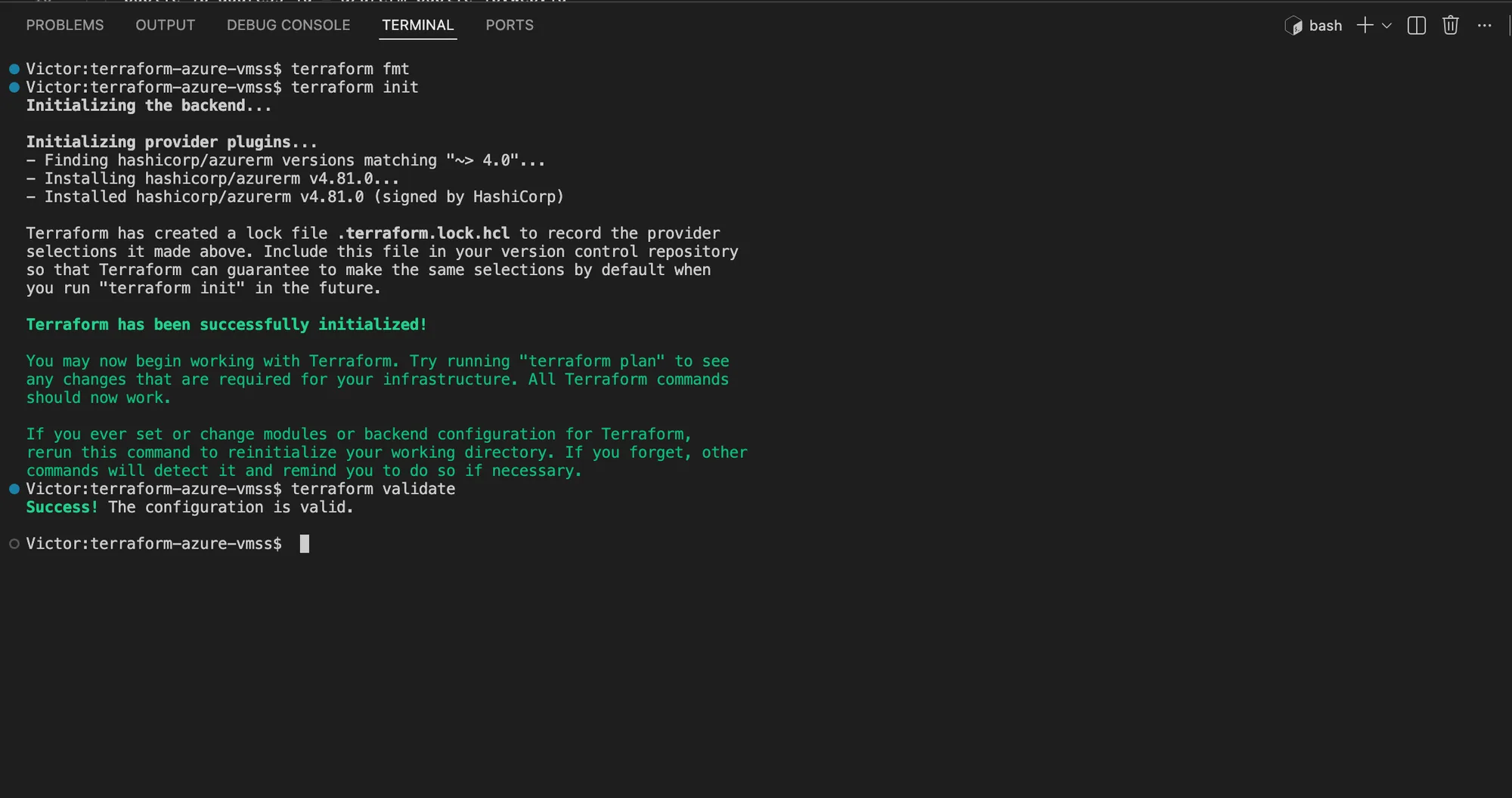
Terraform initialized the pinned AzureRM provider and validated the complete configuration without errors.
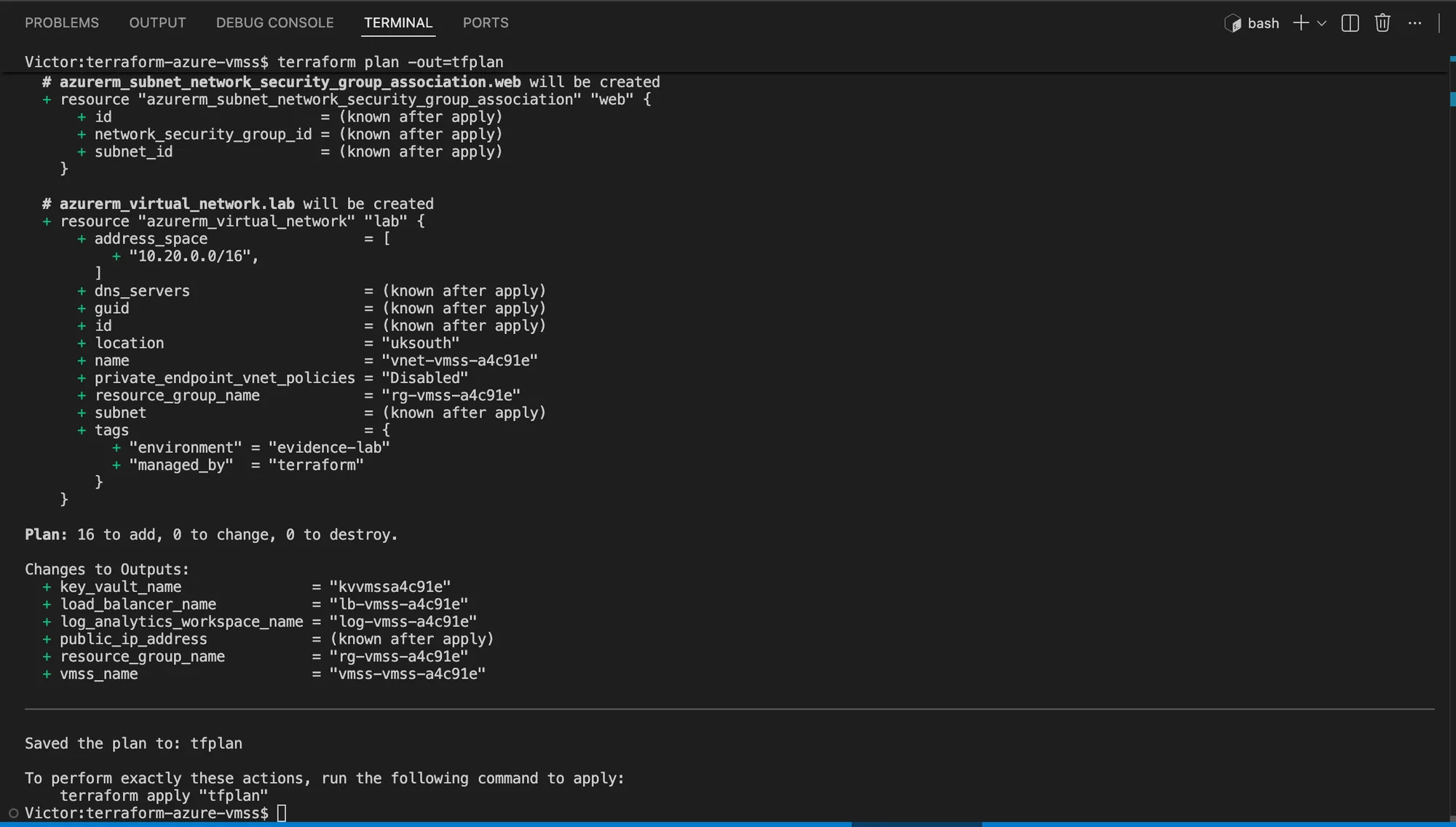
The reviewed saved plan contained the expected 16 additions, with no changes or destroys.
After reviewing the saved plan:
terraform apply -no-color tfplan | tee proof/apply.txt
export TF_VMSS_RG="$(terraform output -raw resource_group_name)"
export TF_VMSS_NAME="$(terraform output -raw vmss_name)"
export TF_LB_IP="$(terraform output -raw public_ip_address)"
export TF_LB_NAME="$(terraform output -raw load_balancer_name)"
az vmss list-instances --resource-group "$TF_VMSS_RG" --name "$TF_VMSS_NAME" \
  --query "[].{instance:instanceId,state:provisioningState}" --output table \
  | tee proof/vmss-instances.txt
printf '%s\n' "$TF_LB_IP" | tee proof/public-ip.txt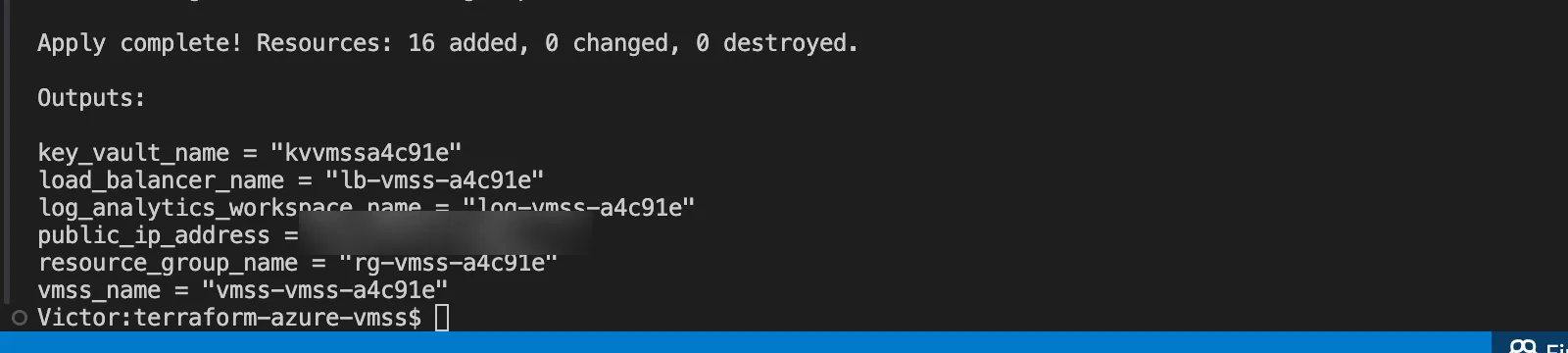
Terraform completed the reviewed plan with 16 resources added. The temporary public IP is intentionally blurred.
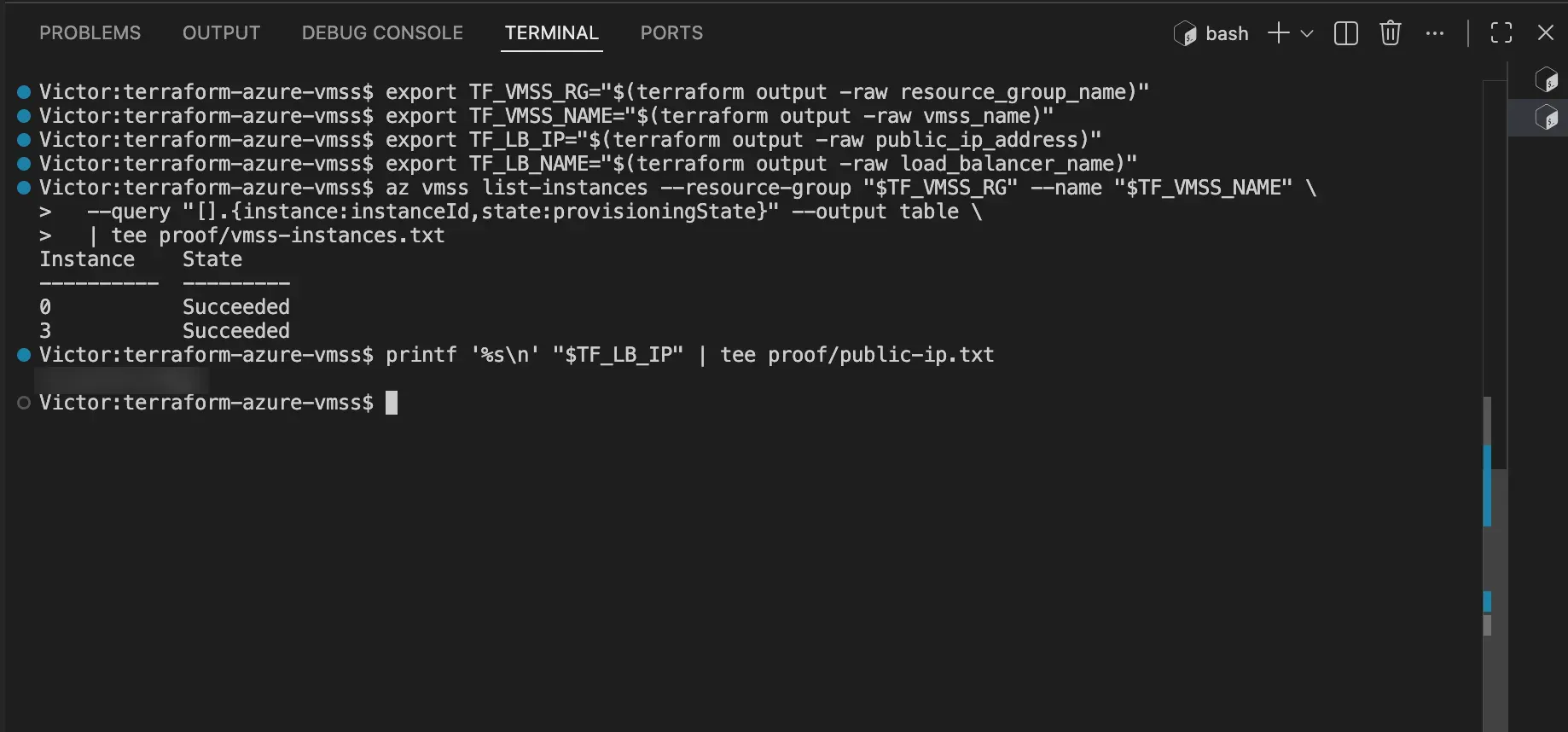
Both VMSS instances reached the expected provisioning state before the failure drill. The temporary public IP is intentionally blurred.
I verify the application several times through the load balancer:
for attempt in 1 2 3 4 5
do
  curl --fail --silent --show-error "http://$TF_LB_IP/healthz"
done | tee proof/health-before.txt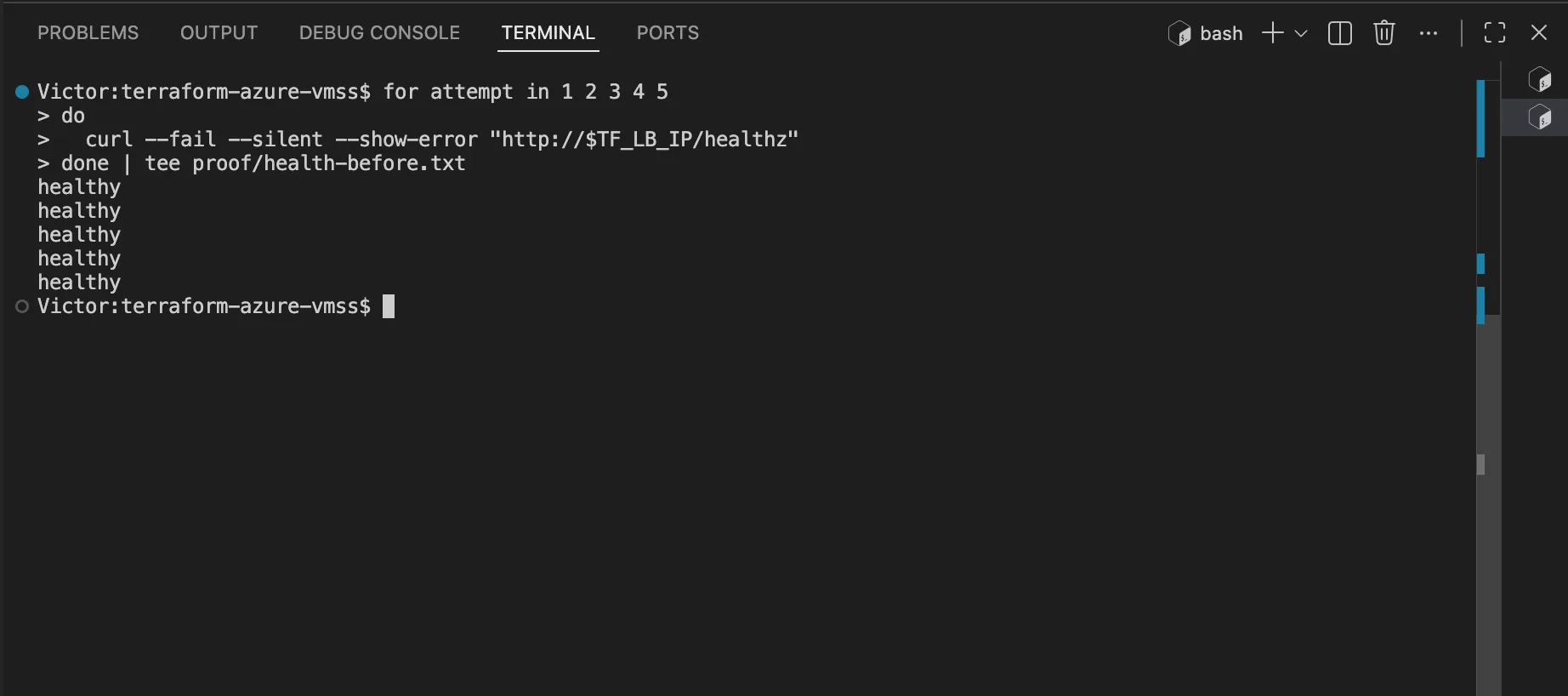
The public load-balancer endpoint returned five healthy responses before an instance was stopped.
For a disposable failure drill, stop one instance, repeat the requests, then start it again:
az vmss stop --resource-group "$TF_VMSS_RG" --name "$TF_VMSS_NAME" --instance-ids 0
az vmss get-instance-view --resource-group "$TF_VMSS_RG" --name "$TF_VMSS_NAME" \
  --instance-id "*" \
  --query "[].{instance:instanceId,power:statuses[?starts_with(code, 'PowerState/')].displayStatus | [0]}" \
  --output table \
  | tee proof/one-instance-stopped.txt

# Two failed 15-second probe intervals are required before the backend is unhealthy.
sleep 45

for attempt in 1 2 3 4 5
do
  curl --fail --silent --show-error "http://$TF_LB_IP/healthz"
done | tee proof/health-during-failure.txt

az vmss start --resource-group "$TF_VMSS_RG" --name "$TF_VMSS_NAME" --instance-ids 0
az vmss get-instance-view --resource-group "$TF_VMSS_RG" --name "$TF_VMSS_NAME" \
  --instance-id "*" \
  --query "[].{instance:instanceId,power:statuses[?starts_with(code, 'PowerState/')].displayStatus | [0]}" \
  --output table \
  | tee proof/vmss-recovered.txt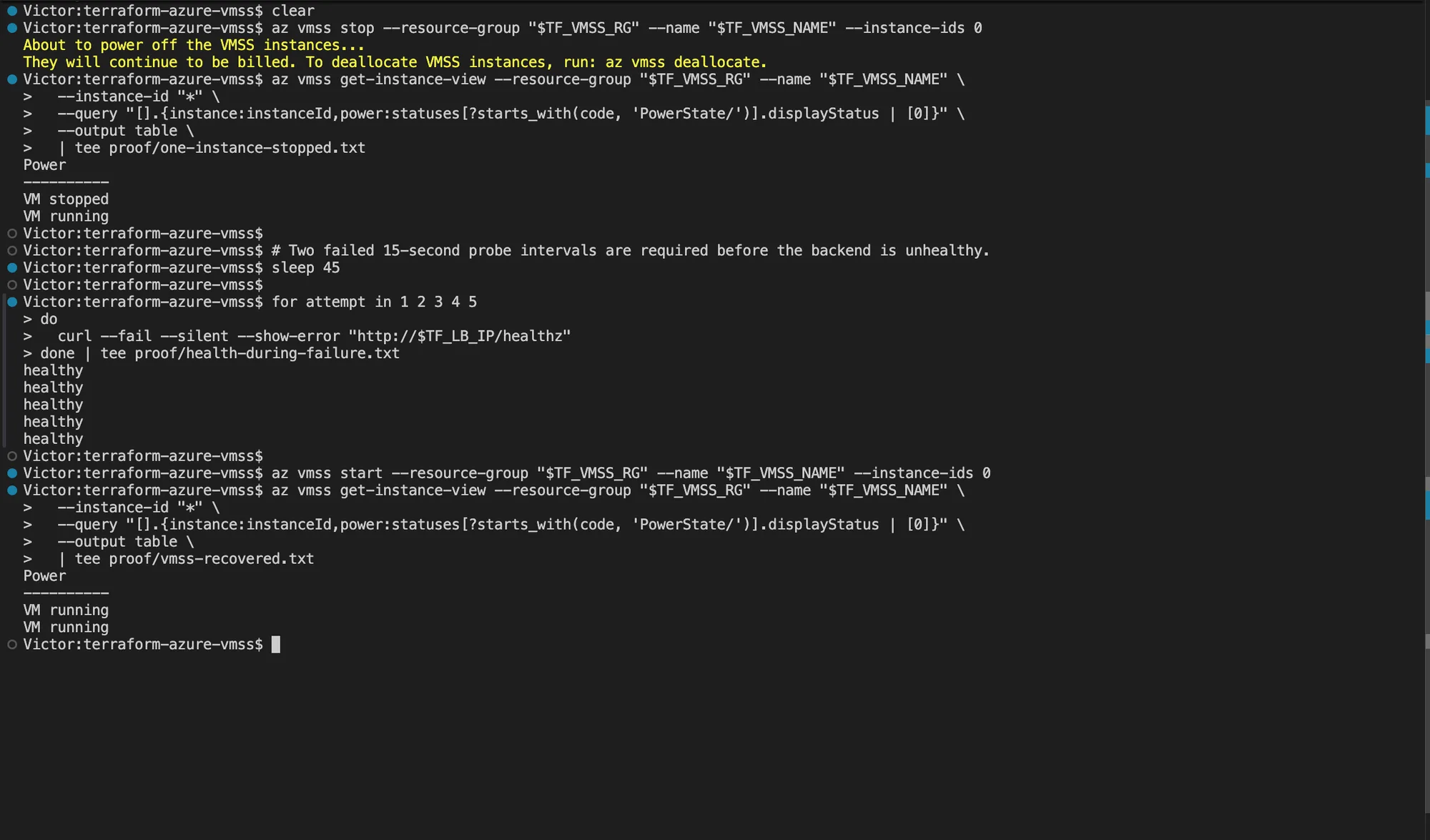
The stopped instance left service while requests continued through the remaining backend, and both instances returned to the running state after recovery.
I capture the two-instance table and successful requests during the stopped-instance window. This supports a narrow load-balancer continuity claim for the lab. It does not prove zero downtime.
Common failure modes
The load-balancer endpoint fails
Confirm the VMSS provisioning state and inspect the health probe before changing Terraform:
az vmss list-instances --resource-group "$TF_VMSS_RG" --name "$TF_VMSS_NAME" \
  --query "[].{instance:instanceId,state:provisioningState}" --output table
az network lb probe show --resource-group "$TF_VMSS_RG" --lb-name "$TF_LB_NAME" \
  --name http-health --output json
If the scale-set instances are still provisioning, wait for them to finish. If they are ready but
the probe remains unhealthy, inspect cloud-init, Nginx, the NSG rules, and /healthz on an
instance before replacing infrastructure. Retain the failed request output as evidence.
The Key Vault role assignment reports PrincipalNotFound
The VMSS system-assigned identity can take time to become visible to Microsoft Entra ID. Confirm the principal ID from Terraform state, then retry the role assignment only after the principal resolves:
terraform state show azurerm_linux_virtual_machine_scale_set.web
az ad sp show --id "<vmss-principal-id>" --query id --output tsv
I do not replace the scale set or broaden the role scope to work around identity propagation.
The VM SKU is unavailable or quota is insufficient
I inspect regional usage before changing the planned SKU:
az vm list-usage --location uksouth --output table
az vm list-skus --location uksouth --resource-type virtualMachines \
  --query "[?name=='Standard_B1s'].{name:name,restrictions:restrictions}" --output json
Select a small supported SKU in the same disposable subscription, update the Terraform plan, and review the resource changes again. I do not increase quota only to obtain publication evidence.
Terraform destroy finishes but cleanup is uncertain
Treat the Azure control plane as the independent signal:
az group exists --name "$TF_VMSS_RG"
# Run this only if the first command returns true.
az resource list --resource-group "$TF_VMSS_RG" --output table
The first command must return false. If the group still exists, preserve the destroy output and
inspect the remaining resource instead of deleting unrelated resources manually.
Cleanup:
terraform destroy -auto-approve -no-color | tee proof/cleanup.txt
az group exists --name "$TF_VMSS_RG" | tee proof/resource-group-gone.txt
rm -f lab-key lab-key.pub
Terraform destroyed all 16 lab resources, and the independent Azure CLI check returned false for the resource group.
Frequently asked questions
How does Terraform attach Azure VMSS instances to a Standard Load Balancer?
The scale set network-interface configuration references the load balancer backend pool ID. A load-balancing rule maps the frontend port to the backend port, and an HTTP health probe determines which instances remain eligible to receive traffic.
How should an Azure VMSS access Key Vault without stored credentials?
Assign the scale set a managed identity and grant that principal the narrowest required Key Vault
data-plane role. The workload then requests an Azure access token at runtime. I do not retrieve a
secret through Terraform and pass it through state or cloud-init.
Does a Log Analytics workspace automatically collect VMSS logs?
No. A workspace is only a destination. Production collection also needs the approved Azure Monitor Agent and data collection rules, or supported diagnostic settings for the required resource logs and metrics. I verify ingestion with a query before relying on an alert or dashboard.
Does this lab prove that the VMSS platform is production-ready?
No. It proves that the declared lab resources can be provisioned and that requests can continue through one controlled stopped-instance test when the remaining backend stays healthy. Production readiness still depends on workload-specific security, resilience, capacity, observability, recovery, cost, and organizational validation.
Where to continue
I use the production-ready Azure Terraform guide for landing-zone and governance controls. I use Zero-Downtime Terraform with GitHub Actions for the delivery path.
The platform becomes credible when the architecture and evidence agree: traffic follows the documented path, identity replaces secrets, unhealthy instances leave rotation, alerts reach an owner, and a reviewed plan is the only route to change.