“Production-ready” is not a Terraform module you can download.
It is a set of decisions about identity, network exposure, policy, state, observability, recovery, ownership, and change control. Terraform can encode those decisions, but it cannot choose the business risk for you.
This guide builds a compact but real Azure workload foundation from an empty directory. It includes every Terraform file, the backend bootstrap, plan and apply commands, independent Azure CLI checks, deployment evidence, common failure paths, and cleanup. The result is not an enterprise landing zone, but it is detailed enough to reproduce and strong enough to explain which production controls still belong outside this workload root.
If Terraform syntax is new to you, complete the existing Terraform on Azure lab first. That tutorial builds a VM. This one focuses on the shared foundation around a workload: state, networking, controlled outbound access, private PaaS access, diagnostics, and deletion protection.
Scope before code
An Azure landing zone is broader than one workload subscription. Management groups, identity, connectivity, governance, and platform subscriptions often have different owners and state. I do not put an entire landing zone and every application into one Terraform root.
Define the production boundary
I start with a workload definition:
- Data classification and regulatory requirements
- Recovery time and recovery point objectives
- Expected load and availability target
- Inbound, outbound, and administrative traffic paths
- Team ownership and escalation path
- Regions, availability zones, and residency constraints
Without those inputs, “high availability” and “secure networking” are decoration. A two-zone design does not solve a regional failure; a private endpoint does not solve excessive identity permissions.
Use a layered Azure architecture
Microsoft's Azure landing zone guidance recommends subscription democratization, policy-driven governance, and platform automation. Translate that into Terraform boundaries instead of a single mega-configuration.
What this walkthrough deploys
The hands-on environment creates 22 Terraform-managed resources in one disposable workload Resource Group:
- One virtual network with separate application and private-endpoint subnets
- One application-subnet NSG
- One Standard NAT Gateway and static public IP for explicit outbound connectivity
- One Log Analytics workspace
- One Key Vault using Azure RBAC, disabled public access, purge protection, and a private endpoint
- One ZRS Storage Account using Microsoft Entra authorization, disabled public access, blob versioning, soft delete, and a private endpoint
- Private DNS zones and virtual-network links for Key Vault and Blob Storage
- Diagnostic settings for Key Vault and Storage
- One Resource Group delete lock created last and removed first
This root intentionally contains no application compute. App Service, AKS, VMSS, databases, and ingress have different availability and scaling decisions. I add them as separately reviewed modules after the foundation works.
This lab has real cost and real permissions
NAT Gateway and private endpoints are billed while deployed. Log Analytics can charge for ingested
data. I use a disposable subscription, complete cleanup in the same session, and verify that the
Resource Group no longer exists. Creating management locks also requires
Microsoft.Authorization/locks/* permissions, which ordinary Contributor access does not include.
Prerequisites and permissions
Install and verify:
- Terraform CLI 1.10 or later
- Azure CLI
- Git
- A text editor such as VS Code
- An Azure subscription that is not production
- Permission to create the listed resources and to create or delete management locks
Storage Blob Data Contributoron the backend Storage Account after bootstrap
I run these checks before creating files:
terraform version
az version --output table
git --version
az login
az account list --query "[].{name:name,isDefault:isDefault}" --output table
az account set --subscription "SUBSCRIPTION_ID_OR_NAME"
az account show --query "{name:name,user:user.name,isDefault:isDefault}" --output table
I stop if the selected account, tenant, or subscription is unexpected. I use
az login --use-device-code when a browser cannot open.
Create the working directory
I use a directory outside the website repository:
mkdir -p production-azure-terraform
cd production-azure-terraform
git init
I create .gitignore before Terraform generates state or plans:
.terraform/
*.tfstate
*.tfstate.*
*.tfplan
crash.log
crash.*.log
backend.hcl
terraform.tfvars
The final structure is:
production-azure-terraform/
├── .gitignore
├── backend.tf
├── backend.hcl
├── terraform.tf
├── providers.tf
├── variables.tf
├── locals.tf
├── network.tf
├── observability.tf
├── security.tf
├── outputs.tf
├── terraform.tfvars
└── proof/
HashiCorp recommends organizing larger roots by logical resource groupings. Terraform loads every
top-level .tf file in the directory as one root module, so filenames help maintainers but do not
control dependency order.
Bootstrap protected remote state
The backend must exist before the workload can store state in it. The commands below create a
separate Resource Group, a ZRS Storage Account, and a private tfstate container. They disable shared
key access, enable blob recovery controls, and restrict the public endpoint to one trusted public IP.
Choose a globally unique lowercase suffix and replace the example administrator IP. The documentation
address 203.0.113.10 will not grant access.
export ARM_SUBSCRIPTION_ID="$(az account show --query id --output tsv)"
export TF_UNIQUE_SUFFIX="v26081801"
export TF_ADMIN_IP="203.0.113.10"
export TF_STATE_RG="rg-tfstate-prod-uks-001"
export TF_STATE_ACCOUNT="sttfprod${TF_UNIQUE_SUFFIX}"
export TF_STATE_CONTAINER="tfstate"
Confirm that the Storage Account name is between 3 and 24 lowercase letters and numbers:
printf '%s\n' "$TF_STATE_ACCOUNT"
printf '%s' "$TF_STATE_ACCOUNT" | wc -c
I create the backend resources:
az group create \
  --name "$TF_STATE_RG" \
  --location uksouth \
  --tags environment=prod managed_by=bootstrap purpose=terraform-state

az storage account create \
  --name "$TF_STATE_ACCOUNT" \
  --resource-group "$TF_STATE_RG" \
  --location uksouth \
  --sku Standard_ZRS \
  --kind StorageV2 \
  --https-only true \
  --min-tls-version TLS1_2 \
  --allow-blob-public-access false \
  --allow-shared-key-access false \
  --default-action Allow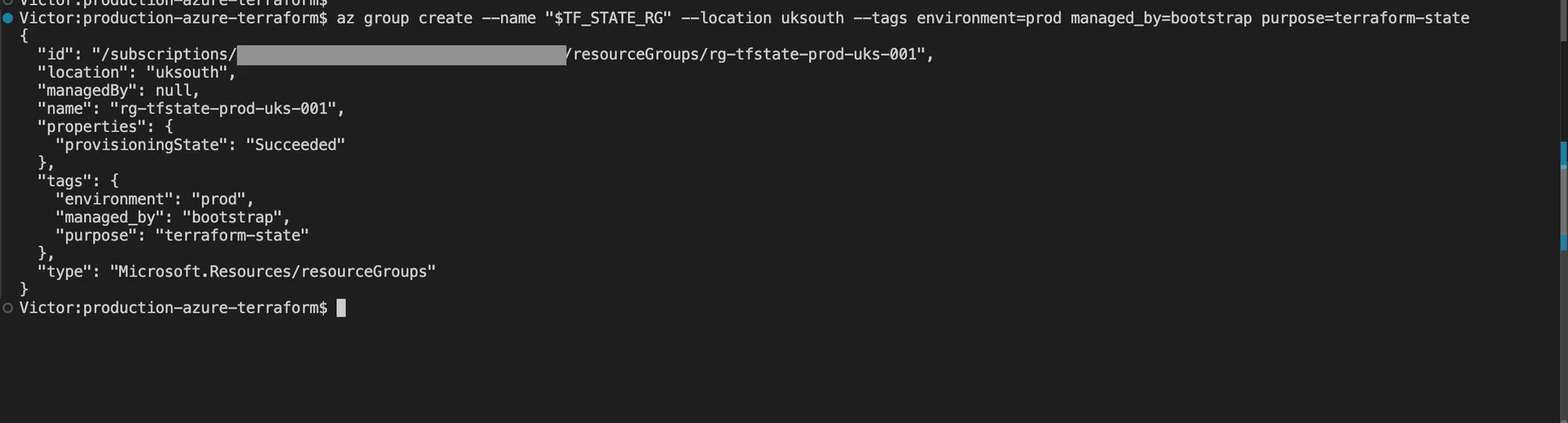
Azure returned Succeeded for the dedicated state Resource Group before the Storage Account and
container were configured.
Grant the signed-in user data-plane access. This role assignment can take several minutes to propagate:
export TF_OPERATOR_OBJECT_ID="$(az ad signed-in-user show --query id --output tsv)"
export TF_STATE_ACCOUNT_ID="$(az storage account show \
  --name "$TF_STATE_ACCOUNT" \
  --resource-group "$TF_STATE_RG" \
  --query id --output tsv)"

az role assignment create \
  --assignee-object-id "$TF_OPERATOR_OBJECT_ID" \
  --assignee-principal-type User \
  --role "Storage Blob Data Contributor" \
  --scope "$TF_STATE_ACCOUNT_ID"
Enable state recovery controls and create the container with Microsoft Entra authorization:
az storage account blob-service-properties update \
  --account-name "$TF_STATE_ACCOUNT" \
  --resource-group "$TF_STATE_RG" \
  --enable-versioning true \
  --enable-delete-retention true \
  --delete-retention-days 14 \
  --enable-container-delete-retention true \
  --container-delete-retention-days 14

az storage container create \
  --name "$TF_STATE_CONTAINER" \
  --account-name "$TF_STATE_ACCOUNT" \
  --auth-mode login
I add the trusted IP rule, then change the network default from allow to deny:
az storage account network-rule add \
  --account-name "$TF_STATE_ACCOUNT" \
  --resource-group "$TF_STATE_RG" \
  --ip-address "$TF_ADMIN_IP"

az storage account update \
  --name "$TF_STATE_ACCOUNT" \
  --resource-group "$TF_STATE_RG" \
  --default-action Deny \
  --bypass AzureServices
If the container command returns AuthorizationPermissionMismatch, wait for RBAC propagation and
retry it. If it times out after the firewall change, confirm that TF_ADMIN_IP is the public egress
address seen by Azure. GitHub-hosted runners do not have one stable outbound address, so a real
private-state pipeline normally uses a private runner or another approved network path.
I create backend.tf:
terraform {
  backend "azurerm" {}
}
I create the uncommitted backend.hcl and replace the Storage Account placeholder:
use_cli              = true
use_azuread_auth     = true
resource_group_name  = "rg-tfstate-prod-uks-001"
storage_account_name = "REPLACE_WITH_TF_STATE_ACCOUNT"
container_name       = "tfstate"
key                  = "workloads/payments/prod.tfstate"
The backend file contains locations rather than credentials, but keeping environment-specific backend configuration out of a reusable root prevents accidental initialization against the wrong state. I never put an account key, SAS token, or client secret in this file.
Pin Terraform and the AzureRM provider
I create terraform.tf:
terraform {
  required_version = ">= 1.10.0, < 2.0.0"

  required_providers {
    azurerm = {
      source  = "hashicorp/azurerm"
      version = "= 4.77.0"
    }
  }
}
This walkthrough pins the provider version whose schema was reviewed for the examples. I do not change the constraint only because a newer major version exists. Read the provider upgrade guide, update in a branch, inspect the lock-file change, and run a saved plan before adopting a new major release.
I create providers.tf:
provider "azurerm" {
  features {
    key_vault {
      purge_soft_delete_on_destroy    = false
      recover_soft_deleted_key_vaults = true
    }
  }

  subscription_id     = var.subscription_id
  storage_use_azuread = true
}

data "azurerm_client_config" "current" {}
storage_use_azuread = true tells AzureRM to use Microsoft Entra authorization for supported Storage
data-plane operations. The workload root does not create blobs or containers, but keeping this
explicit avoids silently falling back to a shared key when the root is extended.
Define inputs with validation
I create variables.tf:
variable "subscription_id" {
  description = "Azure subscription that owns the workload foundation."
  type        = string

  validation {
    condition     = can(regex("^[0-9a-fA-F-]{36}$", var.subscription_id))
    error_message = "subscription_id must be a 36-character Azure subscription GUID."
  }
}

variable "location" {
  description = "Azure region for the workload foundation."
  type        = string
  default     = "uksouth"
}

variable "workload" {
  description = "Short lowercase workload name used in Azure resource names."
  type        = string
  default     = "payments"

  validation {
    condition     = can(regex("^[a-z][a-z0-9-]{2,11}$", var.workload))
    error_message = "workload must be 3 to 12 lowercase letters, numbers, or hyphens and start with a letter."
  }
}

variable "environment" {
  description = "Lifecycle environment used in names and mandatory tags."
  type        = string
  default     = "prod"

  validation {
    condition     = contains(["dev", "staging", "prod"], var.environment)
    error_message = "environment must be dev, staging, or prod."
  }
}

variable "unique_suffix" {
  description = "Globally unique lowercase suffix for Key Vault and Storage names."
  type        = string

  validation {
    condition     = can(regex("^[a-z0-9]{5,10}$", var.unique_suffix))
    error_message = "unique_suffix must contain 5 to 10 lowercase letters or numbers."
  }
}

variable "vnet_cidr" {
  description = "Address space for the workload virtual network."
  type        = string
  default     = "10.41.0.0/16"

  validation {
    condition     = can(cidrnetmask(var.vnet_cidr))
    error_message = "vnet_cidr must be a valid IPv4 CIDR."
  }
}

variable "app_subnet_cidr" {
  description = "Address prefix for future application compute."
  type        = string
  default     = "10.41.1.0/24"
}

variable "private_endpoint_subnet_cidr" {
  description = "Address prefix reserved for private endpoints."
  type        = string
  default     = "10.41.2.0/24"
}

variable "log_retention_days" {
  description = "Log Analytics interactive retention period."
  type        = number
  default     = 30

  validation {
    condition     = var.log_retention_days >= 30 && var.log_retention_days <= 730
    error_message = "log_retention_days must be between 30 and 730."
  }
}

variable "tags" {
  description = "Additional non-sensitive tags merged with mandatory ownership tags."
  type        = map(string)
  default     = {}
}
I create locals.tf:
locals {
  location_short = "uks"

  resource_group_name  = "rg-${var.workload}-${var.environment}-${local.location_short}-001"
  storage_account_name = substr(replace("st${var.workload}${var.environment}${var.unique_suffix}", "-", ""), 0, 24)
  key_vault_name       = substr("kv-${var.workload}-${var.environment}-${var.unique_suffix}", 0, 24)

  mandatory_tags = {
    environment = var.environment
    managed_by  = "terraform"
    owner       = "platform-team"
    workload    = var.workload
  }

  common_tags = merge(var.tags, local.mandatory_tags)
}
The mandatory map is merged last, so a caller cannot replace managed_by, owner, or
environment through the optional tags input. In a real platform, make the owner an explicit input
validated against the organization’s ownership model rather than leaving the tutorial value.
Build the workload network
I create network.tf:
resource "azurerm_resource_group" "workload" {
  name     = local.resource_group_name
  location = var.location
  tags     = local.common_tags
}

resource "azurerm_virtual_network" "workload" {
  name                = "vnet-${var.workload}-${var.environment}-${local.location_short}-001"
  location            = azurerm_resource_group.workload.location
  resource_group_name = azurerm_resource_group.workload.name
  address_space       = [var.vnet_cidr]
  tags                = local.common_tags
}

resource "azurerm_subnet" "application" {
  name                            = "snet-application"
  resource_group_name             = azurerm_resource_group.workload.name
  virtual_network_name            = azurerm_virtual_network.workload.name
  address_prefixes                = [var.app_subnet_cidr]
  default_outbound_access_enabled = false
}

resource "azurerm_subnet" "private_endpoints" {
  name                              = "snet-private-endpoints"
  resource_group_name               = azurerm_resource_group.workload.name
  virtual_network_name              = azurerm_virtual_network.workload.name
  address_prefixes                  = [var.private_endpoint_subnet_cidr]
  private_endpoint_network_policies = "Disabled"
}

resource "azurerm_network_security_group" "application" {
  name                = "nsg-${var.workload}-${var.environment}-application"
  location            = azurerm_resource_group.workload.location
  resource_group_name = azurerm_resource_group.workload.name
  tags                = local.common_tags

  security_rule {
    name                       = "allow-vnet-inbound"
    priority                   = 100
    direction                  = "Inbound"
    access                     = "Allow"
    protocol                   = "*"
    source_port_range          = "*"
    destination_port_range     = "*"
    source_address_prefix      = "VirtualNetwork"
    destination_address_prefix = "VirtualNetwork"
  }

  security_rule {
    name                       = "deny-internet-inbound"
    priority                   = 200
    direction                  = "Inbound"
    access                     = "Deny"
    protocol                   = "*"
    source_port_range          = "*"
    destination_port_range     = "*"
    source_address_prefix      = "Internet"
    destination_address_prefix = "*"
  }
}

resource "azurerm_subnet_network_security_group_association" "application" {
  subnet_id                 = azurerm_subnet.application.id
  network_security_group_id = azurerm_network_security_group.application.id
}

resource "azurerm_public_ip" "outbound" {
  name                = "pip-${var.workload}-${var.environment}-outbound"
  location            = azurerm_resource_group.workload.location
  resource_group_name = azurerm_resource_group.workload.name
  allocation_method   = "Static"
  sku                 = "Standard"
  tags                = local.common_tags
}

resource "azurerm_nat_gateway" "outbound" {
  name                    = "nat-${var.workload}-${var.environment}-${local.location_short}-001"
  location                = azurerm_resource_group.workload.location
  resource_group_name     = azurerm_resource_group.workload.name
  sku_name                = "Standard"
  idle_timeout_in_minutes = 10
  tags                    = local.common_tags
}

resource "azurerm_nat_gateway_public_ip_association" "outbound" {
  nat_gateway_id       = azurerm_nat_gateway.outbound.id
  public_ip_address_id = azurerm_public_ip.outbound.id
}

resource "azurerm_subnet_nat_gateway_association" "application" {
  subnet_id      = azurerm_subnet.application.id
  nat_gateway_id = azurerm_nat_gateway.outbound.id
}
The application subnet disables Azure default outbound access and receives an explicit NAT Gateway. NAT provides a stable outbound address and scalable source NAT. It is not an egress firewall and does not decide which destinations an application may reach. I add Azure Firewall, a network virtual appliance, or application-layer controls when the threat model requires destination filtering.
The private-endpoint subnet is separate so private IP consumption and network policy choices are visible. This example disables private-endpoint network policies, matching the simple provider path. If your organization applies NSGs or user-defined routes to private endpoints, enable the applicable policy mode only after testing the service-specific traffic path.
Add Log Analytics before diagnostic settings
I create observability.tf:
resource "azurerm_log_analytics_workspace" "workload" {
  name                = "log-${var.workload}-${var.environment}-${local.location_short}-001"
  location            = azurerm_resource_group.workload.location
  resource_group_name = azurerm_resource_group.workload.name
  sku                 = "PerGB2018"
  retention_in_days   = var.log_retention_days
  tags                = local.common_tags
}
A workspace is only a destination. It does not automatically collect every Azure resource log. The diagnostic settings below explicitly connect Key Vault and Storage telemetry to it. A production monitoring design must also define queries, alerts, action groups, data-retention ownership, and a response runbook.
Add private Key Vault and Storage services
I create security.tf:
resource "azurerm_key_vault" "workload" {
  name                          = local.key_vault_name
  location                      = azurerm_resource_group.workload.location
  resource_group_name           = azurerm_resource_group.workload.name
  tenant_id                     = data.azurerm_client_config.current.tenant_id
  sku_name                      = "standard"
  rbac_authorization_enabled    = true
  public_network_access_enabled = false
  soft_delete_retention_days    = 7
  purge_protection_enabled      = true
  tags                          = local.common_tags

  network_acls {
    bypass         = "AzureServices"
    default_action = "Deny"
  }
}

resource "azurerm_private_dns_zone" "key_vault" {
  name                = "privatelink.vaultcore.azure.net"
  resource_group_name = azurerm_resource_group.workload.name
  tags                = local.common_tags
}

resource "azurerm_private_dns_zone_virtual_network_link" "key_vault" {
  name                  = "link-${azurerm_virtual_network.workload.name}-keyvault"
  resource_group_name   = azurerm_resource_group.workload.name
  private_dns_zone_name = azurerm_private_dns_zone.key_vault.name
  virtual_network_id    = azurerm_virtual_network.workload.id
  registration_enabled  = false
  tags                  = local.common_tags
}

resource "azurerm_private_endpoint" "key_vault" {
  name                = "pep-${local.key_vault_name}"
  location            = azurerm_resource_group.workload.location
  resource_group_name = azurerm_resource_group.workload.name
  subnet_id           = azurerm_subnet.private_endpoints.id
  tags                = local.common_tags

  private_service_connection {
    name                           = "psc-${local.key_vault_name}"
    private_connection_resource_id = azurerm_key_vault.workload.id
    subresource_names              = ["vault"]
    is_manual_connection           = false
  }

  private_dns_zone_group {
    name                 = "default"
    private_dns_zone_ids = [azurerm_private_dns_zone.key_vault.id]
  }
}

resource "azurerm_storage_account" "workload" {
  name                              = local.storage_account_name
  resource_group_name               = azurerm_resource_group.workload.name
  location                          = azurerm_resource_group.workload.location
  account_kind                      = "StorageV2"
  account_tier                      = "Standard"
  account_replication_type          = "ZRS"
  access_tier                       = "Hot"
  min_tls_version                   = "TLS1_2"
  https_traffic_only_enabled        = true
  allow_nested_items_to_be_public   = false
  public_network_access_enabled     = false
  shared_access_key_enabled         = false
  default_to_oauth_authentication   = true
  infrastructure_encryption_enabled = true
  cross_tenant_replication_enabled  = false
  tags                              = local.common_tags

  blob_properties {
    versioning_enabled = true

    delete_retention_policy {
      days = 14
    }

    container_delete_retention_policy {
      days = 14
    }
  }
}

resource "azurerm_private_dns_zone" "blob" {
  name                = "privatelink.blob.core.windows.net"
  resource_group_name = azurerm_resource_group.workload.name
  tags                = local.common_tags
}

resource "azurerm_private_dns_zone_virtual_network_link" "blob" {
  name                  = "link-${azurerm_virtual_network.workload.name}-blob"
  resource_group_name   = azurerm_resource_group.workload.name
  private_dns_zone_name = azurerm_private_dns_zone.blob.name
  virtual_network_id    = azurerm_virtual_network.workload.id
  registration_enabled  = false
  tags                  = local.common_tags
}

resource "azurerm_private_endpoint" "blob" {
  name                = "pep-${local.storage_account_name}-blob"
  location            = azurerm_resource_group.workload.location
  resource_group_name = azurerm_resource_group.workload.name
  subnet_id           = azurerm_subnet.private_endpoints.id
  tags                = local.common_tags

  private_service_connection {
    name                           = "psc-${local.storage_account_name}-blob"
    private_connection_resource_id = azurerm_storage_account.workload.id
    subresource_names              = ["blob"]
    is_manual_connection           = false
  }

  private_dns_zone_group {
    name                 = "default"
    private_dns_zone_ids = [azurerm_private_dns_zone.blob.id]
  }
}

resource "azurerm_monitor_diagnostic_setting" "key_vault" {
  name                       = "diag-key-vault"
  target_resource_id         = azurerm_key_vault.workload.id
  log_analytics_workspace_id = azurerm_log_analytics_workspace.workload.id

  enabled_log {
    category = "AuditEvent"
  }

  enabled_metric {
    category = "AllMetrics"
  }
}

resource "azurerm_monitor_diagnostic_setting" "storage" {
  name                       = "diag-storage-account"
  target_resource_id         = azurerm_storage_account.workload.id
  log_analytics_workspace_id = azurerm_log_analytics_workspace.workload.id

  enabled_metric {
    category = "AllMetrics"
  }
}

resource "azurerm_management_lock" "workload" {
  name       = "lock-${azurerm_resource_group.workload.name}-delete"
  scope      = azurerm_resource_group.workload.id
  lock_level = "CanNotDelete"
  notes      = "Managed by Terraform. Remove through the reviewed Terraform workflow before deleting this environment."

  depends_on = [
    azurerm_monitor_diagnostic_setting.key_vault,
    azurerm_monitor_diagnostic_setting.storage,
    azurerm_private_endpoint.key_vault,
    azurerm_private_endpoint.blob,
    azurerm_subnet_network_security_group_association.application,
    azurerm_subnet_nat_gateway_association.application,
  ]
}
Key Vault uses Azure RBAC rather than inline access policies. This root creates no secrets and no data-plane role assignments because the future workload identity is not part of the lab. Grant that identity only the exact Key Vault data role it needs at the vault scope.
Purge protection cannot be disabled after activation. When the lab is destroyed, the vault remains soft-deleted for the configured retention period and its name cannot be immediately reused. That is real Azure behavior, not a Terraform cleanup failure.
The Resource Group lock includes explicit dependencies so Terraform creates it after the protected foundation and removes it before trying to delete those resources. A lock applies to Azure control-plane operations and does not protect Storage blobs or Key Vault secrets from authorized data-plane deletion.
Add operational outputs
I create outputs.tf:
output "resource_group_name" {
  description = "Resource Group containing the workload foundation."
  value       = azurerm_resource_group.workload.name
}

output "virtual_network_name" {
  description = "Name of the workload virtual network."
  value       = azurerm_virtual_network.workload.name
}

output "nat_gateway_public_ip" {
  description = "Stable outbound public IP assigned to the application subnet NAT Gateway."
  value       = azurerm_public_ip.outbound.ip_address
}

output "key_vault_name" {
  description = "Name of the private Key Vault."
  value       = azurerm_key_vault.workload.name
}

output "storage_account_name" {
  description = "Name of the private Storage Account."
  value       = azurerm_storage_account.workload.name
}

output "log_analytics_workspace_name" {
  description = "Name of the Log Analytics workspace receiving diagnostics."
  value       = azurerm_log_analytics_workspace.workload.name
}
Outputs are saved in state. I do not output keys, secrets, tokens, connection strings, or private data merely to make another automation step easier.
Supply environment values
I create the uncommitted terraform.tfvars. Replace both placeholders:
subscription_id = "00000000-0000-0000-0000-000000000000"
location        = "uksouth"
workload        = "payments"
environment     = "prod"
unique_suffix   = "v26081801"

vnet_cidr                    = "10.41.0.0/16"
app_subnet_cidr              = "10.41.1.0/24"
private_endpoint_subnet_cidr = "10.41.2.0/24"
log_retention_days           = 30

tags = {
  cost_center = "cc-1042"
  service     = "payments-api"
}
The network prefixes must not overlap with connected Azure or on-premises networks. This lab does not peer the VNet, but production IP planning must happen before a hub connection is introduced.
Initialize and validate
I create the proof directory, export the backend authentication settings, and initialize:
mkdir -p proof
export ARM_USE_CLI=true
export ARM_USE_AZUREAD=true
export ARM_SUBSCRIPTION_ID="$(az account show --query id --output tsv)"

terraform fmt -recursive
terraform init -backend-config=backend.hcl -input=false
terraform validate
terraform providers | tee proof/providers.txt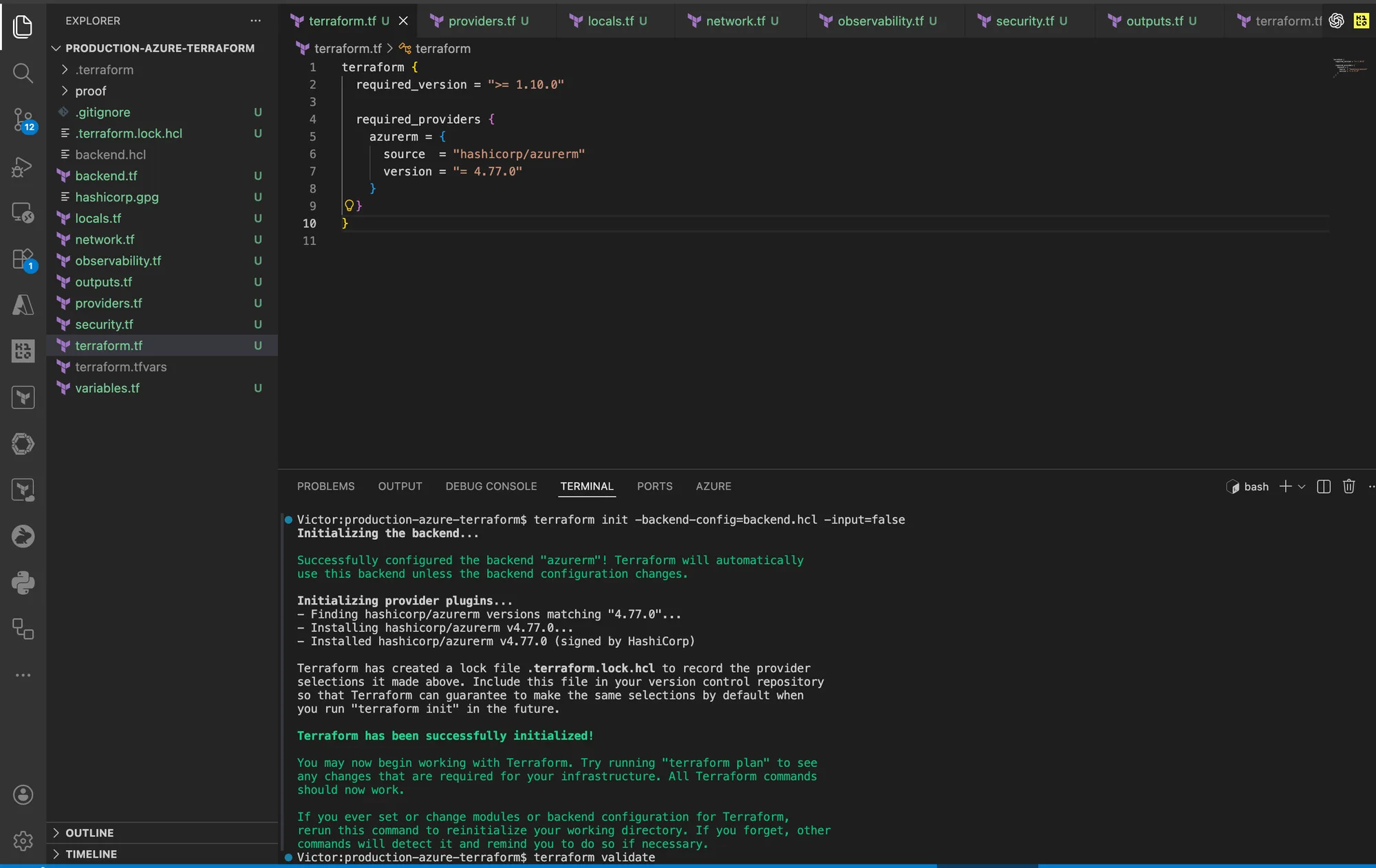
Terraform initialized the AzureRM backend and installed the provider version pinned by the root module.
Commit .terraform.lock.hcl after reviewing it. I do not commit .terraform/, backend.hcl,
terraform.tfvars, state, or plans.
If initialization returns HTTP 403, separate the two likely causes:
az role assignment list --scope "$TF_STATE_ACCOUNT_ID"checks data-plane RBAC.az storage account network-rule listchecks whether the current public IP is allowed.
I do not enable shared-key access as a quick workaround.
Create and review a saved plan
Generate a binary plan, render a text copy for review, and save the machine-readable summary:
terraform plan -input=false -out=workload.tfplan
terraform show -no-color workload.tfplan | tee proof/workload-plan.txt
terraform show -json workload.tfplan > proof/workload-plan.json
For a new environment, the summary should report 22 resources to add, 0 to change, and 0 to destroy. I stop if the count differs until you can explain every additional or missing resource.
I check the most important plan properties before applying:
jq -r '
  .resource_changes[]
  | [.address, (.change.actions | join(","))]
  | @tsv
' proof/workload-plan.json | tee proof/resource-actions.txt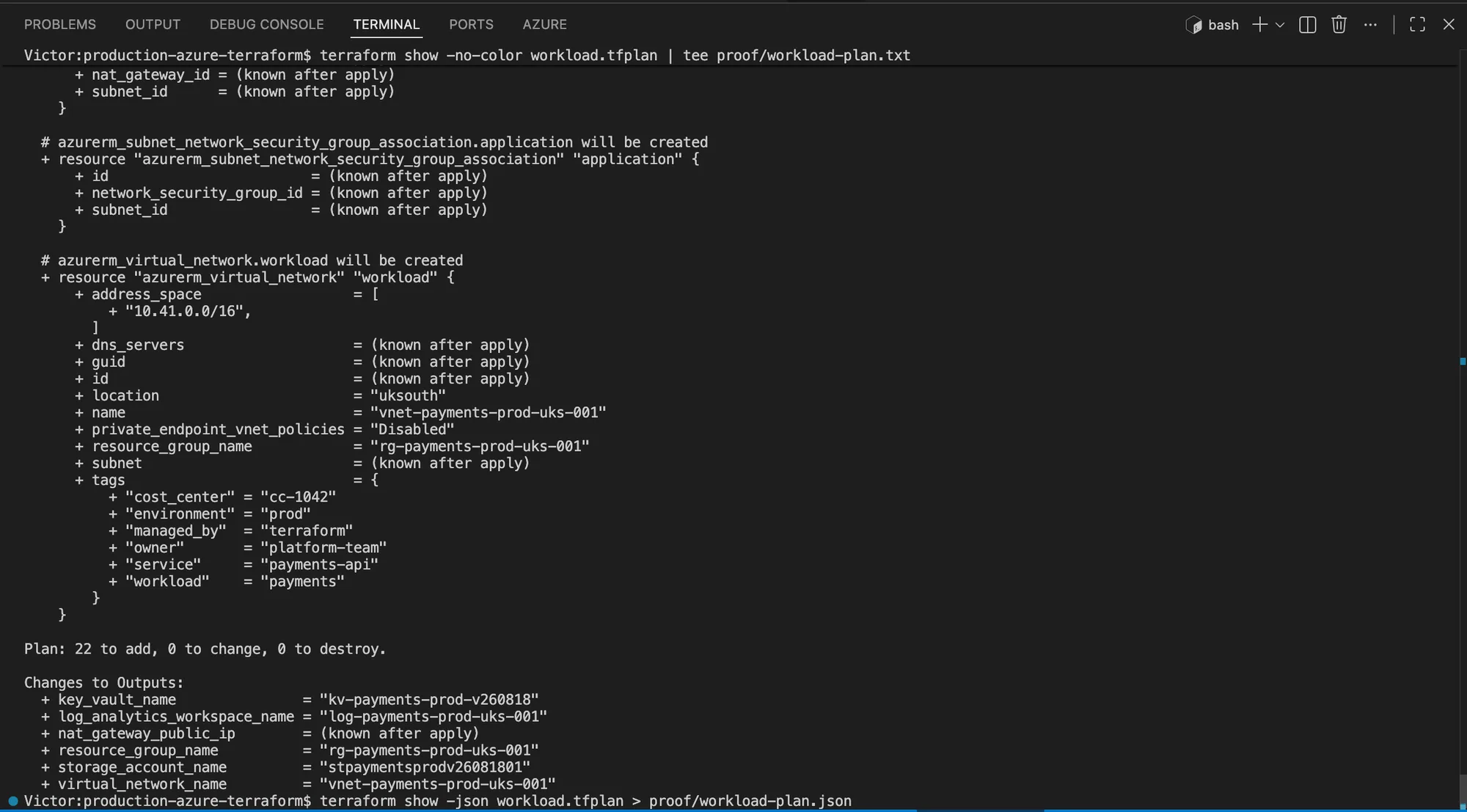
The saved plan matched the expected 22 create operations before approval.
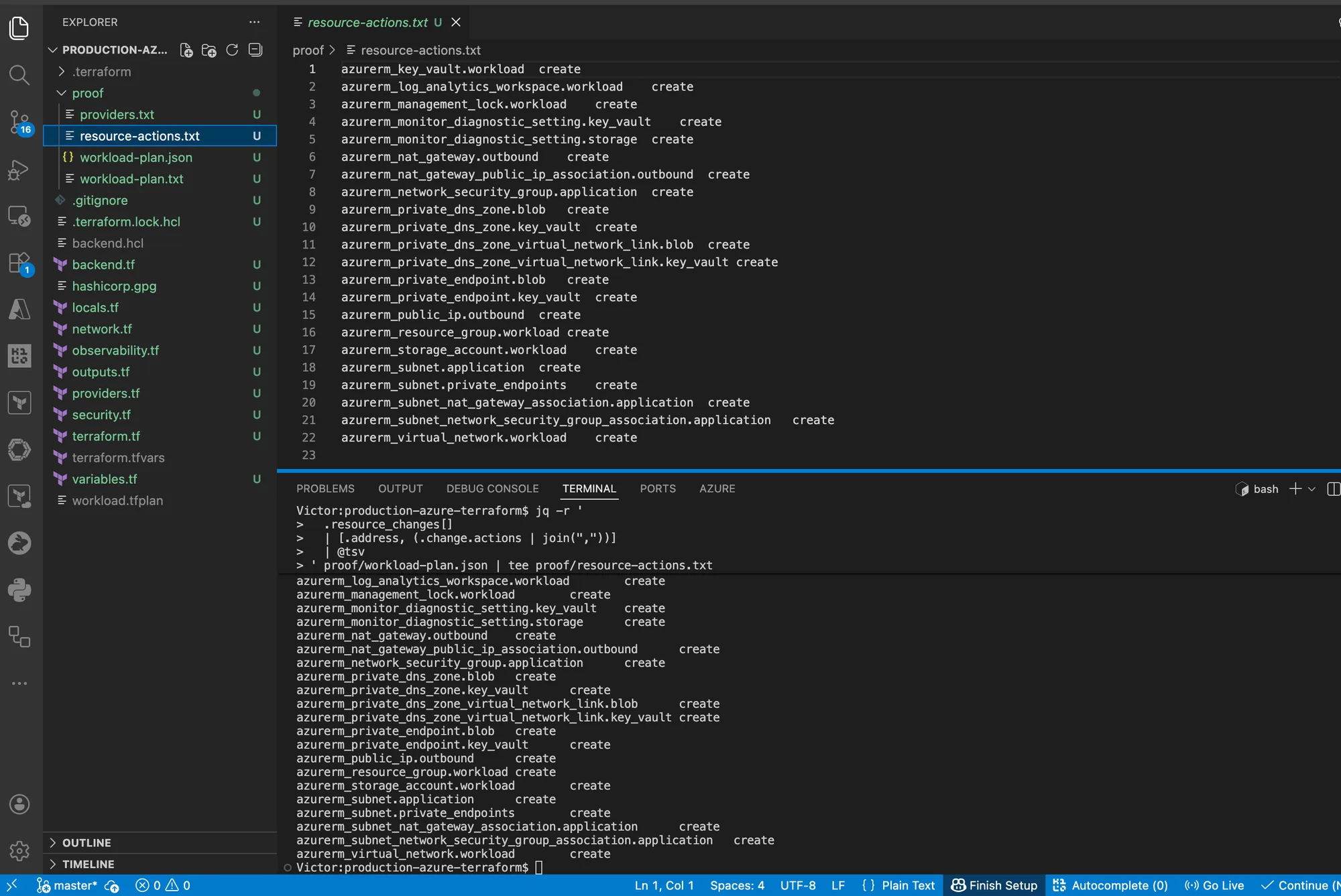
The JSON review confirmed that every planned resource action was create.
The review must show only create actions. Search the rendered plan for:
public_network_access_enabled = falseon Key Vault and Storageshared_access_key_enabled = falseon Storagepurge_protection_enabled = trueon Key VaultCanNotDeleteon the Resource Group lock- The expected VNet and subnet CIDRs
- No secret, access key, SAS token, or unplanned public ingress
Saved plans and plan JSON can contain sensitive values. I keep the proof directory private and expose only the non-secret command results needed to support the article.
Apply the reviewed plan
Apply the exact binary plan instead of calculating a new one:
terraform apply -input=false workload.tfplan | tee proof/workload-apply.txtExpected completion is Resources: 22 added, 0 changed, 0 destroyed. A provider may occasionally
produce a different count after a schema change. I do not edit the expected number to match output.
Investigate the provider version and configuration first.
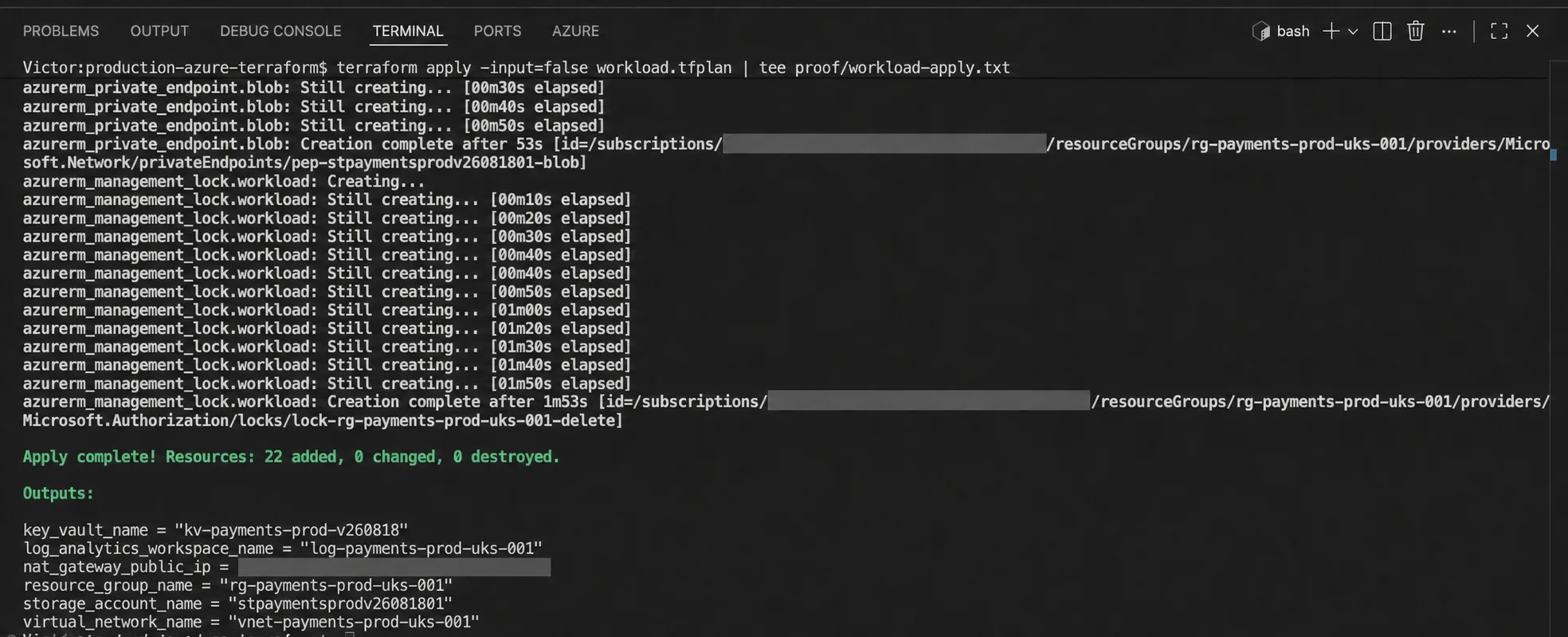
The reviewed binary plan completed with the expected resource count. The Azure checks below provide independent control-plane verification.
Verify Azure independently
Terraform apply success proves that Azure accepted the requested operations. It does not prove the network and security properties you intended. Query Azure directly.
Store only non-sensitive output names:
export WORKLOAD_RG="$(terraform output -raw resource_group_name)"
export WORKLOAD_KV="$(terraform output -raw key_vault_name)"
export WORKLOAD_STORAGE="$(terraform output -raw storage_account_name)"
export WORKLOAD_LOG="$(terraform output -raw log_analytics_workspace_name)"
Inventory the Resource Group:
az resource list \
  --resource-group "$WORKLOAD_RG" \
  --query "[].{name:name,type:type,location:location}" \
  --output table | tee proof/resource-inventory.txt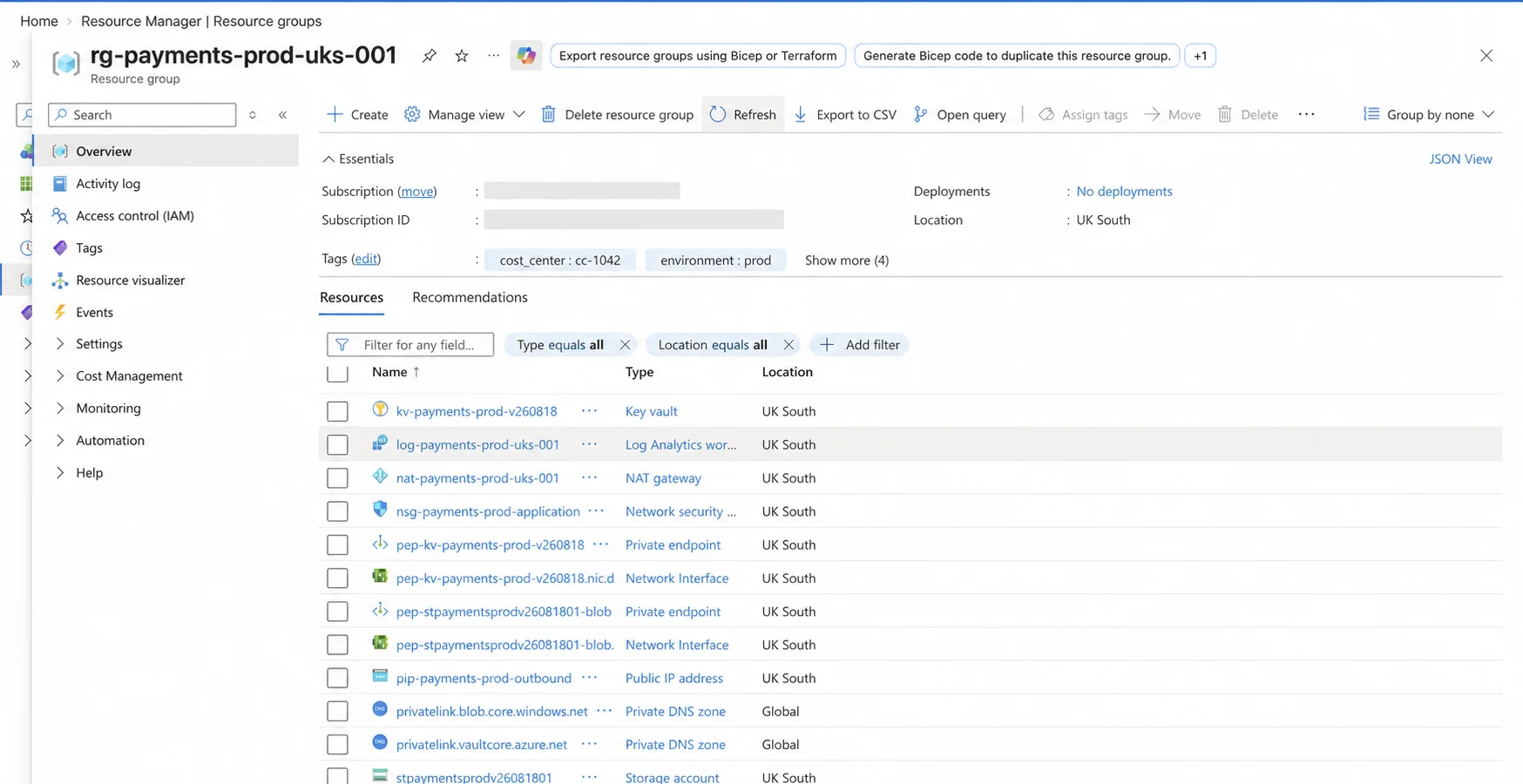
The Azure Portal inventory confirms that the expected workload foundation resources exist in UK South.
I verify the outbound path:
az network nat gateway show \
  --name "nat-payments-prod-uks-001" \
  --resource-group "$WORKLOAD_RG" \
  --query "{name:name,sku:sku.name,idleTimeout:idleTimeoutInMinutes,provisioningState:provisioningState}" \
  --output table | tee proof/nat-gateway.txt

terraform output -raw nat_gateway_public_ip | tee proof/nat-public-ip.txt
I verify Key Vault controls:
az keyvault show \
  --name "$WORKLOAD_KV" \
  --resource-group "$WORKLOAD_RG" \
  --query "{name:name,publicAccess:properties.publicNetworkAccess,rbac:properties.enableRbacAuthorization,purgeProtection:properties.enablePurgeProtection,softDeleteDays:properties.softDeleteRetentionInDays}" \
  --output table | tee proof/key-vault-controls.txt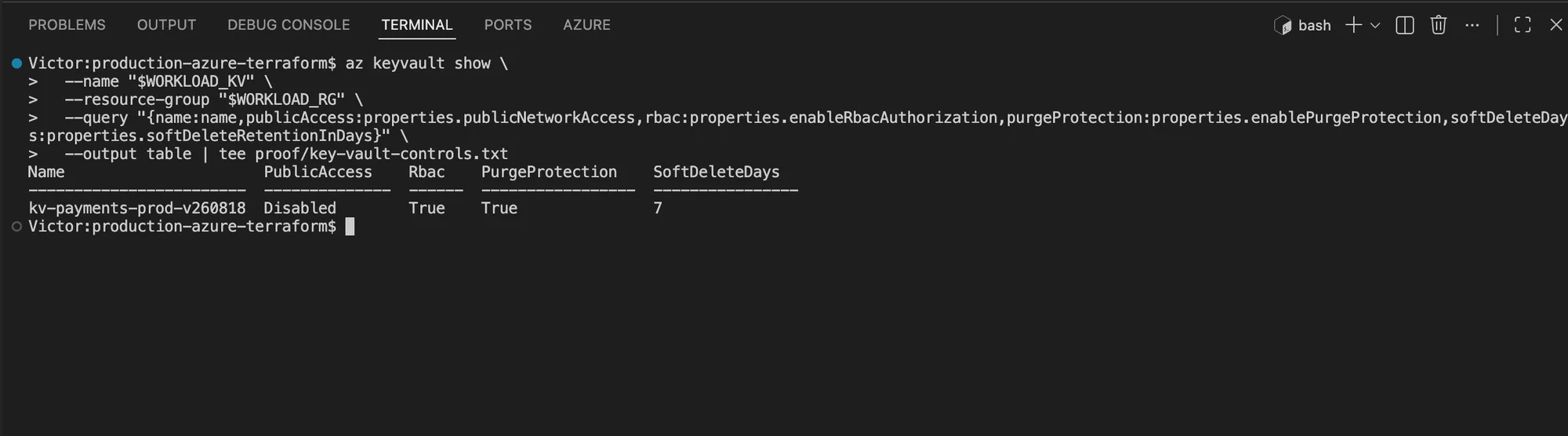
Azure reports the intended Key Vault access and recovery controls directly from the deployed resource.
I verify Storage controls:
az storage account show \
  --name "$WORKLOAD_STORAGE" \
  --resource-group "$WORKLOAD_RG" \
  --query "{name:name,replication:sku.name,publicAccess:publicNetworkAccess,sharedKey:allowSharedKeyAccess,blobPublic:allowBlobPublicAccess,minTls:minimumTlsVersion}" \
  --output table | tee proof/storage-controls.txt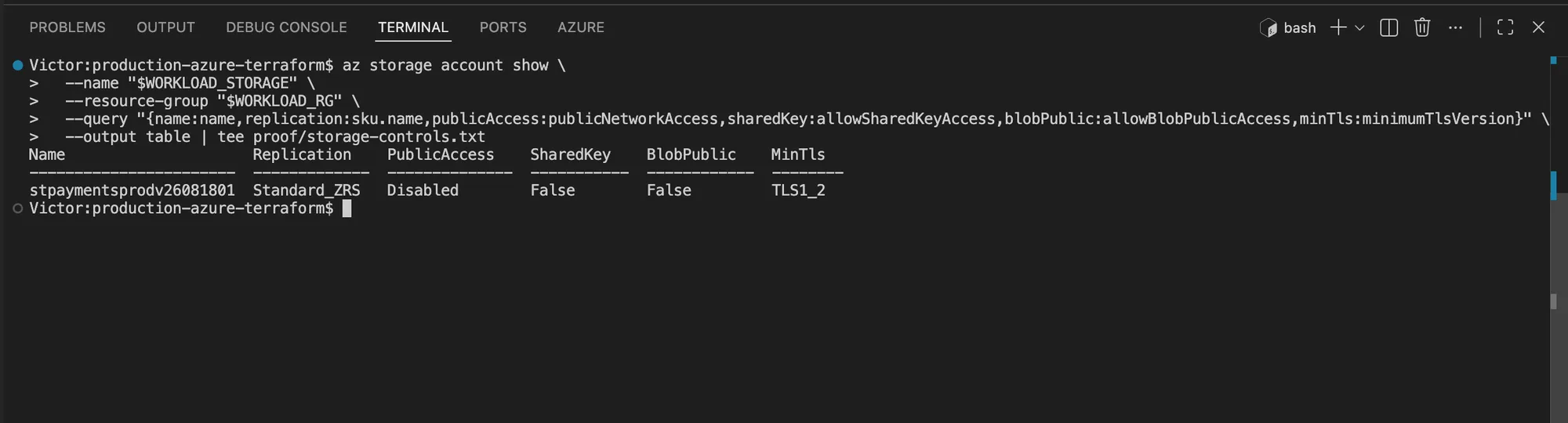
The Storage Account uses ZRS and rejects public network, shared-key, and anonymous blob access.
I verify private endpoint approval and private DNS links:
az network private-endpoint list \
  --resource-group "$WORKLOAD_RG" \
  --query "[].{name:name,status:privateLinkServiceConnections[0].privateLinkServiceConnectionState.status,subnet:subnet.id}" \
  --output table | tee proof/private-endpoints.txt

az network private-dns link vnet list \
  --resource-group "$WORKLOAD_RG" \
  --zone-name privatelink.vaultcore.azure.net \
  --query "[].{name:name,state:virtualNetworkLinkState}" \
  --output table | tee proof/key-vault-dns-link.txt

az network private-dns link vnet list \
  --resource-group "$WORKLOAD_RG" \
  --zone-name privatelink.blob.core.windows.net \
  --query "[].{name:name,state:virtualNetworkLinkState}" \
  --output table | tee proof/blob-dns-link.txt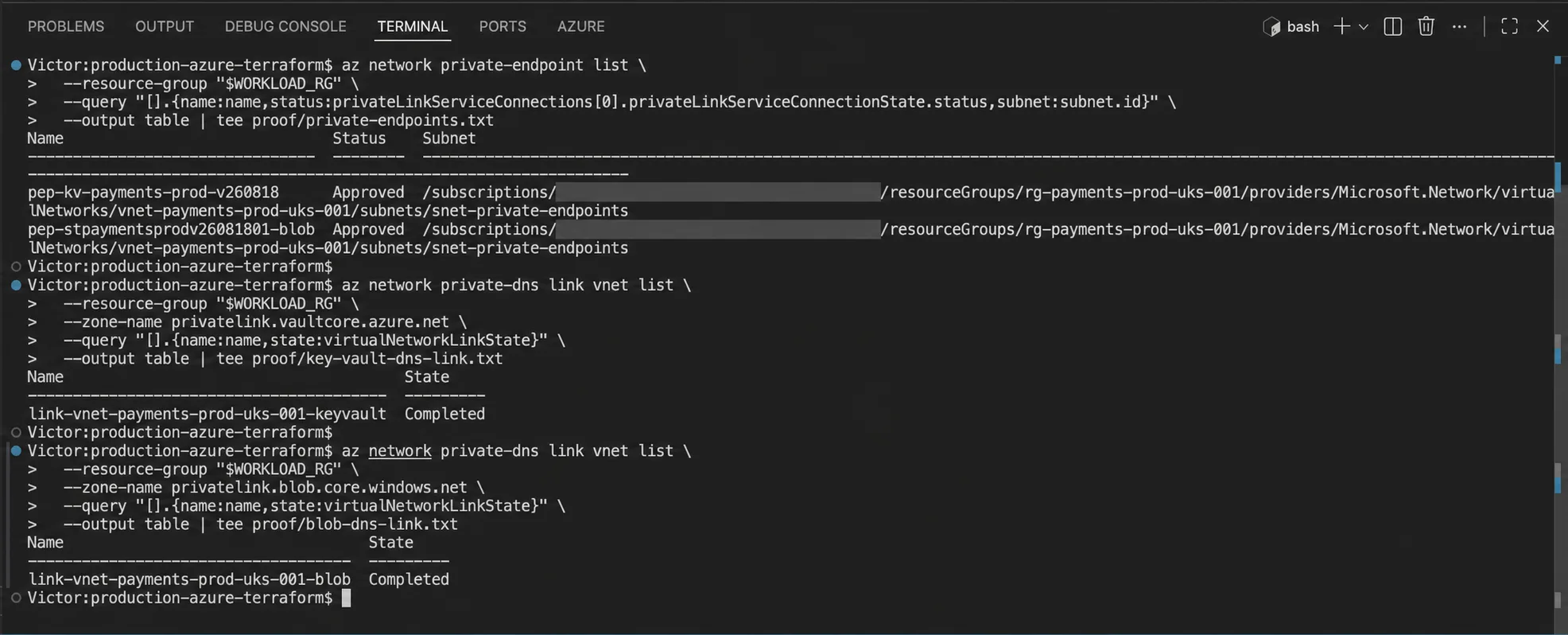
Both private endpoint connections are approved, and both private DNS zones report completed VNet links.
I verify diagnostic settings and the deletion lock:
export WORKLOAD_KV_ID="$(az keyvault show --name "$WORKLOAD_KV" --query id --output tsv)"
export WORKLOAD_STORAGE_ID="$(az storage account show \
  --name "$WORKLOAD_STORAGE" \
  --resource-group "$WORKLOAD_RG" \
  --query id --output tsv)"

az monitor diagnostic-settings list \
  --resource "$WORKLOAD_KV_ID" \
  --query "value[].{name:name,workspaceId:workspaceId}" \
  --output table | tee proof/key-vault-diagnostics.txt

az monitor diagnostic-settings list \
  --resource "$WORKLOAD_STORAGE_ID" \
  --query "value[].{name:name,workspaceId:workspaceId}" \
  --output table | tee proof/storage-diagnostics.txt

az lock list \
  --resource-group "$WORKLOAD_RG" \
  --query "[].{name:name,level:level}" \
  --output table | tee proof/resource-lock.txt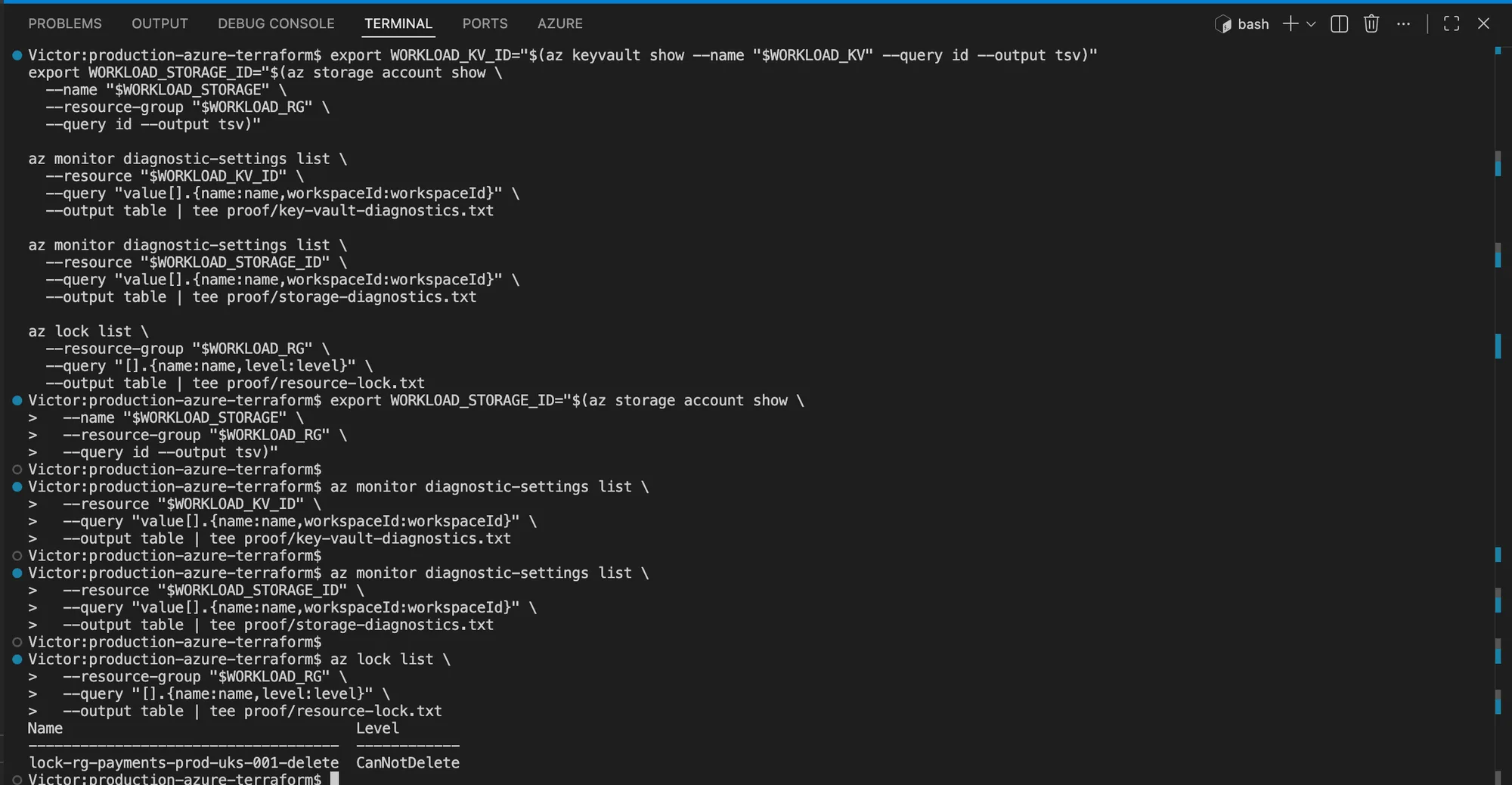
The independent Azure CLI query returns the CanNotDelete lock applied to the workload Resource
Group.
Finally, confirm idempotence:
terraform plan -input=false -detailed-exitcode
echo "Terraform detailed exit code: $?"
Exit code 0 means no changes. Exit code 2 means Terraform found a difference. Exit code 1
means planning failed. I do not describe the deployment as stable unless the result is 0 and the
Azure checks match the expected controls.
This control-plane verification does not prove private data-plane connectivity. To test DNS and TLS from inside the VNet, use an approved private runner, test VM, or existing workload identity in the application subnet. I keep the private access controls enabled throughout that test.
Troubleshooting the build
Backend initialization returns 403
I check both RBAC and the Storage firewall. Management-plane Contributor does not grant blob data
access. Confirm Storage Blob Data Contributor at the Storage Account or container scope, wait for
propagation, and verify the current public egress IP is allowed.
A global name is unavailable
Key Vault and Storage names are globally unique. Change only unique_suffix, rerun terraform plan,
and verify that the new names still satisfy the service limits. A soft-deleted, purge-protected Key
Vault name remains unavailable until its retention period ends.
Terraform cannot create the management lock
The error normally names Microsoft.Authorization/locks/write. Microsoft documents that lock
management requires Owner, User Access Administrator, or a custom role containing the required lock
actions. I do not grant broad permanent access solely to finish a tutorial.
A private endpoint remains pending
I inspect the connection state and the target subresource:
az network private-endpoint-connection list \
  --id "$WORKLOAD_KV_ID" \
  --output table
The Key Vault subresource must be vault; the Storage endpoint in this lab uses blob. Manual
approval is not requested by this configuration, so a persistent pending state needs an Azure
permission or service-level investigation.
Diagnostic setting categories fail validation
Diagnostic categories are service-specific. Query the actual target before changing the Terraform:
az monitor diagnostic-settings categories list \
  --resource "$WORKLOAD_KV_ID" \
  --output table
Preserve the provider and Azure error, compare it with the current official resource documentation, and update both code and article if the service contract changed.
Destroy is blocked by a lock
First confirm the lock is Terraform-managed:
terraform state list | grep azurerm_management_lock
az lock list --resource-group "$WORKLOAD_RG" --output table
The explicit dependencies in this root cause Terraform to remove its lock first. If another team or policy created an additional lock, do not delete it without the owner’s approval.
Destroy and verify cleanup
I create and review a dedicated destroy plan:
terraform plan -destroy -input=false -out=destroy.tfplan
terraform show -no-color destroy.tfplan | tee proof/destroy-plan.txt
The summary should show 22 resources to destroy. Confirm the backend key, subscription, Resource Group, and lock before applying:
terraform apply -input=false destroy.tfplan | tee proof/destroy-apply.txt
az group exists --name "$WORKLOAD_RG" | tee proof/workload-group-exists.txt
terraform state list
The Azure existence check must return false, and terraform state list must print no managed
resources. I remove only the two known local plan files after saving the required evidence:
rm -f workload.tfplan destroy.tfplanFor a short-lived personal lab, delete the separate backend only after the workload state is empty and its proof is preserved:
az group delete --name "$TF_STATE_RG" --yes
az group exists --name "$TF_STATE_RG"
The final command must return false. In a real platform, the backend is shared protected
infrastructure and must not be deleted as part of a workload cleanup.
Use workload identity, not stored client secrets
For local engineering, Microsoft documents Azure CLI authentication as one supported path. For CI, use a dedicated federated workload identity with no long-lived secret in GitHub.
Separate identities by environment and purpose:
| Identity | Scope | Permission intent |
|---|---|---|
| Pull-request plan | Development or read-only production context | Read enough to refresh and plan |
| Development apply | Development subscription/resource group | Mutate development only |
| Production apply | Narrow production scope | Mutate after protected approval |
| Break-glass operator | Emergency path | Time-bound, monitored, exceptional |
I avoid broad Owner assignments as a convenience. If Terraform creates role assignments, the deployment identity needs the specific role-assignment permission, but that does not mean it needs unlimited tenant access.
Build private-by-default networking
A production network design should make the allowed path obvious:
- Put internet-facing traffic behind an approved ingress service.
- I use subnet boundaries that match control needs, not one subnet per resource.
- Prefer private endpoints for supported PaaS services when the threat model requires private access.
- Centralize private DNS ownership and link zones deliberately.
- Control outbound traffic where inspection or allow-listing is required.
- I keep administration off public RDP and SSH.
The secure Azure Bicep private-endpoint guide explains the Azure networking mechanics independently of IaC language. The same routing, DNS, and identity concerns apply to Terraform.
Put secrets behind identity
I use managed identities for workloads to access Key Vault. Terraform should create the vault, network controls, identities, and role assignments; it should not become a transport for application secret values unless there is no safer provider-specific mechanism.
Marking a variable sensitive = true only redacts normal CLI display. HashiCorp documents that sensitive values can still be stored in plan and state. Protect the backend accordingly and prefer designs where secrets do not enter Terraform at all.
Enforce the baseline with policy
Azure Policy evaluates deployed Azure resources. Terraform plan policy evaluates intended changes before deployment. I use both:
- Plan checks: block insecure intent before
apply. - Azure Policy deny/modify/deployIfNotExists: enforce tenant and subscription rules at the platform boundary.
- Scheduled compliance: detect existing exceptions and drift.
A useful minimum policy set covers allowed regions, mandatory tags, diagnostic settings, public-network access, approved SKUs, encryption, and private connectivity requirements. Every deny rule needs a tested exemption process; otherwise teams route around governance.
The Azure Policy tags and locks guide provides an existing governance walkthrough. A forthcoming Terraform security guardrails reference will map checks to the Terraform pipeline.
Make observability part of the module contract
I do not deploy a resource and leave its telemetry as a ticket for later. For each supported service, decide:
- Which platform metrics create alerts
- Which resource logs go to Log Analytics or another approved destination
- How long logs are retained
- Which service-level objective the alert protects
- Who receives and owns the alert
Azure Monitor is a platform, not one workspace. Diagnostic settings, alert rules, action groups, Application Insights, and workload dashboards need an explicit design. I use the Azure monitoring reference and alerts/action groups guide to deepen this layer.
Design availability at every layer
Terraform can configure availability zones, scale sets, load balancers, redundant data services, and health probes. It cannot make a single-instance application highly available.
I check the whole request path:
- Is ingress deployed redundantly?
- Can compute survive an instance or zone failure?
- Is state externalized from ephemeral compute?
- Does the data tier meet the recovery target?
- Are dependencies regionally available?
- Has failover been exercised?
For the compute implementation, follow the existing modular Azure VMSS guide. A highly available AKS with Terraform guide is also planned for Kubernetes workloads.
Build a production change pipeline
The pipeline should:
pull request
  -> fmt + validate + test
  -> static and policy checks
  -> speculative plan
  -> peer review
merge
  -> re-plan or verify approved plan provenance
  -> protected production approval
  -> apply saved plan
  -> post-deployment checks
I use concurrency controls so two applies cannot target the same state simultaneously. I do not print secrets or upload unredacted plan JSON to a broadly readable artifact store. Retain enough evidence to show who approved and applied the change.
Prove recovery before calling it ready
- The state backend has a tested restore procedure
- Production apply uses a dedicated short-lived identity
- Public entry points and outbound paths are documented
- Policy exemptions have owners and expiry dates
- Alerts have tested action groups and runbooks
- A zone or instance failure has been exercised
- Provider upgrades follow a staged process
- Destroy and replacement plans require explicit review
I run a game day: restore state to an isolated key, revoke the deployment identity, fail a health probe, and test the escalation path. Recovery documentation that has never been exercised is still a hypothesis.
What Terraform cannot guarantee
Terraform does not guarantee zero downtime, regulatory compliance, least privilege, or disaster recovery. It gives you a declarative way to encode infrastructure and a plan that predicts changes. The architecture, provider behavior, application design, controls, and operations determine the outcome.
That is the honest production definition: not “Terraform applied successfully,” but “the environment has explicit boundaries, preventative controls, observable behavior, and a rehearsed recovery path.”
References
- Microsoft Learn - Azure landing zone design principles
- Microsoft Learn - Authenticate Terraform to Azure
- Microsoft Learn - Store Terraform state in Azure Storage
- Microsoft Learn - Azure Policy overview
- Microsoft Learn - Azure private endpoints
- Microsoft Learn - Azure Monitor overview
- HashiCorp - AzureRM backend
- HashiCorp - Terraform style guide
- Terraform Registry - AzureRM provider 4.77.0
- Microsoft Learn - Azure NAT Gateway
- Microsoft Learn - Key Vault with Private Link
- Microsoft Learn - Azure resource locks
- Terraform Registry - AzureRM diagnostic setting