This lab documents a real-world Group Policy implementation used to restrict USB drives, external hard drives, and all removable storage devices across domain-joined systems in an Active Directory environment.
A blanket removable-storage block can interrupt legitimate encrypted media, smart-card workflows, imaging, recovery tools, specialist hardware, and support operations. Treat this as a security-control lab, then design production policy from risk, compliance, business exceptions, device ownership, and incident-response requirements.
The configuration addresses a critical security risk in modern on-premises and hybrid environments by preventing unauthorized data transfers, blocking removable media access, and securing Remote Desktop sessions.
Lab Objective
To centrally enforce removable media restrictions using Group Policy, ensuring:
- No read/write access to USB storage
- All removable storage classes are blocked
- Related RDP drive and device redirection is addressed separately
- Policies apply consistently across all domain-joined systems
Lab Prerequisites
Before starting this lab, ensure the following:
- A functioning Active Directory domain
- Domain-joined client computers
- Group Policy Management Console (GPMC) installed
- Administrative privileges in the domain
- Target computers placed in the correct OU
- A pilot OU and representative test devices
- A documented exception, rollback, and emergency-support process
Step-by-Step Lab Tasks
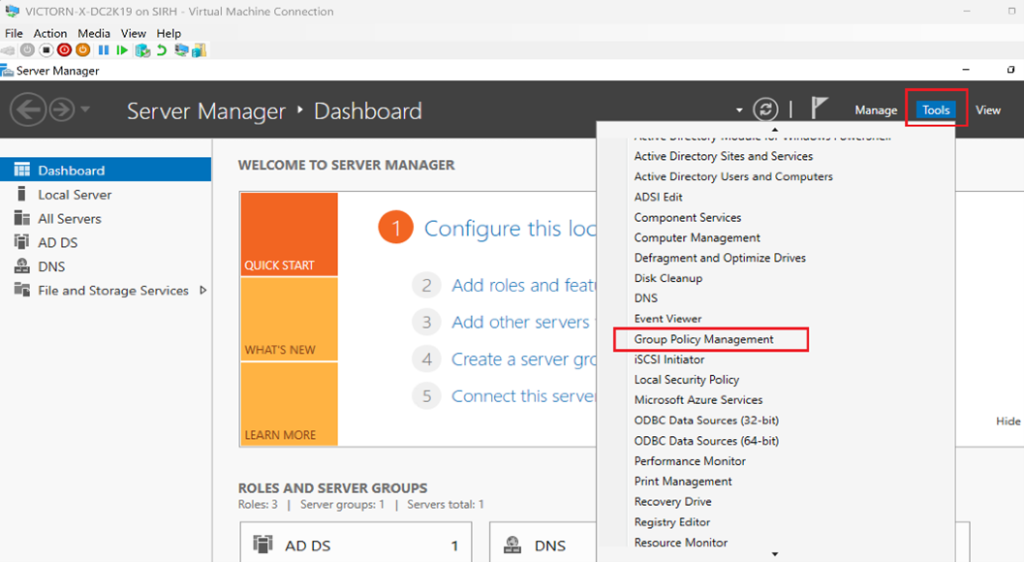
Step 1: Open Group Policy Management
- Log in to the Domain Controller
- Open Group Policy Management
- Identify the OU containing target computers
Step 2: Create and Link a New GPO
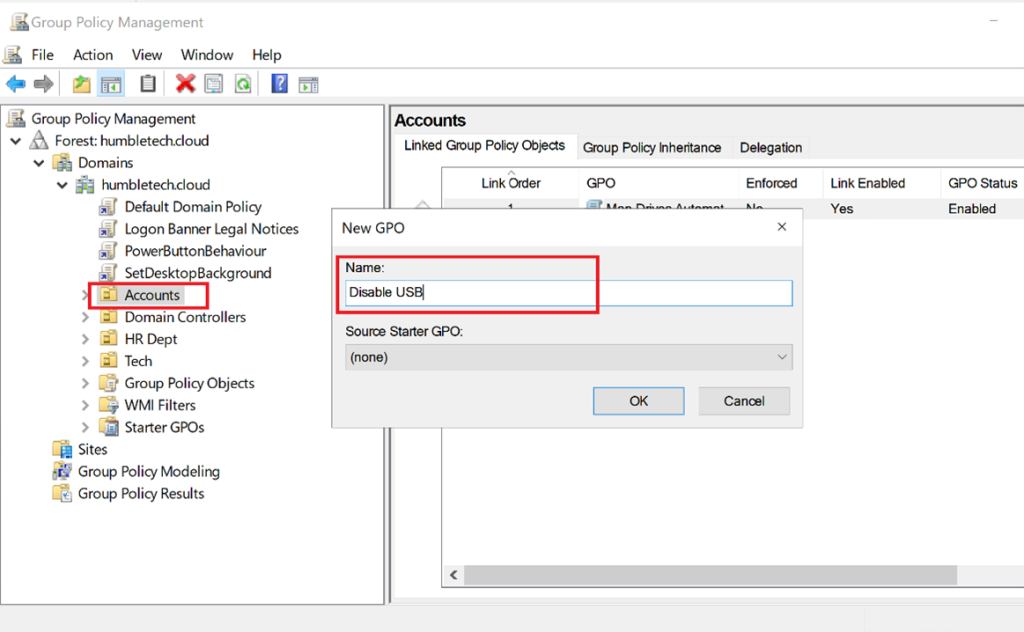
- I create a new Group Policy Object (e.g., Disable USB & Removable Media)
- Link the GPO to the appropriate computer-based OU
💡 These settings apply under Computer Configuration, so the GPO must target computer objects, not users.
Link the GPO to a pilot workstation OU first. Don't link an untested blanket-deny policy at the domain root, where it can unexpectedly affect servers, domain controllers, recovery stations, and administrative systems.
For group-based rollout, keep Authenticated Users with read permission on the GPO and grant Apply Group Policy only to a computer security group such as GG-USB-Storage-Deny-Computers. Approved exception computers can remain outside that group. I avoid relying on a broad Deny Apply Group Policy permission for exceptions because deny entries take precedence and are easy to troubleshoot incorrectly. When exceptions must be based on individual device identity rather than computer membership, use a granular device-control technology instead of stacking contradictory GPOs.
Step 3: Edit the Group Policy Object
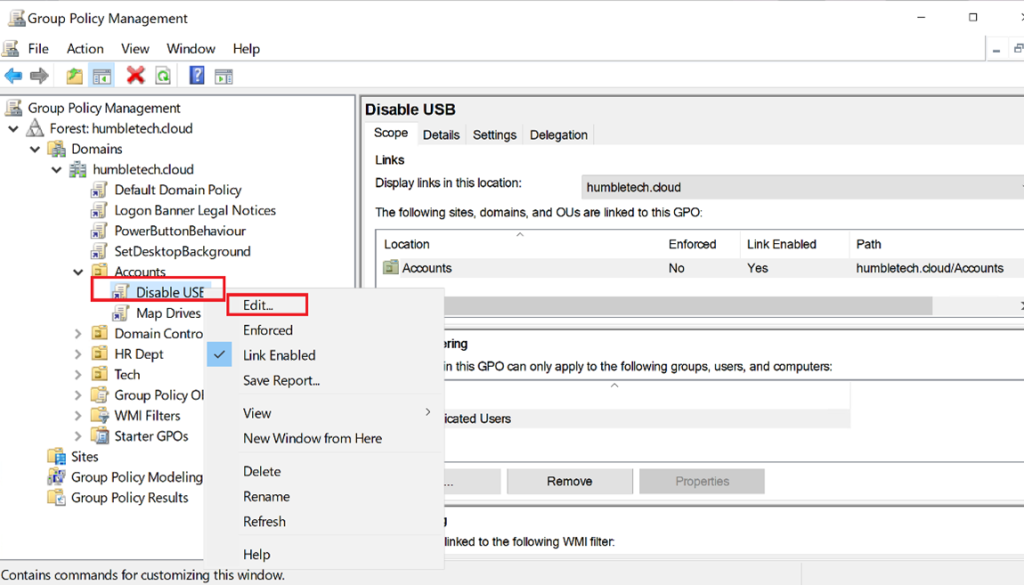
Navigate to:
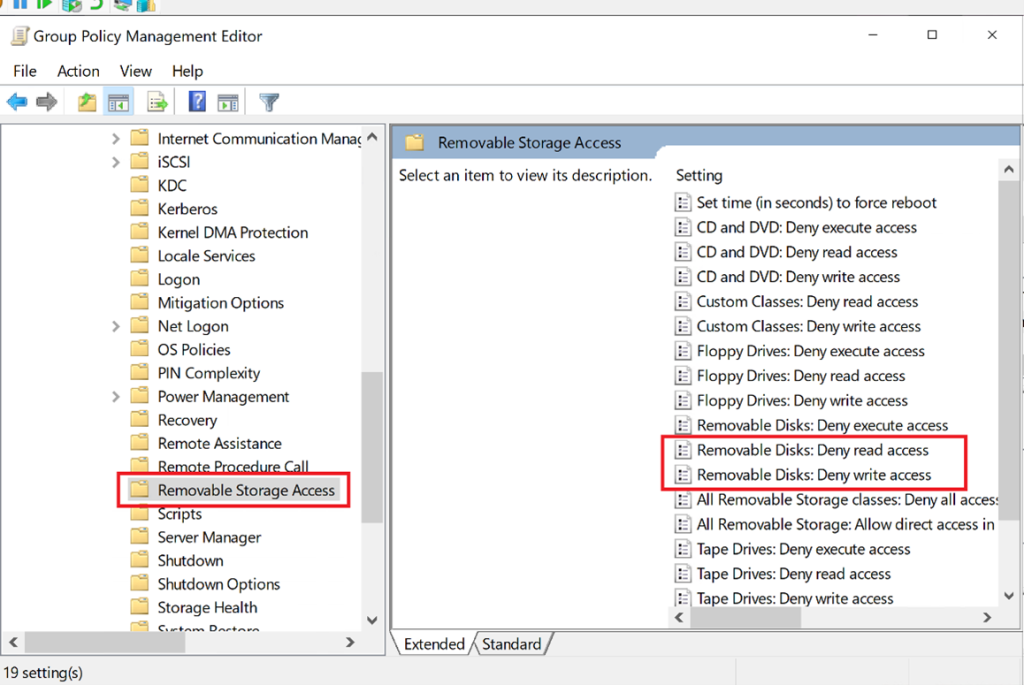
Computer Configuration → Administrative Templates → System → Removable Storage Access
Step 4: Configure Removable Storage Policies
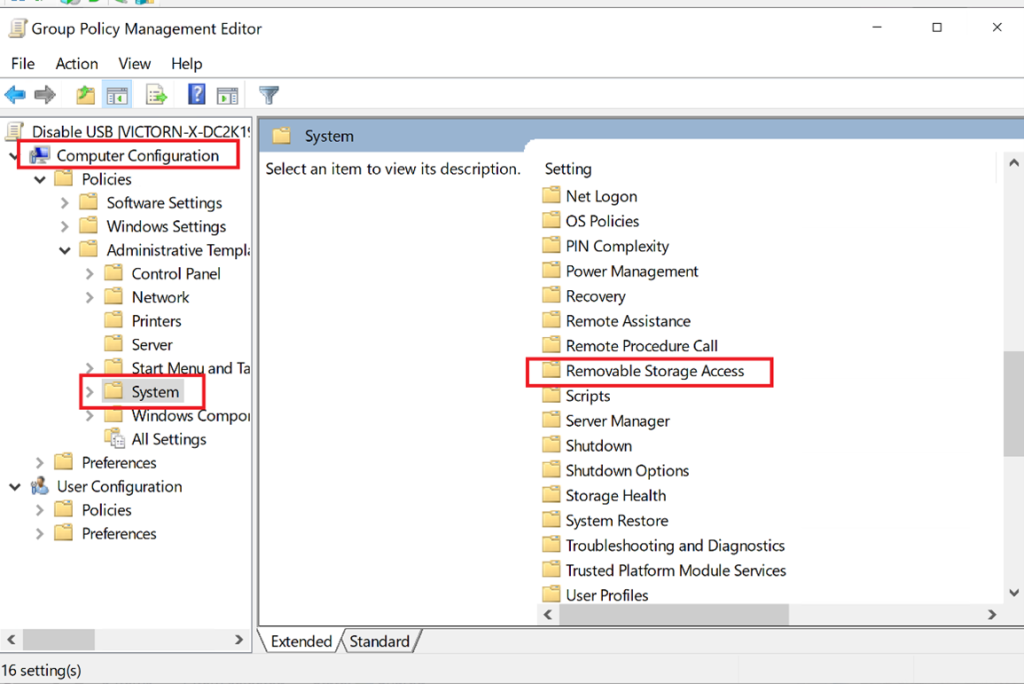
Navigate to Computer Configuration → Administrative Templates → System → Removable Storage Access
Enable/Disable the options shown on the right side as per the company requirements.
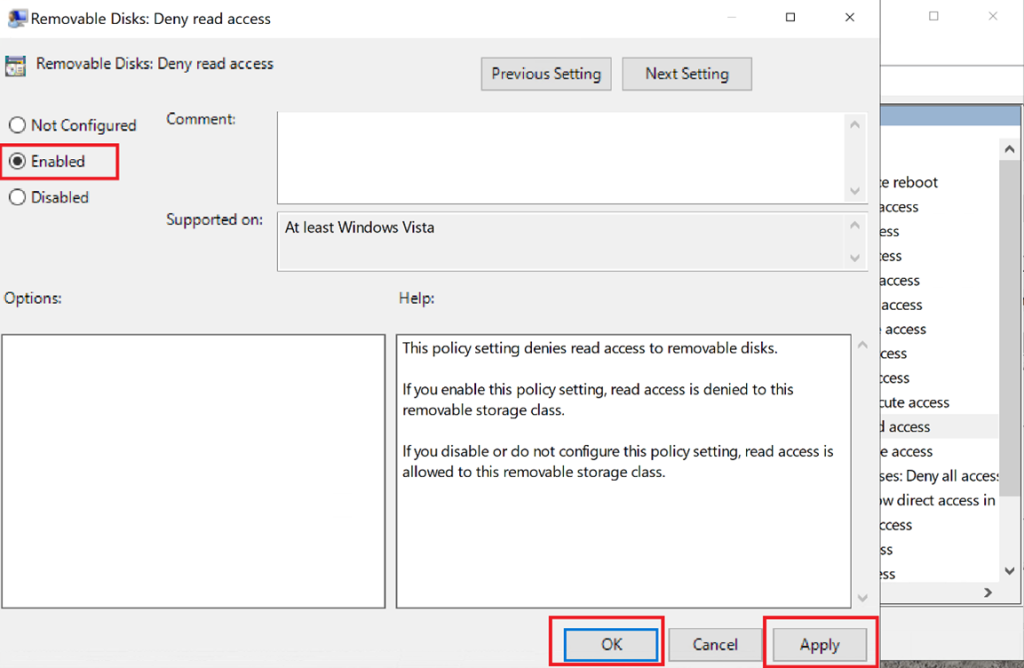
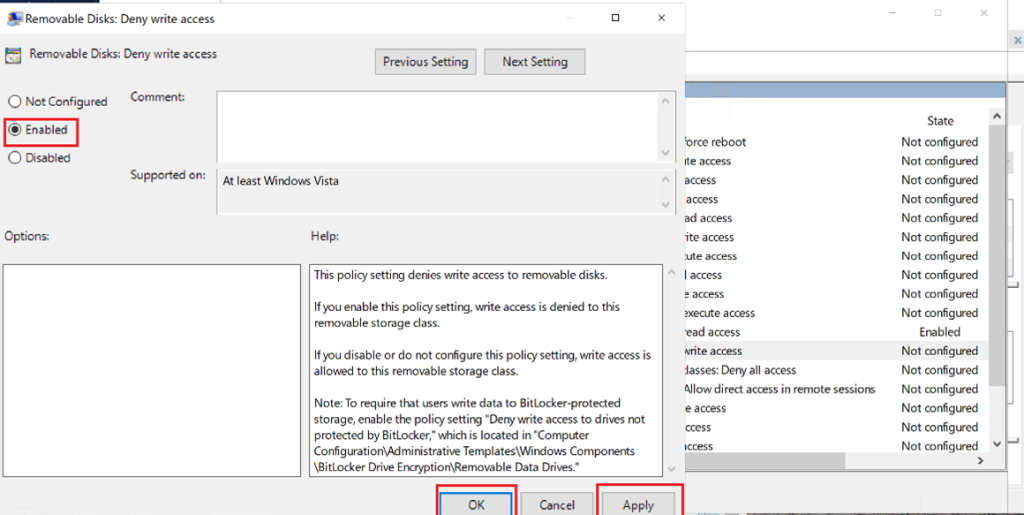
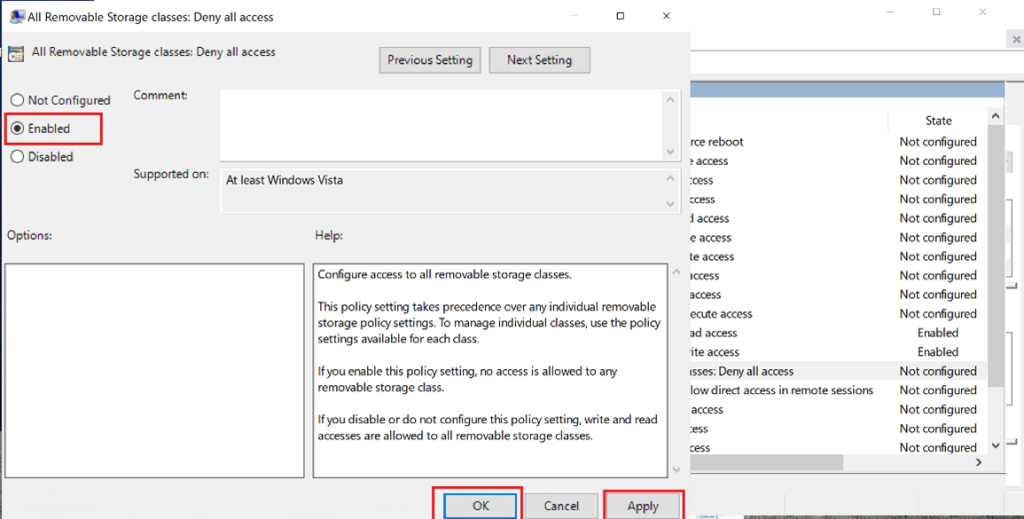
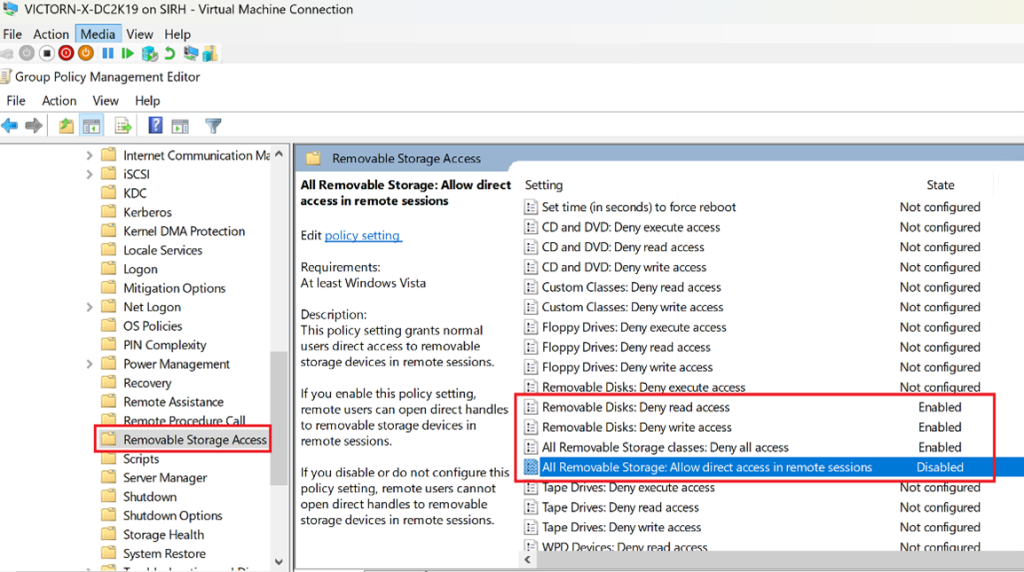
Enabled Settings (Full Removable Media Restriction)
Removable Disks: Deny read access - Enabled
- Prevents users from opening or viewing files on USB storage
- Blocks access even if the device is physically connected
Removable Disks: Deny write access - Enabled
- Prevents copying or saving files to USB drives
- Reduces data leakage and unauthorized file transfers
All Removable Storage Classes: Deny all access - Enabled
- Blocks all removable storage types, including:
- USB flash drives
- External hard drives
- CDs/DVDs
- Tape drives
- Smartphones and portable devices (WPD)
This setting overrides individual device permissions and enforces a blanket restriction.
Because this blanket setting takes precedence over the individual removable-storage class settings, enabling all three deny settings is usually redundant. Configure the minimum policy that expresses the requirement, document which setting is authoritative, and test every supported device class.
Remote Sessions Require Separate Policy Review
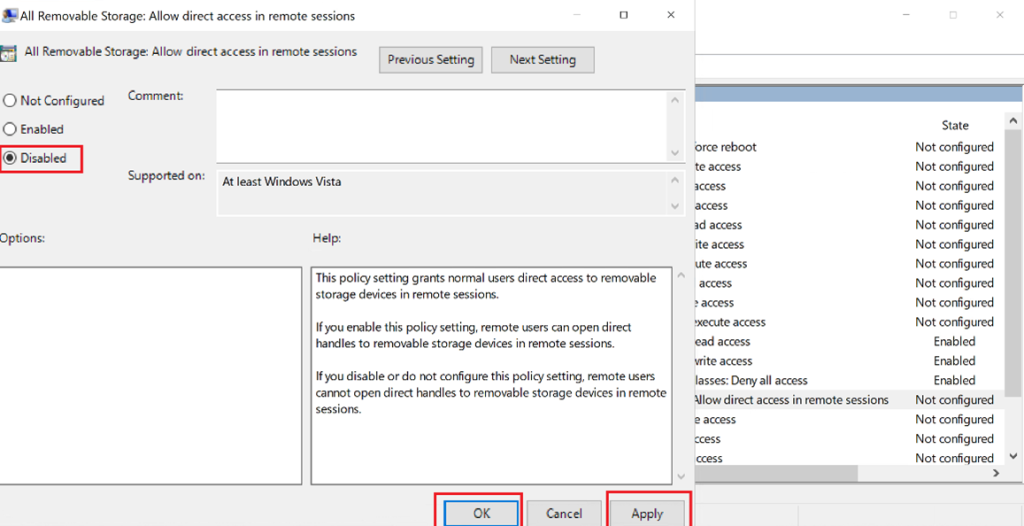
All Removable Storage: Allow direct access in remote sessions - Disabled controls direct removable-storage access within a remote session for this policy area, but it isn't a complete RDP redirection policy.
Also review the Remote Desktop Services policies under:
Computer Configuration → Administrative Templates → Windows Components → Remote Desktop Services → Remote Desktop Session Host → Device and Resource Redirection
Relevant controls include Do not allow drive redirection and Do not allow supported Plug and Play device redirection. Drive, clipboard, PnP/USB, smart-card, printer, and other redirections are distinct channels. I test the actual RDP client and host configuration instead of assuming one removable-storage setting blocks them all.
Not Configured Settings (Left at Default)
The following remain Not Configured:
- CD/DVD (deny read/write/execute)
- Floppy drives
- Tape drives
- Custom device classes
- WPD devices (phones, tablets)
Because “Deny all access to all removable storage classes” is enabled, the individual removable-storage class policies are generally superseded. Granular configuration is only required if exceptions are needed later.
If production needs approved-device exceptions, a blanket GPO may be too coarse. Microsoft Defender for Endpoint Device Control supports more granular device groups, allow/deny rules, and auditing. That introduces licensing and operational requirements, so choose it only when the exception model justifies the additional complexity.
Step 5: Apply and Enforce the Policy
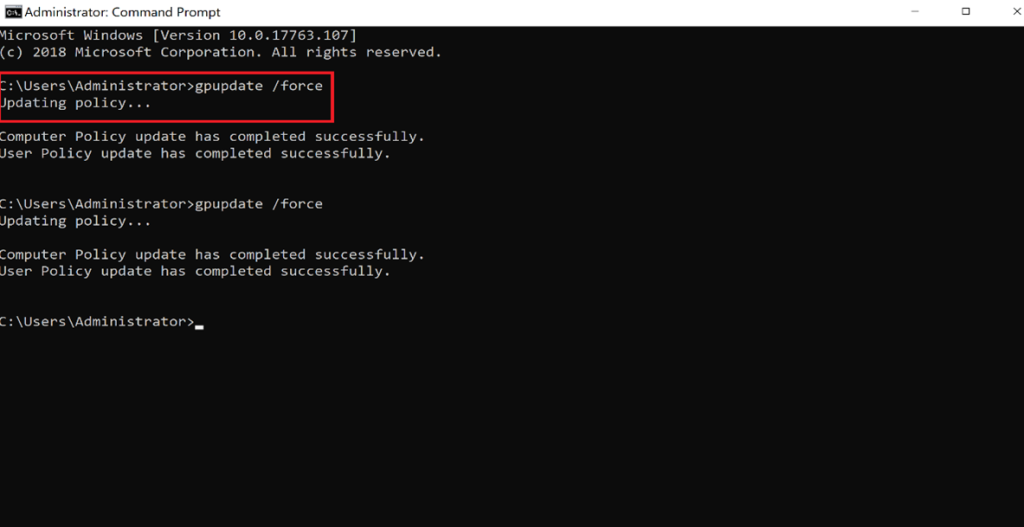
On a target pilot client, run:
gpupdate /force
gpresult /h "$env:TEMP\removable-storage-policy.html"
After that, I:
- I reboot if required
- I test USB access using a standard user account
- I confirm removable media is blocked locally and via RDP
Validation Matrix
I test with a standard user and record the result for:
- USB mass-storage read, write, and execute operations.
- External HDD/SSD media.
- CD/DVD or other removable classes if the organization uses them.
- A phone or Windows Portable Device, which might not behave like a USB disk.
- Local console access and an RDP session with drive/PnP redirection enabled and disabled.
- An approved exception device or support workstation, if exceptions exist.
- Policy removal or rollback, including whether a restart is required.
I use gpresult or Resultant Set of Policy to confirm the winning GPO. A failed USB test doesn't prove which policy caused the result; device drivers, endpoint security, local policy, Intune, and Defender Device Control can also affect access.
Rollout and Operations
- Deploy in audit or pilot mode where the selected technology supports it.
- Identify business-critical removable-media workflows and assign accountable owners.
- Communicate the user impact and approved data-transfer alternatives.
- Expand OU scope gradually while monitoring support tickets and security telemetry.
- I review exceptions regularly and remove expired access.
- I keep a tested break-glass procedure for recovery and incident response.
Blocking storage reduces one path for malware and data loss; it doesn't replace endpoint protection, least privilege, data-loss prevention, email/web controls, encryption, monitoring, or user training.
Lab Outcome
After completing this lab:
- USB and removable storage access is fully restricted
- USB passthrough is blocked in Remote Desktop sessions
- Policy enforcement is centralized and consistent
- Endpoint security posture is significantly improved
This configuration reflects real enterprise security controls used in regulated and hybrid environments.
Why This Matters (Real-World Context)
Removable media remains a common attack vector for:
- Data exfiltration
- Malware introduction
- Policy and compliance violations
Microsoft provides native Group Policy settings to control removable storage access, making this approach fully supported, auditable, and enterprise-ready.
The settings are Microsoft-supported, but the deployment becomes enterprise-ready only after scoping, testing, exception management, monitoring, and rollback are defined. I use the domain-join lab for the client prerequisite and the Group Policy workstation guide for policy-result troubleshooting.