A server started throwing disk-full alerts.
df -h showed the filesystem at 95%:
Filesystem      Size  Used Avail Use% Mounted on
/dev/vda1        80G   72G  4.1G  95% /
Then I I du walked the visible directory tree, and its totals came nowhere close to 72 GB. Large files were deleted. The alert did not move.
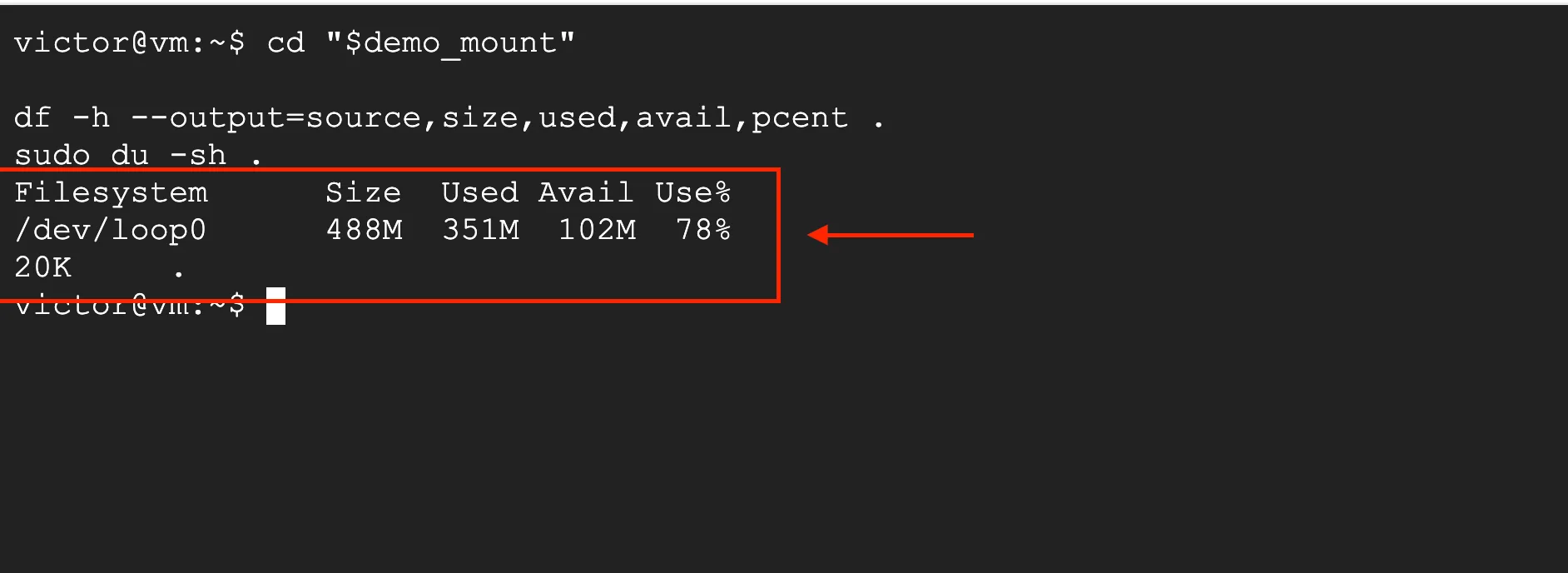
A controlled ext4 reproduction of the contradiction: df sees 351 MiB of allocated blocks while du can reach only 20 KiB through the directory tree.
That looks like one tool must be wrong. Neither is.
df reports usage for the filesystem. du adds up storage associated with the named files and directories it can walk. Those are normally two views of the same data. They stop agreeing when a process still has a file open after its last directory entry has been removed.
The file has no usable pathname, so du cannot find it in the directory tree. Its blocks are still allocated, so df still counts them. If the process keeps writing through the open file descriptor, the invisible file can keep growing.
The command that exposes it is:
sudo lsof +L1If disk usage stays high after deleting files, run that before deleting anything else.
For the broader storage model behind df, du, mount points, and filesystems, see Linux Storage & LVM. Linux Process Management & systemd covers the process and signal side of the diagnosis.
Why Deleting an Open File Does Not Free Its Blocks
On Linux, a filename is a directory entry that links a name to an inode. A process does not keep writing by repeatedly resolving that name. It opens the file and receives a file descriptor that refers to an open file description in the kernel.
The Linux unlink(2) manual defines the behavior precisely:
- removing the last link deletes the name;
- if no process has the file open, its space becomes available for reuse;
- if a process still has it open, the file remains until the last file descriptor referring to it is closed.
That distinction is the whole incident.
Before deletion

/var/log/myapp/app.log ──> inode 393421 ──> allocated blocks
                              ▲
                              │
                       myapp file descriptor 7

After deletion

no directory entry           inode 393421 ──> allocated blocks
                              ▲
                              │
myapp file descriptor 7The pathname is gone. The process-to-inode reference is not.
This behavior is useful in normal operation. A process can continue using an already-open object without another process being able to open it by name. It becomes an operational problem when the object is a large log, database temporary file, or other growing file on a nearly full filesystem.
A Controlled Reproduction
The screenshots in this guide come from an isolated 512 MiB ext4 filesystem created inside a regular disk-image file and mounted through /dev/loop0. No production filesystem or log was used.
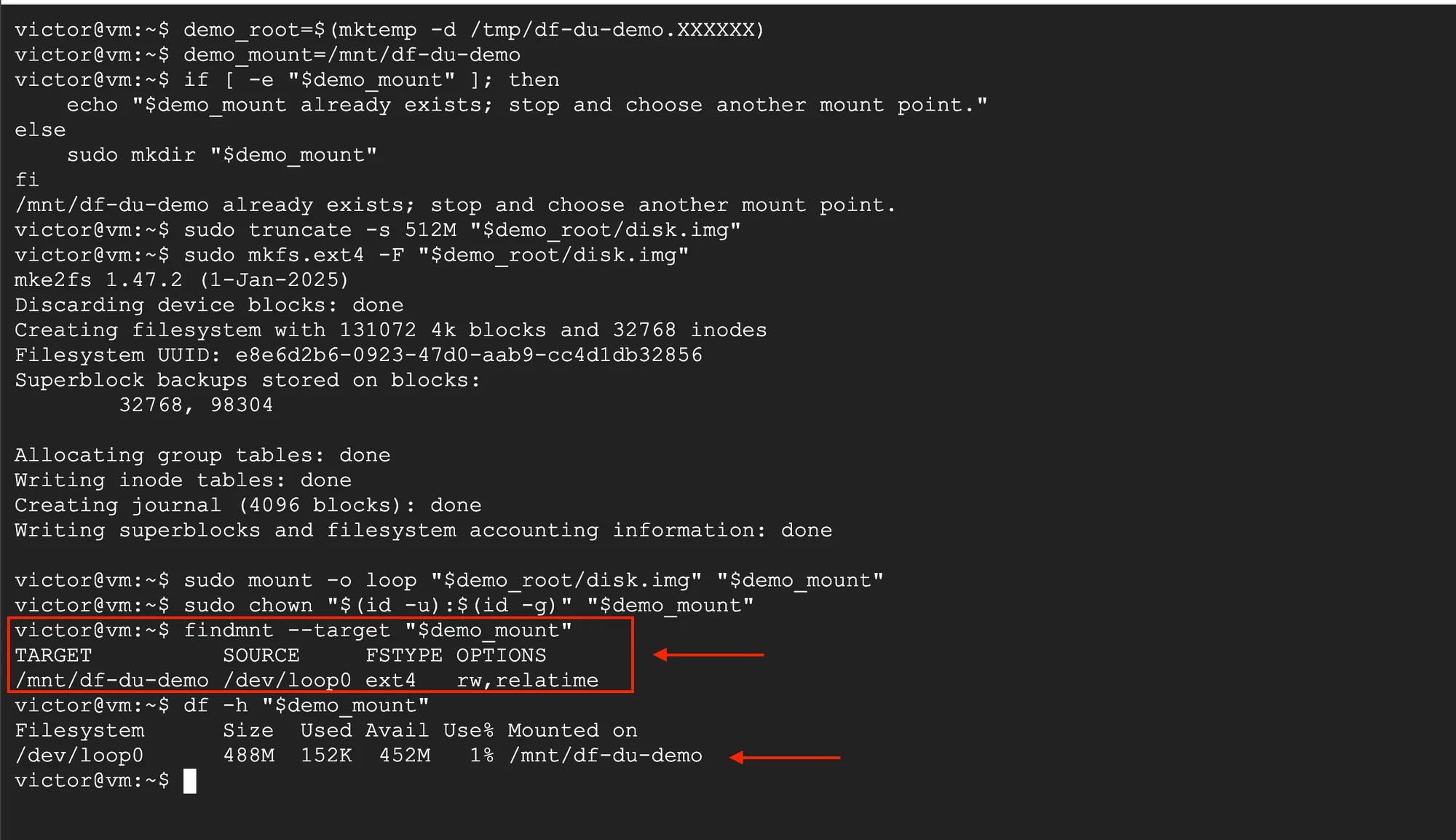
The lab starts at 1% usage. A Python process then writes 350 MiB to myapp.log, unlinks the pathname, and keeps the descriptor open.
Using a deliberately small filesystem makes the accounting change visible without generating a large file on the host. The mechanism is the same one involved when a real service retains an unlinked log descriptor.
Why df and du Diverge
The GNU Coreutils documentation describes df as reporting used and available space on filesystems. With a path argument, df reports the filesystem containing that path:
df -h /var/log/myappdu estimates space used by the files and directories named in its arguments. It recursively walks that visible tree:
sudo du --one-file-system --human-readable --max-depth=1 / \
  2>/dev/null | sort --human-numeric-sort
Replace / with the mount point reported for the affected filesystem. --one-file-system prevents du from crossing into other mounted filesystems, and running it with sufficient permissions avoids silently building an incomplete picture from unreadable directories.
An unlinked file is absent from that walk. The filesystem still has its blocks allocated, so df includes them.
| Tool | What it observes | Deleted-but-open file |
|---|---|---|
df | Filesystem-level used and available space | Counted |
du | Named files reachable through the directory tree | Not reachable, so not counted |
lsof +L1 | Open files with a link count below one | Selected directly |
The difference is not caching, and it is not fixed by rerunning du. The two commands are answering different questions.
The Fast Diagnostic Path
I start by confirming the affected filesystem instead of running an unrestricted du -sh /* and mixing several mounts into one investigation:
df -h /var/log/myapp
findmnt --target /var/log/myapp
Then I I measure visible usage on that filesystem's mount point:
sudo du --one-file-system --human-readable --max-depth=1 / \
  2>/dev/null | sort --human-numeric-sort
If the visible totals are far below df's used space, list unlinked open files:
sudo lsof +L1+L adds the link-count column. Adding 1 selects files whose link count is less than one: open files that have been unlinked.
A representative Linux result looks like this:
COMMAND  PID USER   FD   TYPE DEVICE    SIZE/OFF NLINK   NODE NAME
myapp   1842 app     7w   REG  253,0  17179869184     0 393421 /var/log/myapp/app.log (deleted)
The real lab output: python3 holds descriptor 3w, the regular file is 350 MiB, NLINK is zero, and Linux marks the former pathname (deleted).
The useful fields are:
COMMANDandPID: the process holding the file open;FD: the descriptor number and access mode;7wmeans descriptor 7 is open for writing;SIZE/OFF: for a regular file in this output, the size in bytes;NLINK:0confirms that no directory entry links to the file;NODE: the inode number;NAME: on Linux, the former path normally ends with(deleted).
I do not add every SIZE/OFF value blindly. The same inode can appear more than once if several descriptors or processes have it open. I use DEVICE plus NODE to recognize duplicate references to the same underlying file.
You will also see this common alternative:
sudo lsof | grep deletedIt can be useful as a quick text search, but lsof +L1 expresses the actual condition: an open file with a link count of zero. It also exposes NLINK, which makes the diagnosis easier to verify.
Confirm the Process Before Touching It
Treat the lsof row as evidence, not as permission to kill a process immediately.
I inspect the process:
ps -p 1842 -o pid,ppid,user,etime,cmd
sudo readlink /proc/1842/fd/7
Linux exposes one symbolic link per open descriptor under /proc/<pid>/fd/. In this example, descriptor 7 should resolve to the deleted log path. Access is permission-controlled, which is why the investigation may require elevated privileges.
Also answer these questions:
- Is this the service that normally writes the affected log?
- Is the file size large enough to explain the
dfanddugap? - Is
SIZE/OFFincreasing between twolsof +L1checks? - Does the service document a supported log-reopen operation?
- What user impact would a restart cause if reopening is unavailable?
The PID, file descriptor, inode, size, and process command should tell one consistent story before you change production state.
How Log Rotation Creates This Failure Mode
A common sequence begins with move-and-create rotation:
- The application opens
/var/log/myapp/app.log. - logrotate moves that pathname to a rotated name such as
app.log.1. - logrotate creates a new
/var/log/myapp/app.log. - The application never closes and reopens its original descriptor.
- The application continues writing to the inode now reachable as
app.log.1, while the newapp.logstays small. - A later rotation, retention cleanup, or manual deletion removes the old file's last name.
- The application still holds the descriptor, so the inode now has link count zero and keeps consuming blocks.
The rename alone does not immediately make the file invisible. It changes the name attached to the inode. The deleted-but-open state starts when the final remaining name is removed while the descriptor is still open.
This is why an incident can appear days after an apparently successful rotation. The application was already writing to the wrong inode, but the file remained visible under a rotated name until a later cleanup removed that name.
logrotate's delaycompress option can postpone compression of the previous log until the next rotation cycle. Its manual describes this as useful when a program may continue writing to the previous file for some time. It is not a permanent fix for a process that never reopens its log.
Reclaim the Space Safely
The space returns when the last descriptor referring to the unlinked file closes.
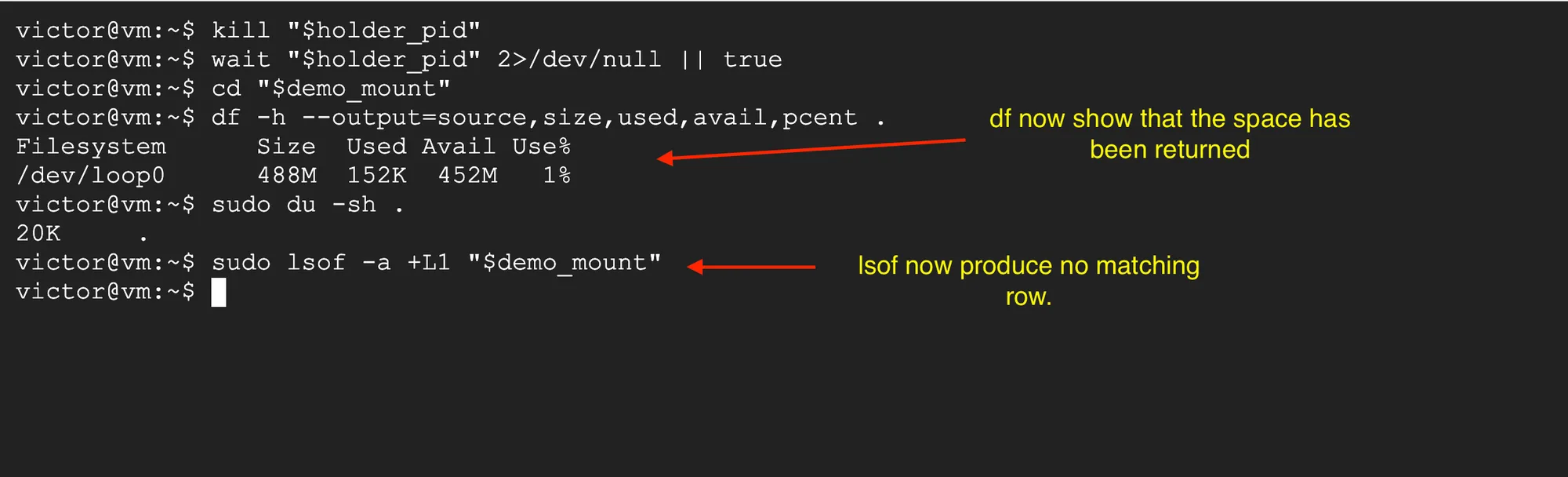
After the controlled holder process exits, the kernel closes its descriptor, df falls from 78% to 1%, and lsof +L1 returns no matching file.
There are three operationally reasonable paths, in preferred order.
Ask the application to reopen its logs
Many daemons document a signal or administrative command that closes old log descriptors and opens the current path again. If the application's official documentation says SIGHUP performs that action, the operation may look like:
kill -HUP <pid>I verify the PID, run the documented command, and then check:
sudo lsof +L1
df -h /var/log/myapp
The row should disappear and the filesystem's available space should increase.
SIGHUP is not a universal log-reopen command
Linux defines the default action for an unhandled SIGHUP as process termination. Some daemons deliberately catch it to reload configuration or reopen logs; others do not. I never send SIGHUP based only on convention. I check the exact application's documentation and service configuration first.
Restart the service in a controlled window
Stopping the process closes its descriptors, so a controlled restart also releases the unlinked file. I use the service manager and the application's normal operational procedure rather than killing a PID arbitrarily:
sudo systemctl restart myapp.serviceThe unit name is an example. Confirm the real unit, redundancy, health checks, and expected user impact first. On a replicated service, restart one instance at a time and verify health before continuing.
Use copytruncate when the process cannot reopen
logrotate documents copytruncate for programs that cannot be told to close their log file. It copies the current content to the rotated file and then truncates the original file in place, so the application's existing descriptor continues to refer to the active pathname:
/var/log/myapp/*.log {
    daily
    rotate 7
    compress
    missingok
    notifempty
    copytruncate
}
I do not add create to this example. The logrotate manual says create has no effect with copytruncate because the original file stays in place.
copytruncate has a real tradeoff: copying and truncating are separate operations. The official manual warns that log data written in the small window between them may be lost. Prefer an application-supported reopen mechanism when one exists. I use copytruncate knowingly when it does not.
A Better logrotate Configuration
For a daemon that explicitly documents SIGHUP as "reopen log files," keep move-and-create rotation and trigger that supported behavior after rotation:
/var/log/myapp/*.log {
    daily
    rotate 7
    compress
    missingok
    notifempty
    create 0640 myapp myapp
    sharedscripts
    postrotate
        /bin/kill -HUP "$(cat /run/myapp.pid)" 2>/dev/null || true
    endscript
}
This is a pattern, not a drop-in configuration. The service user, group, PID-file path, signal, and wildcard must match the real application. Some services expose a dedicated reopen command and should use that instead. A stale or incorrectly managed PID file is also unsafe, so follow the service vendor's documented integration.
The important sequence is:
rotate old pathname
        ↓
create new active pathname
        ↓
tell the application to close the old descriptor
        ↓
application opens the new pathname
I test the configuration before relying on it:
sudo logrotate --debug /etc/logrotate.d/myapp
sudo logrotate --force /etc/logrotate.d/myapp
sudo lsof +L1
--debug makes no changes; it is for inspecting logrotate's decisions. A forced rotation does change files, so run it only in an approved test or maintenance context.
What Not to Do During the Incident
Do not keep deleting visible files
Deleting unrelated files may buy temporary headroom, but it does not close the descriptor holding the hidden file. If the process is still writing, the filesystem can fill again.
Do not send an unverified signal
SIGHUP is application-defined once caught, but its default Linux action is termination. A command copied from another daemon's runbook can turn a storage incident into an outage.
Do not kill the process before identifying it
The COMMAND column can be truncated, and PIDs are reused over time. Confirm the full command and the service relationship with ps and the service manager.
Do not treat copytruncate as lossless
It avoids the rename/reopen requirement by keeping the same inode, but its copy-then-truncate window can lose log lines.
Do not assume every df/du gap has this cause
If lsof +L1 is empty, verify that both commands inspected the same filesystem and that du completed without permission errors. GNU Coreutils also notes that copy-on-write, filesystem compression, network filesystems, and storage features not represented as ordinary named files can make du an imperfect measure of underlying device consumption.
If blocks are available but file creation still fails, check inode usage separately:
df -iBlock exhaustion and inode exhaustion are different incidents.
The Incident Checklist
When a Linux disk alert does not add up:
- I run
df -h <affected-path>to identify the full filesystem. - I use
findmnt --target <affected-path>to confirm its mount point. - I run
sudo du --one-file-system --human-readable --max-depth=1 <mountpoint>. - If visible usage is too small, run
sudo lsof +L1. - Match
COMMAND,PID,FD,SIZE/OFF,NLINK,DEVICE, andNODE. - I inspect
/proc/<pid>/fd/<fd>and the full process command. - I use the application's documented log-reopen operation, or plan a controlled restart.
- Re-run
lsof +L1anddf -hto prove the space was released. - Fix log rotation with a supported reopen action, or use
copytruncatewith its documented risk. - Alert on the cause as well as the symptom: repeated deleted-open files mean the rotation contract is still broken.
The core idea is simple once the two views are separated:
du can only count the file tree it can reach. df counts blocks the filesystem still considers allocated. An unlinked file held open by a process exists in the second view and not the first.
Both tools are right. The missing link is the open file descriptor.