Modern businesses rely on technology to operate, scale, and compete. Traditionally, this meant running physical data centers filled with servers, networking equipment, and storage systems. While this on-premises approach offers control, it also introduces high upfront costs, ongoing maintenance, and limited flexibility.
Cloud computing emerged as a response to these limitations. Instead of waiting for a hardware purchasing cycle, teams can provision resources through an API, measure consumption, and change capacity as demand changes. That flexibility is valuable, but it does not make every cloud workload automatically cheaper, secure, or highly available; those outcomes still depend on architecture and operations.
This guide explains cloud computing from first principles, connects theory to real-world architectures, and shows how platforms like Microsoft Azure fit into the modern cloud ecosystem.
What Is Cloud Computing?
Cloud computing is an operating model in which a shared pool of configurable computing resources, such as servers, storage, databases, networking, applications, and managed services, can be provisioned and released on demand with minimal provider interaction.
Rather than owning every physical component, organizations consume provider-operated resources as services. This can shift part of the cost from upfront capital investment toward flexible operating expenditure, while long-term commitments, licenses, private connectivity, and retained on-premises systems may still create fixed costs.
In simple terms:
Cloud computing turns infrastructure and platforms into programmable services. You request capacity through a portal, CLI, API, or infrastructure-as-code workflow while the provider operates the underlying facilities and hardware.
Large public-cloud platforms are operated by providers such as:
- Microsoft Azure
- Amazon Web Services (AWS)
- Google Cloud
- IBM Cloud
- Oracle Cloud
Linux is common across cloud virtual machines, containers, Kubernetes nodes, and CI/CD runners, although Windows and managed services are also first-class options. If you operate infrastructure rather than only consume SaaS, Linux Fundamentals provides a useful systems foundation.
The Five Characteristics That Make a Service Cloud
The formal NIST definition of cloud computing identifies five essential characteristics. These are more useful than describing cloud as simply “someone else’s computer” because they distinguish a cloud operating model from ordinary hosting:
| Characteristic | What it means in practice | Example |
|---|---|---|
| On-demand self-service | A consumer provisions capacity without waiting for a provider employee | Creating a VM or database through an API |
| Broad network access | Services are reachable through standard network mechanisms | HTTPS APIs, browser consoles, VPN, and private endpoints |
| Resource pooling | Provider capacity serves multiple customers with logical isolation | Multi-tenant compute and storage fleets |
| Rapid elasticity | Capacity can expand or contract with demand | Autoscaling application instances from 2 to 20 |
| Measured service | Usage is metered for visibility and billing | Compute time, requests, storage, or transferred data |
A rented server with a monthly invoice is not automatically “cloud” if it lacks self-service provisioning, pooled resources, elasticity, and measured consumption. Likewise, a private environment can be a cloud when it implements these characteristics even though the organization owns or exclusively uses it.
Cloud is an operating model, not a location
Moving a virtual machine from an office datacenter to a provider region changes where it runs. Adopting cloud also changes how it is requested, automated, measured, secured, and operated.
Why Cloud Computing Was Created
Traditionally, organizations ran their own on-premises datacenters. These facilities contained:
- Physical servers
- Network switches and routers
- Storage devices
- Cooling and power infrastructure
While this model works, it introduces major limitations.
The On-Premises Problem
Organizations must:
- Buy hardware upfront
- Maintain and replace equipment
- Plan capacity years in advance
- Pay for infrastructure even when it sits idle
Imagine a business that hosts a large annual event. For a short period, it needs extra computing power for registrations, payments, and analytics. With fixed on-premises capacity, the business must either purchase servers that remain underused for most of the year or accept the risk of running out of capacity during the event.
This leads to:
- High capital costs
- Wasted resources
- Limited agility
Cloud self-service and elasticity make that capacity easier to acquire and release. The trade-off is a new operational discipline: teams must set budgets, quotas, autoscaling limits, identity controls, and lifecycle automation so that convenience does not become uncontrolled cost or risk.
Cloud Deployment Models (Where the Cloud Runs)
Cloud environments are classified by how and where they are hosted.
| Model | Ownership and access | Typical reason to choose it |
|---|---|---|
| Public cloud | A provider operates pooled infrastructure for many isolated customers | Fast provisioning, broad managed-service catalog, and global reach |
| Private cloud | Cloud capabilities are dedicated to one organization | Specialized control, locality, or regulatory requirements |
| Hybrid cloud | Private/on-premises and public-cloud environments are integrated | Gradual migration, data locality, or systems that cannot move together |
| Community cloud | Infrastructure is shared by organizations with common requirements | Sector-specific governance or mission requirements |
Private Cloud
A private cloud is used exclusively by a single organization. It may be hosted in an internal data center or managed by a third party.
Key characteristics:
- Greater control over the infrastructure and platform
- The organization or its service partner operates the cloud platform
- Capacity and operational responsibility remain largely with the organization
- Often used when dedicated infrastructure or locality is a hard requirement
Public Cloud
A public cloud is owned and operated by a cloud service provider such as Microsoft Azure, AWS, or Google Cloud.
Key characteristics:
- Pooled infrastructure with tenant isolation
- Consumption and commitment-based pricing options
- Rapid provisioning and global scale
Public cloud is common across startups and enterprises, often alongside SaaS and existing on-premises systems.
Hybrid Cloud
A hybrid cloud combines private and public environments.
Organizations often:
- I keep sensitive systems on premises
- I run scalable workloads in the public cloud
- Connect identity, networking, security monitoring, and operations across both environments
Hybrid does not mean every workload is split across both locations. A practical hybrid estate often contains some systems that remain entirely on premises and others that run entirely in a public cloud, connected by shared identity, network, data, or management processes.
Community Cloud and Multicloud
Community cloud is one of NIST's four deployment models. Multicloud is different: it is an organizational strategy that uses services from more than one provider. A company can use Azure for identity and application hosting while using AWS for a separate analytics workload, but that does not automatically make either workload portable or resilient across providers.
Multicloud can reduce dependence on one vendor or let teams choose specialized services, but it also multiplies identity models, network designs, policy engines, observability systems, skills, and support boundaries. Choose it for a concrete business or technical requirement, not as a default badge of maturity.
Cloud Service Models (What the Cloud Provides)
Cloud services are categorized by how much responsibility is handled by the provider versus the customer.
| Model | Provider operates | Customer operates | Azure example |
|---|---|---|---|
| IaaS | Facilities, physical network, hosts, hypervisor | OS, runtime, applications, data, access, and network configuration | Azure Virtual Machines |
| PaaS | IaaS layers plus OS, runtime, and platform services | Application code, data, identities, and service configuration | Azure App Service |
| SaaS | The complete application and underlying platform | Users, access policies, data governance, and tenant configuration | Microsoft 365 |
These models describe a responsibility boundary, not a quality ranking. IaaS is appropriate when the workload genuinely needs OS-level control; PaaS removes undifferentiated platform work when a managed runtime fits; SaaS is appropriate when the business needs the finished capability rather than a platform to build it. See Cloud Service Models for a focused reference and interview questions.
Infrastructure as a Service (IaaS)
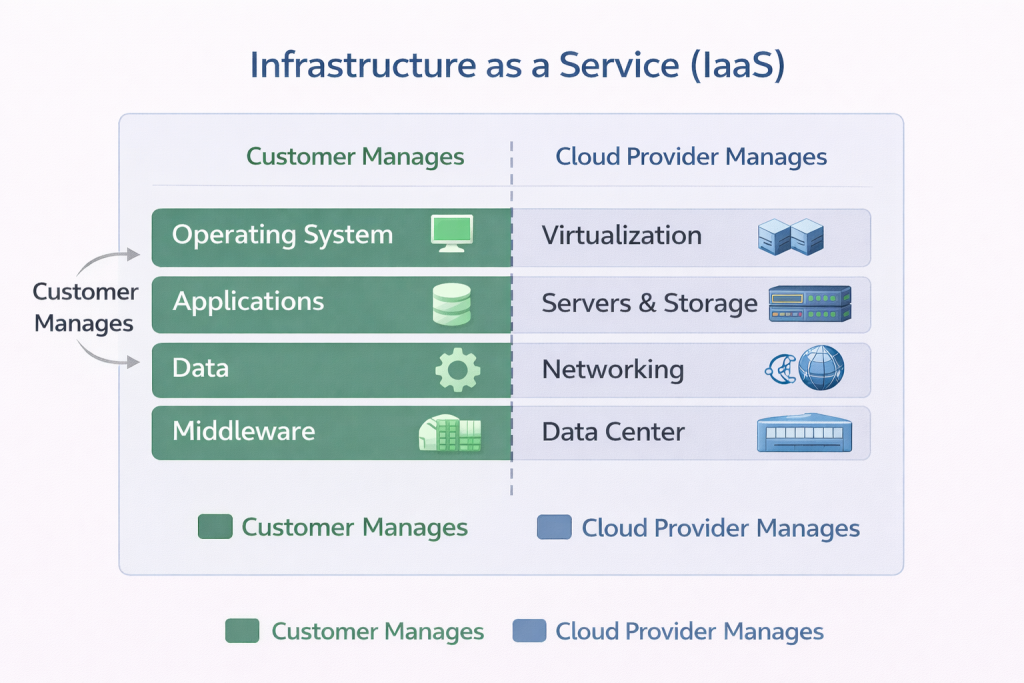
IaaS provides virtualized computing resources such as:
- Virtual machines
- Storage
- Networking
The customer manages:
- Operating systems
- Applications
- Data
The provider manages the physical infrastructure.
Example: Azure Virtual Machines. The provider maintains the datacenter and hypervisor, but the customer still patches the guest OS, configures network controls, manages identities, protects data, and operates the application.
Platform as a Service (PaaS)
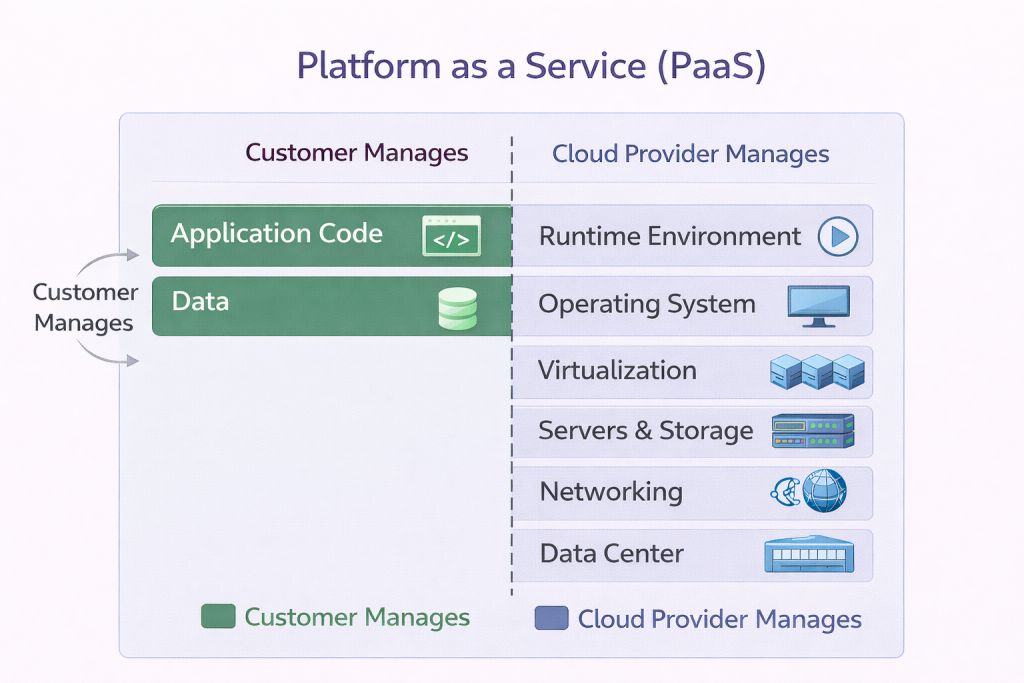
PaaS removes the need to manage operating systems and infrastructure.
The customer focuses on:
- Application code
- Data
The provider manages:
- OS
- Runtime
- Platform scaling mechanisms
Example: Azure App Service. Microsoft operates the hosting platform, but the customer still owns application vulnerabilities, secrets, identity assignments, data, network exposure, scaling settings, and deployment safety.
Software as a Service (SaaS)
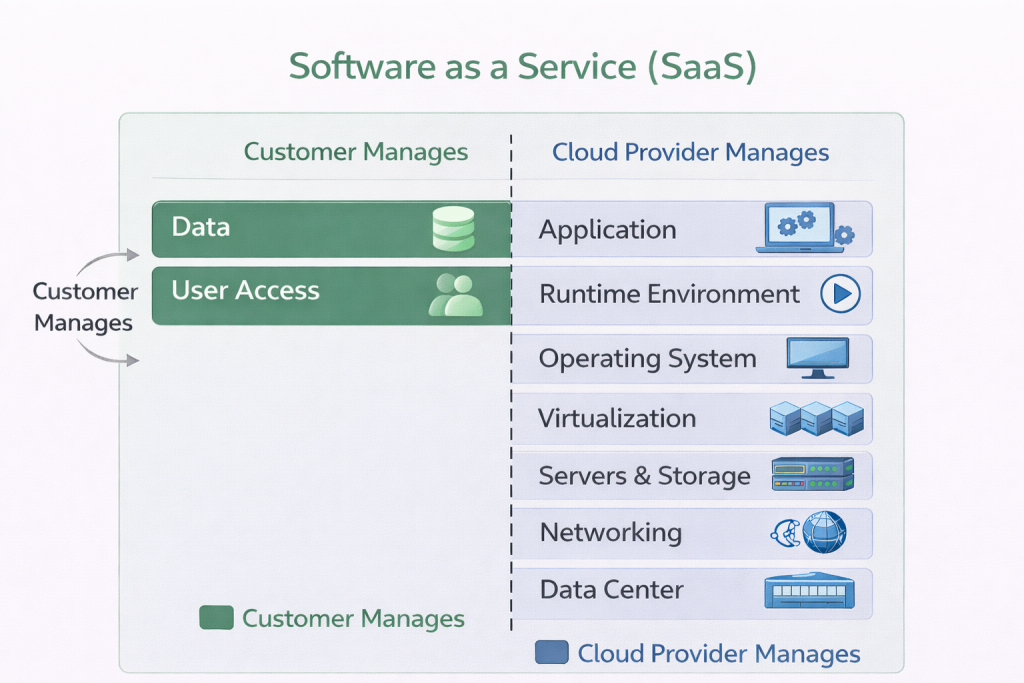
SaaS delivers complete applications over the internet.
The customer manages:
- Data
- User access
The provider operates the application and underlying platform, while the customer configures and governs its tenant.
Examples: Microsoft 365 and Salesforce. SaaS reduces infrastructure and application operations, but the customer still decides who has access, how data is classified and retained, which integrations are trusted, and how tenant security settings are configured.
Containers, serverless functions, and managed Kubernetes do not create a fourth universal service model. They occupy different points inside IaaS and PaaS boundaries. For example, a container running on a self-managed VM leaves far more responsibility with the customer than the same image running on a fully managed container platform.
The Shared Responsibility Model (Critical for Security)
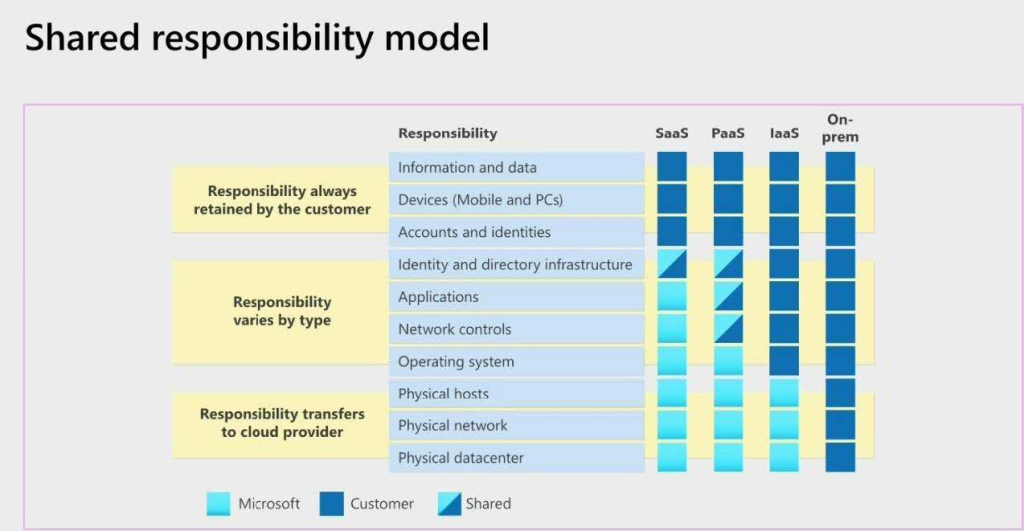
A common misconception is that “the cloud is fully secure by default.” In reality, security is shared.
According to the shared responsibility model:
- The cloud provider secures the cloud
- The customer secures what’s in the cloud
The dividing line moves with the service model, but some customer responsibilities remain in every model. Microsoft's shared responsibility guidance identifies customer data, identities, accounts, access management, configurations, and client endpoints as customer concerns even when much of the stack is managed.
For example:
- IaaS: The provider protects facilities, physical hardware, and the hypervisor. You patch the guest OS, restrict network traffic, secure applications, manage identities, encrypt data appropriately, and monitor the workload.
- PaaS: The provider also operates the OS and runtime. You still secure your code, dependencies, data, secrets, identity permissions, tenant configuration, and public/private access settings.
- SaaS: The provider operates the application. You still manage users, privileged roles, MFA and conditional access, data sharing and retention, endpoint security, integrations, and tenant configuration.
Managed does not mean configured for your requirements
A provider can operate a highly secure service while a customer exposes data through an overly broad role, public endpoint, weak tenant policy, or leaked credential. Always read the responsibility and security documentation for the specific service and SKU you deploy.
I use the Cloud IAM Fundamentals and Cloud Networking Fundamentals references to go deeper on the two customer-controlled layers most often involved in exposure: identity and network access.
Core Cloud Principles: Cost, Scaling, and Availability
Cost Model: CapEx vs OpEx
Cloud can replace some upfront capital expenditure with operating expenditure, but the practical choice is more nuanced than “cloud is OpEx.” Providers offer several billing models:
- Consumption: Pay for metered usage and retain maximum flexibility.
- Commitment: Reserve or commit to predictable usage for a discounted rate.
- Spot/preemptible capacity: Accept interruption in exchange for a lower price.
- Licensed or fixed tiers: Pay for a defined service tier whether or not every unit is consumed.
Cloud is not automatically cheaper. Idle resources, oversized SKUs, retained snapshots, premium managed services, logging volume, and cross-region or internet data transfer can produce substantial waste. A sound cost model includes direct provider charges plus engineering, licensing, support, migration, reliability, and operational costs. The Cloud Cost Optimization reference covers budgets, rightsizing, commitments, and cost allocation.
Scalability and Elasticity
- Vertical scaling: Increase resources (e.g., more RAM)
- Horizontal scaling: Add more instances
Scalability is the system's ability to handle growth; elasticity is the ability to add and remove capacity as demand changes. Autoscaling is one mechanism for elasticity, but it needs tested signals, minimum and maximum limits, cooldown behavior, and an application that can safely run across multiple instances. Scaling an inefficient design can increase the bill faster than it improves performance.
High Availability
Cloud providers supply regions, availability zones, load balancers, replication services, and backup capabilities. You must still choose and configure them. A single VM in one zone is a single point of failure even though it runs on a global cloud platform.
High availability and disaster recovery solve different scopes:
- High availability keeps a workload serving during expected component or zone failures, usually through redundancy and automated failover.
- Disaster recovery restores service after a larger failure, such as regional loss, severe data corruption, or an operational incident.
- Backup preserves recoverable copies of data; it is not by itself a running failover environment.
Define recovery time objectives (RTO) and recovery point objectives (RPO) before buying redundancy. Multi-zone and multi-region designs improve failure isolation, but they also increase cost and operational complexity.
Regions, Zones, and the Cloud Resource Hierarchy
The physical location of a resource affects latency, data residency, service availability, cost, and failure isolation. Provider terminology differs slightly, but the common hierarchy is:
- Geography or global scope: A broad data-residency or globally distributed boundary.
- Region: A provider location containing one or more datacenters and regional service endpoints.
- Availability zone: An isolated group of datacenters within a region, designed with independent power, cooling, and networking.
- Resource: A VM, database, storage service, network, function, or other deployed service whose scope may be global, regional, or zonal.
Microsoft's Azure regions guidance and Google's resource scope documentation both emphasize that resources have different scopes. Spreading components across zones can protect against many local infrastructure failures; using multiple regions provides greater failure independence but requires a deliberate data replication, routing, failover, and testing strategy.
When selecting a region, evaluate:
- User and dependency latency
- Data residency and regulatory boundaries
- Required service and SKU availability
- Availability-zone support
- Quotas and capacity
- Network connectivity and data-transfer cost
- Disaster-recovery requirements
For provider-specific foundations, use Azure Fundamentals or AWS Fundamentals.
How Microsoft Azure Fits into the Cloud Ecosystem
Microsoft Azure is a public cloud platform that provides:
- IaaS capabilities such as Virtual Machines, managed disks, and virtual networks
- PaaS capabilities such as App Service, Functions, Azure SQL Database, and Storage
- Managed identity, governance, security, observability, data, and AI services around those workloads
Azure integrates tightly with:
- Windows Server
- Microsoft Entra ID
- Enterprise governance and compliance tools
This makes it particularly attractive to organizations with existing Microsoft environments.
Microsoft 365 and Dynamics 365 are Microsoft SaaS products, but they are not simply Azure services that customers deploy inside an Azure subscription. Keeping that distinction clear helps when assigning ownership: an Azure resource follows Azure subscription, RBAC, policy, networking, and billing structures, while a Microsoft 365 tenant has its own administration and security controls.
Azure's Resource Manager control plane organizes resources under management groups, subscriptions, and resource groups. A production environment then adds landing-zone decisions for identity, network topology, policy, logging, and subscription design before application teams deploy workloads.
If you’re new to Azure, begin with Azure Fundamentals and follow the structured Azure Engineer roadmap.
Real-World Use Cases
Cloud computing is used across industries:
- Variable-demand applications: Scale web, API, and queue-processing capacity around real traffic.
- Managed data platforms: Use databases, analytics, event streaming, and machine-learning services without operating every underlying host.
- Development and testing: Create isolated, repeatable environments on demand and remove them when work finishes.
- Business continuity: Maintain backups, replicas, or recovery environments outside the primary failure domain.
- Global delivery: Place services and cached content closer to users while respecting residency requirements.
- Migration and modernization: Rehost a legacy system temporarily, then refactor selected components toward managed services where the benefit justifies the change.
Cloud is often a poor fit when a workload has hard real-time local requirements, cannot tolerate network dependency, has specialized hardware or licensing constraints, or is already served efficiently by stable owned capacity. The correct question is not “cloud or no cloud?” for an entire organization; it is which operating model and service boundary best fit each workload.
A Practical Cloud Decision Framework
Before selecting a provider or service, answer these questions in order:
- Business outcome: What must improve: delivery speed, global reach, resilience, experimentation, or reduced platform operations?
- Workload constraints: What are the latency, residency, compliance, licensing, performance, availability, RTO, and RPO requirements?
- Responsibility boundary: Does the team need OS-level control, or can PaaS/SaaS remove work without blocking a requirement?
- Failure design: Which components, zones, regions, identities, and external dependencies can fail, and how will the workload respond?
- Security design: Who can access what, from where, with which identity, and where are secrets, keys, logs, and data protected?
- Cost model: What is the steady-state, peak, transfer, observability, support, and engineering cost? Which usage is predictable enough to commit?
- Operating model: Who owns deployment, patching, incident response, capacity, backup restoration, policy, and cost review after launch?
- Exit and recovery: How will data be exported, the service be restored elsewhere, or a failed migration be rolled back?
This sequence prevents a common mistake: choosing a fashionable service first and trying to make the workload requirements fit afterward.
What Cloud Computing Does Not Remove
Cloud changes ownership boundaries, but it does not eliminate engineering fundamentals:
- Distributed systems still experience latency, partial failure, retries, and consistency trade-offs.
- Managed databases still need indexes, capacity planning, backup validation, and safe schema changes.
- Autoscaling still needs limits and load testing.
- Provider identity and network controls still need least privilege and review.
- Infrastructure still drifts unless changes are automated and reconciled.
- Availability features still need application-level failure handling and recovery exercises.
- Consumption still needs budgets, allocation tags, anomaly detection, and regular optimization.
I use Observability Fundamentals, CI/CD Pipelines, and Terraform Basics to continue from cloud concepts into day-to-day operations.
Cloud Careers and Learning Paths
Common cloud roles include:
- Cloud Administrator
- Cloud Engineer
- DevOps Engineer
- Security Engineer
As cloud environments grow, manual infrastructure management does not scale. Automation, version control, CI/CD pipelines, and infrastructure as code make changes repeatable and reviewable. Those practices do not replace architecture or operational judgment; they make the chosen design executable and auditable.
New to Cloud Computing?
If you’re building skills from scratch, follow this learning order:
- Linux Fundamentals for processes, files, permissions, services, and networking.
- Cloud Service Models for the responsibility boundary.
- Azure Fundamentals or AWS Fundamentals for one provider's hierarchy and core services.
- Cloud IAM Fundamentals and Cloud Networking Fundamentals for access and traffic control.
- Terraform Basics and CI/CD Pipelines for repeatable delivery.
This approach mirrors how real production environments are built and operated.
Final Thoughts
Cloud computing is not just remote infrastructure or a pricing model. It combines self-service, pooled resources, network access, elasticity, and measured usage with a deliberate division of operational responsibility.
The most important professional skill is not memorizing a provider catalog. It is learning to choose the right service boundary, design for explicit failure and security requirements, measure the real cost, and operate the workload after deployment. With that foundation, provider-specific services become tools rather than architecture by brand name.
References
- NIST SP 800-145 - The Definition of Cloud Computing
- Microsoft Learn - Shared Responsibility in the Cloud
- Microsoft Learn - Azure Regions Overview
- Microsoft Learn - Azure Availability Zones
- Microsoft Azure Well-Architected Framework - Cost Optimization
- AWS - Shared Responsibility Model
- AWS Well-Architected Framework - Cost Optimization Principles
- Google Cloud - Global, Regional, and Zonal Resources