The AWS bill jumped by several thousand dollars in a month.
Nobody had launched new instances. No Auto Scaling group had expanded. No database had moved to a larger class. The architecture diagram still looked exactly the same.
The traffic was not new either.
A nightly backup job in a private subnet had been pushing a large volume of data to Amazon S3 for months. The subnet's route table sent its default IPv4 route, 0.0.0.0/0, to a NAT Gateway. With no S3 VPC endpoint in the route table, the backup traffic followed that path.
Every byte crossed a metered network service before reaching S3.
AWS charges for each hour a NAT Gateway is available and for every gigabyte it processes, regardless of the traffic's source or destination. The hourly line item was visible and predictable. The data-processing line item grew quietly with the backup volume.
The traffic did not need a NAT Gateway. A Gateway VPC endpoint can route same-Region S3 or DynamoDB traffic directly from selected VPC route tables. AWS documents no additional hourly or data-processing charge for Gateway endpoints.
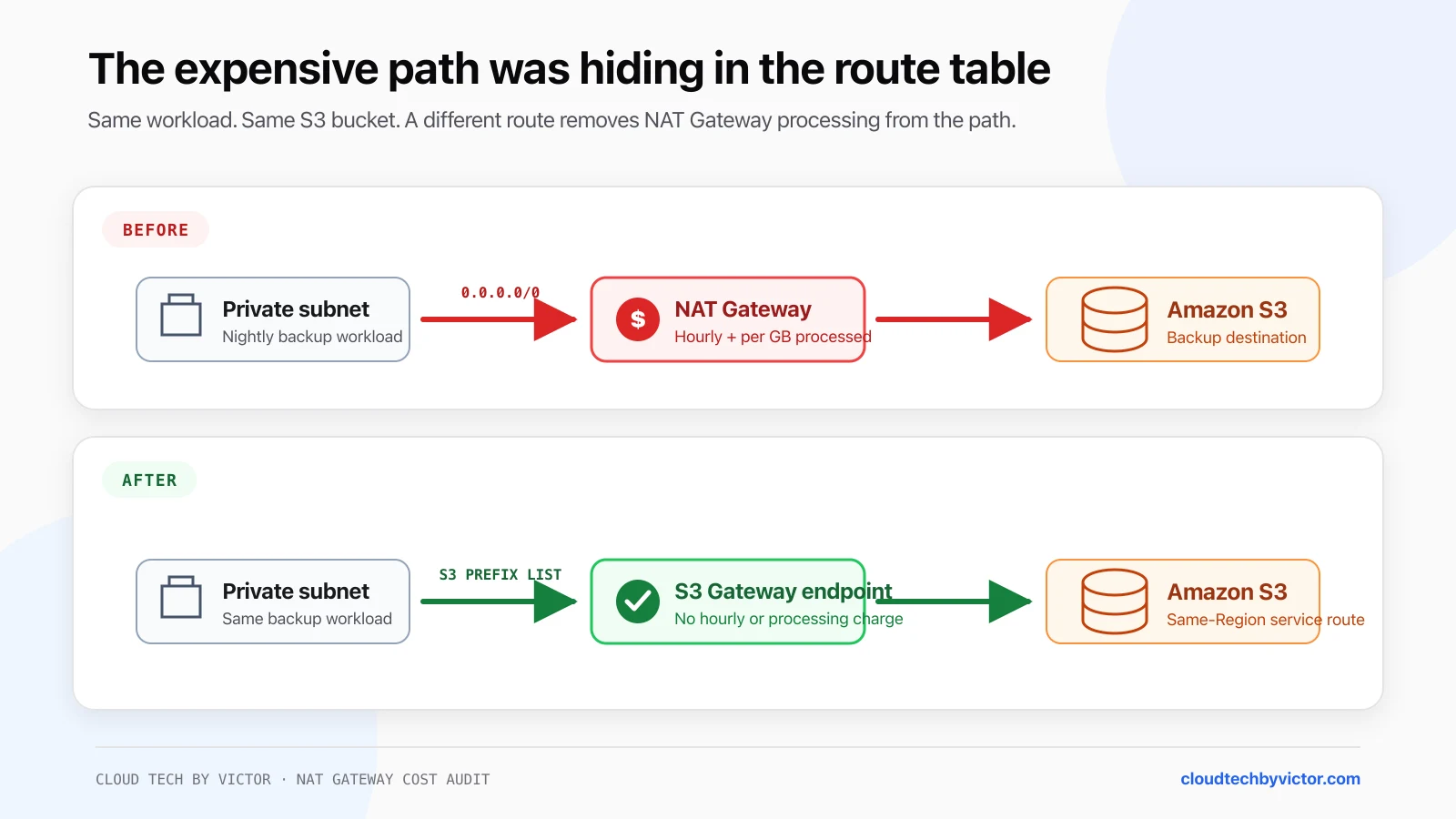
The workload and bucket do not change. The S3 prefix-list route is more specific than 0.0.0.0/0, so same-Region S3 traffic uses the Gateway endpoint instead of the NAT Gateway.
For the underlying subnet and route-table model, start with AWS Networking. The AWS Storage reference explains where S3 fits among AWS storage services.
The Cost Model That Causes the Surprise
A NAT Gateway bill can contain more than one network cost:
| Cost component | What triggers it |
|---|---|
| NAT Gateway hours | Each hour, or partial hour, the gateway is provisioned and available |
| NAT Gateway data processing | Each gigabyte processed through the gateway, regardless of source or destination |
| Standard data transfer | Depends on the source, destination, Region, and Availability Zone |
| Cross-AZ data transfer | Can apply when a workload uses a zonal NAT Gateway in another Availability Zone |
I do not add all four NAT byte metrics together to estimate processed data. BytesInFromSource is paired with BytesOutToDestination, and BytesInFromDestination is paired with BytesOutToSource. Adding both the input and output side of the same traffic counts it twice.
AWS's own VPC pricing example sends a 1 GB file from EC2 to S3 through a NAT Gateway in the same Region and Availability Zone. It charges 1 GB of NAT data processing, not 2 GB. If response data also crosses the gateway, those response bytes are processed too.
At the example rate AWS currently publishes for US East (Ohio), 0.045 USD/GB, 80 TiB of processed data is:
80 × 1,024 GB × $0.045 = $3,686.40That is the data-processing charge alone. It excludes the NAT Gateway's hourly charge and any applicable transfer charges.
Do not hard-code the example rate into a forecast
NAT Gateway rates vary by Region and can change. I use the current Amazon VPC pricing page or AWS Pricing Calculator for the Region you are auditing. The calculation above only demonstrates how a routine high-volume job can create a four-figure line item.
The important question is not whether NAT Gateway is expensive in the abstract. It is whether the traffic needed NAT at all.
Why the S3 Traffic Followed the NAT Route
A private subnet does not automatically route through a NAT Gateway. Its associated route table determines the path.
A common route table looks like this:
| Destination | Target |
|---|---|
10.0.0.0/16 | local |
0.0.0.0/0 | nat-0123456789abcdef0 |
Without a more specific S3 route, requests to S3's public service addresses match 0.0.0.0/0 and cross the NAT Gateway.
Creating an S3 Gateway endpoint and associating that route table adds an AWS-managed S3 prefix-list route:
| Destination | Target |
|---|---|
pl-xxxxxxxx for S3 | vpce-0123456789abcdef0 |
0.0.0.0/0 | nat-0123456789abcdef0 |
Amazon VPC uses longest-prefix matching. The S3 endpoint route is more specific than the default route, so matching same-Region S3 traffic uses the endpoint. Other internet-bound traffic can continue to use the NAT Gateway.
This is a route change, not an application rewrite. Applications can continue using the normal Regional S3 service names.
Step 1: Confirm the Charge in Cost Explorer
I start with the bill, not the route table.
In AWS Cost Explorer:
- Set a date range that includes the increase and a normal comparison period.
- I use Daily granularity so a nightly or weekly pattern remains visible.
- Group by Usage type.
- Find usage types ending in
NatGateway-BytesandNatGateway-Hours. A Region code can appear before those names. - Filter or group by Linked account and Region to locate the account and Region responsible.
NatGateway-Hours answers whether the number or lifetime of gateways changed. NatGateway-Bytes answers whether more data crossed them. In this scenario, the hourly baseline stayed flat while the byte charge climbed.
Cost Explorer is the billing source for the investigation, but it is not a real-time packet monitor. AWS states that current cost data is generally available after a delay and refreshes at least daily. I use it to identify the cost category and time window, then move to CloudWatch for operational timing.
The usage type is evidence, not attribution
NatGateway-Bytes proves that a NAT Gateway processed billable data. It does not identify the
workload or destination. That attribution comes from NAT Gateway metrics and VPC Flow Logs.
Step 2: Match the Billing Spike to NAT Gateway Metrics
NAT Gateway metrics are published to CloudWatch in the AWS/NATGateway namespace at one-minute intervals.
Graph these metrics with the Sum statistic:
| Metric | Meaning |
|---|---|
BytesInFromSource | Bytes the NAT Gateway received from clients in the VPC |
BytesOutToDestination | Bytes it sent toward the destination |
BytesInFromDestination | Bytes it received from the destination |
BytesOutToSource | Bytes it returned to clients in the VPC |
For a large upload, BytesInFromSource and BytesOutToDestination rise together. For a large download, BytesInFromDestination and BytesOutToSource rise together.
Look for:
- A repeating spike at the backup schedule.
- One NAT Gateway with materially more bytes than the others.
- Traffic crossing an Availability Zone to reach a zonal NAT Gateway.
- A flat hourly count but a growing byte total.
This step turns "the bill increased last month" into a precise window such as "every day between 01:00 and 03:00 UTC."
If the metrics are unfamiliar, AWS Monitoring covers the CloudWatch model used here.
Step 3: Use VPC Flow Logs to Find the Workload
VPC Flow Logs can monitor a VPC, subnet, or network interface, including a network interface created for a NAT Gateway.
For a conventional zonal NAT Gateway:
- Open the NAT Gateway in the VPC console.
- I record its private IP addresses and network interface ID.
- I create or inspect a Flow Log that covers the NAT Gateway network interface.
- I capture accepted traffic, or all traffic if the same log also supports security troubleshooting.
- I use a one-minute aggregation interval when you need the closest match to a short scheduled job.
I use a custom record format that includes at least:
${version} ${interface-id} ${srcaddr} ${dstaddr} ${pkt-srcaddr} ${pkt-dstaddr} ${pkt-dst-aws-service} ${srcport} ${dstport} ${protocol} ${bytes} ${start} ${end} ${action} ${log-status} ${flow-direction} ${traffic-path}The packet-level fields matter. On a NAT Gateway network interface, dstaddr can be the NAT Gateway's private address while pkt-dstaddr preserves the final destination. pkt-dst-aws-service identifies supported AWS service address ranges and can return S3 or DYNAMODB.
Flow Logs are not the billing ledger
Flow Logs are delivered on a best-effort basis and can contain SKIPDATA. I use them to attribute
the traffic pattern, but reconcile the final cost against Cost Explorer or the Cost and Usage
Report. Publishing and storing Flow Logs also incurs the relevant CloudWatch Logs or S3 charges.
Step 4: Query the Top Sources and Destinations
If the Flow Log publishes to CloudWatch Logs, AWS provides Logs Insights queries for NAT Gateway investigations.
Replace the example NAT private IPs and VPC CIDR before running this query:
filter (
  dstAddr in ["10.0.1.5"]
  and isIpv4InSubnet(srcAddr, "10.0.0.0/16")
)
| stats sum(bytes) / 1024 / 1024 / 1024 as gibTransferred by srcAddr
| sort gibTransferred desc
| limit 20
This ranks the private source IPs sending the most data into the NAT Gateway. Map the leading IP to its ENI, EC2 instance, ECS task, or other workload.
With the custom AWS-service field enabled, group the same traffic by destination service:
filter (
  dstAddr in ["10.0.1.5"]
  and isIpv4InSubnet(srcAddr, "10.0.0.0/16")
  and action = "ACCEPT"
)
| stats
    sum(bytes) / 1024 / 1024 / 1024 as gibTransferred
  by pktDstAwsService
| sort gibTransferred desc
Then I I isolate S3 and preserve the original destination:
fields @timestamp, srcAddr, pktDstAddr, pktDstAwsService, bytes, logStatus
| filter (
    dstAddr in ["10.0.1.5"]
    and isIpv4InSubnet(srcAddr, "10.0.0.0/16")
    and pktDstAwsService = "S3"
    and action = "ACCEPT"
  )
| stats
    sum(bytes) / 1024 / 1024 / 1024 as gibTransferred
  by srcAddr, pktDstAddr
| sort gibTransferred desc
| limit 20
If pktDstAwsService is blank, do not label the destination as S3 from a guess or a reverse DNS lookup alone. Confirm that the custom field is present, check the original destination against AWS's published IP ranges or S3 prefix list, and correlate it with the workload's application logs and schedule.
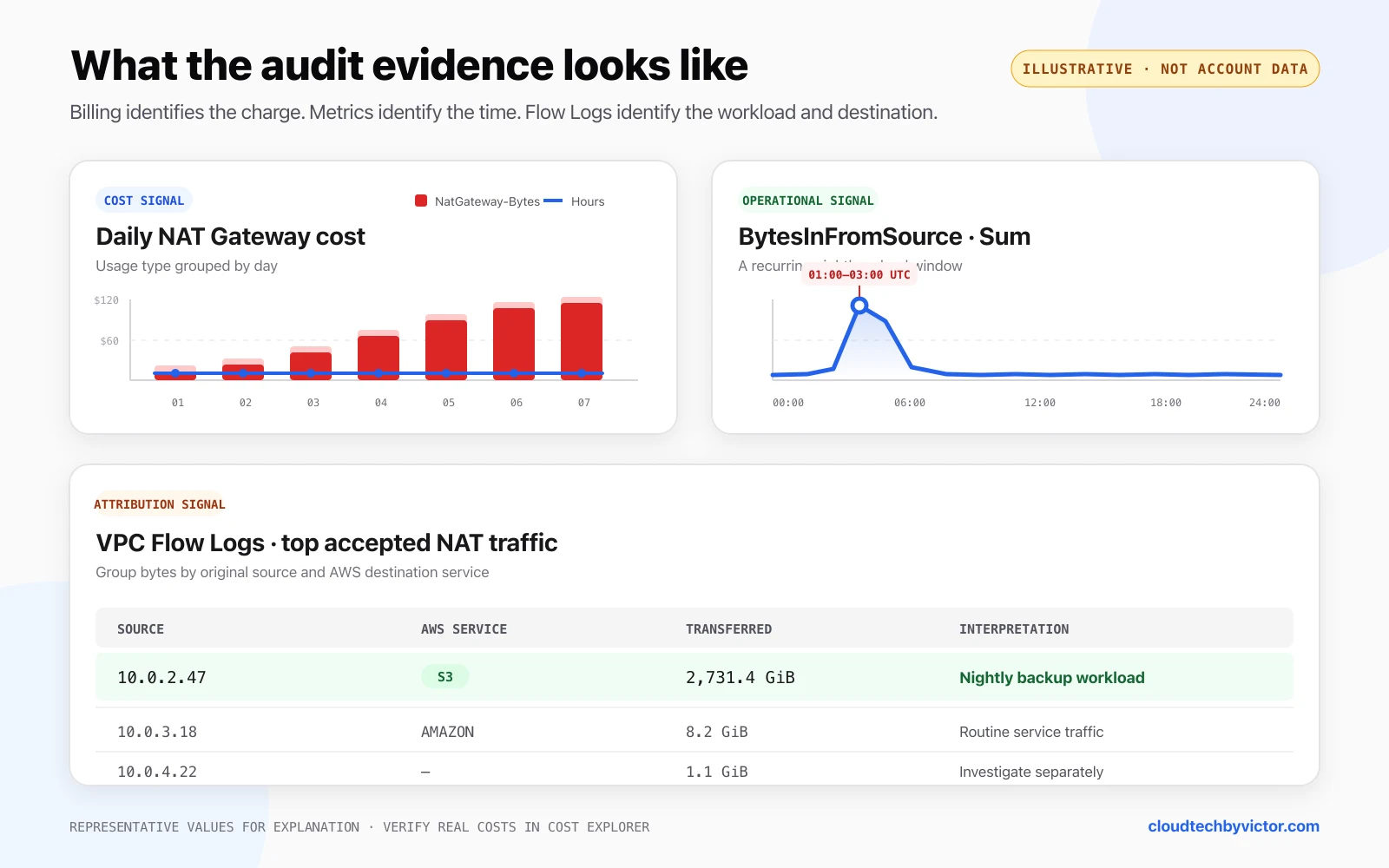
Illustrative example, not an AWS account screenshot: billing identifies the charge, metrics locate the recurring window, and Flow Logs connect the bytes to a workload and AWS service. The values are representative; use your own Cost Explorer data for a real audit.
For a regional NAT Gateway, Flow Log records use the resource-id field for the NAT Gateway and return - for fields that do not apply, including interface-id. Include resource-id in the custom format and filter on the NAT Gateway ID instead. AWS documents zonal and regional examples separately.
Step 5: Add the S3 Gateway Endpoint
The following Terraform uses the route table associated with the private workload subnet:
resource "aws_vpc_endpoint" "s3" {
  vpc_id            = aws_vpc.main.id
  service_name      = "com.amazonaws.eu-west-2.s3"
  vpc_endpoint_type = "Gateway"
  route_table_ids   = [aws_route_table.private.id]

  tags = {
    Name = "s3-gateway"
  }
}
The service name must match the provider Region. For example, use com.amazonaws.us-east-1.s3 in us-east-1. The HashiCorp AWS provider documents route_table_ids for Gateway endpoints, and AWS's CLI reference uses the same com.amazonaws.<region>.s3 service-name pattern.
If several private route tables contain S3 clients, include every intended route table:
route_table_ids = [
  aws_route_table.private_a.id,
  aws_route_table.private_b.id,
  aws_route_table.private_c.id,
]
Associating the endpoint with only one route table fixes only the subnets using that table.
Creating the endpoint changes live routes
AWS warns that creating or modifying an S3 Gateway endpoint switches network routes and can disconnect open TCP connections. Existing connections are not resumed. Deploy outside a critical transfer window and verify that clients reconnect correctly.
Step 6: Review the Security Boundary
A Gateway endpoint does not grant S3 permissions by itself. IAM policies and bucket policies still decide which API actions and resources the workload can access.
I review four controls:
- Endpoint policy: restrict which principals, actions, and buckets can be reached through the endpoint.
- IAM policy: keep the workload's S3 permissions least-privileged.
- Bucket policy: if you restrict by VPC endpoint, test every legitimate access path before enforcing a deny.
- Security groups and network ACLs: allow HTTPS to the S3 prefix list or service ranges as appropriate.
AWS specifically notes that S3 sees private VPC source addresses after the route change. For S3 requests through a VPC endpoint, use the documented VPC-aware condition keys rather than assuming the previous public source address remains visible.
I do not paste a restrictive aws:SourceVpce deny into a production bucket policy without testing it. AWS warns that a policy tied to one endpoint can also block access through other paths, including console access.
Step 7: Prove the Traffic Left the NAT Gateway
I do not stop when terraform apply succeeds.
I verify the change in this order:
- I inspect every intended private route table and confirm the S3 prefix-list destination targets the new
vpce-...endpoint. - I run a controlled S3 upload from the same workload and subnet.
- Confirm the operation succeeds under the endpoint, IAM, and bucket policies.
- I check Flow Logs on the workload interface. For egress traffic,
traffic-path = 7identifies a Gateway VPC endpoint. - Re-run the NAT Gateway Logs Insights query for the same source IP and confirm that S3 bytes no longer appear.
- I compare the next scheduled job's
BytesInFromSourcewith the previous baseline. - Confirm the reduction in
NatGateway-Bytesafter Cost Explorer refreshes.
I keep the NAT Gateway if the subnet still needs general IPv4 internet egress. The endpoint removes only matching S3 traffic from that path.
Gateway Endpoints Are Powerful but Deliberately Narrow
Gateway endpoints support Amazon S3 and DynamoDB. They are free to use, but they are not a universal replacement for NAT Gateway or AWS PrivateLink.
Important limits include:
- The endpoint and target S3 bucket or DynamoDB table must be in the same Region for the managed service route to apply.
- Gateway endpoint connectivity cannot be extended through VPC peering, Transit Gateway, VPN, or Direct Connect.
- Resources in route tables not associated with the endpoint do not use it.
- Interface endpoints use private IP addresses and can support network paths that Gateway endpoints cannot, but they are billed.
For other AWS services, evaluate an Interface VPC endpoint. AWS PrivateLink charges for each endpoint hour in each selected Availability Zone and for data processed through the endpoint. That can be cheaper than NAT processing for a high-volume service, but it is not automatically cheaper.
I use a break-even calculation:
Interface endpoint monthly cost
= (endpoint hourly price × hours × Availability Zones)
  + (PrivateLink processing price × GB)

Current NAT path monthly cost
= NAT processing price × GB
  + any avoidable cross-AZ transfer
Include only costs that actually change. If the NAT Gateway must remain for internet egress, its existing hourly charge is not saved by adding one Interface endpoint. I compare the avoided NAT processing and transfer charges with the new endpoint's hourly and processing charges using current Regional prices.
A Ten-Minute NAT Gateway Audit
I use this checklist before the next bill lands:
- Group Cost Explorer by usage type and isolate NatGateway-Bytes by account and Region.
- Graph NAT Gateway byte metrics with Sum and identify the exact recurring time window.
- Use VPC Flow Logs to rank private source IPs by bytes sent through the NAT Gateway.
- Capture pkt-dstaddr and pkt-dst-aws-service instead of guessing from translated addresses.
- Add same-Region S3 and DynamoDB Gateway endpoints where their traffic currently uses NAT.
- Associate every intended private route table and review endpoint, IAM, bucket, SG, and NACL policy.
- Evaluate Interface endpoints for other high-volume AWS services with a Regional break-even calculation.
- Check for cross-AZ paths to zonal NAT Gateways.
- Re-run the workload and prove the NAT metrics and Flow Logs changed.
- Confirm the billing reduction after Cost Explorer refreshes.
The expensive architecture was not a larger instance or a new database. It was a default route carrying traffic that had a free, more specific path available.
That is why NAT Gateway cost reviews should start with bytes, not resource counts.