An AI coding assistant suggests an import, gives you an install command, and explains exactly how the package solves your problem.
The name fits the ecosystem. The API looks conventional. The example is internally consistent.
There is still one question to answer before running anything:
Does that exact package come from the project you think it does?
In 2024, security researcher Bar Lanyado published the results of an experiment around a repeatedly hallucinated Python package named huggingface-cli. The name sounded reasonable, but it was not the distribution developers were supposed to install for Hugging Face's command-line tooling. Lanyado registered an empty package under the hallucinated name to measure what would happen.
According to Lanyado's research, the empty package received more than 30,000 authentic downloads in three months. He also found the install instruction in public repository documentation for Alibaba research.
The package was harmless because the researcher made it harmless. An attacker could make the opposite choice.
Today, this attack pattern is commonly called slopsquatting: an attacker identifies package names that AI tools are likely to invent, registers those names on a public registry, and waits for a developer or coding agent to install one on trust.
A successful install proves almost nothing
Once somebody claims a hallucinated name, the registry will report that the package exists and the install command may succeed. Existence is the first check, not a trust verdict.
If you use AI to write or review code, LLM Evaluation and Reducing Hallucinations explains the broader reliability problem. This guide focuses on the narrower moment where generated text becomes executable third-party code.
How Big Is the Package Hallucination Problem?
A USENIX Security 2025 study tested 16 code-generating models with Python and JavaScript prompts.
The researchers generated 576,000 code samples, then used several methods to identify the packages those samples recommended. Across the full experiment, they collected 2.23 million package recommendations. Of those recommendations:
- 440,445, or 19.7%, were classified as hallucinated;
- 205,474 were unique non-existent package names;
- the tested commercial models averaged 5.2% hallucinated packages;
- the tested open-source models averaged 21.7%;
- GPT-4 Turbo had the lowest overall rate in that experiment at 3.59%.
Those figures describe the models, prompts, languages, and model versions in that study. They are not a timeless failure rate for every current coding assistant.
The persistence result matters just as much as the average. When the researchers repeated a prompt that had produced a hallucination, 43% of the hallucinated packages reappeared in all ten follow-up queries. Another 39% did not reappear at all.
That split creates the security opportunity. An attacker does not need every hallucination to be predictable. A smaller set of names that recur reliably is enough to identify names worth registering.
Package Hallucination and Slopsquatting Are Different Steps
A package hallucination is a model error. Slopsquatting is what somebody can do with that error.
The sequence is similar to typosquatting, but the source of the name is different:
| Attack | What creates the wrong name? | What the attacker predicts |
|---|---|---|
| Typosquatting | A human mistypes a real package name | Common keyboard and spelling mistakes |
| Dependency confusion | A private and public package share a name | How a resolver chooses between registries |
| Slopsquatting | An AI tool invents a plausible package name | Which hallucinations models will repeat |
The dangerous transition is not “the model was wrong.” It is “the wrong answer crossed an execution boundary without an identity check.”
The Five-Minute Dependency Check
I use this workflow for every dependency first introduced by generated code, whether it came from chat, autocomplete, an autonomous agent, or an AI-written tutorial.
1. Copy the Exact Registry Name
I do not search for a description such as “Hugging Face CLI package” and assume the first similar result is what the generated code intended.
Copy the exact distribution name from the install command. Preserve its scope, punctuation, and spelling:
@scope/package-name
package-name
package_name
package-name[extra]
Package names, import names, executable names, and repository names are not guaranteed to match. Confirm the mapping in the project's official documentation.
For example, Hugging Face's current CLI documentation says its hf CLI is shipped through documented distributions and install methods. It does not instruct readers to install a distribution merely because its name resembles the command.
2. Ask the Registry Without Installing
Replace PACKAGE_NAME with the exact npm or PyPI distribution name:
# npm: show registry metadata without installing the package
npm view PACKAGE_NAME

# Request the identity and history fields most useful for review
npm view PACKAGE_NAME \
  name version description repository.url maintainers \
  time.created time.modified --json

# PyPI: ask the configured Python package index which versions exist
python -m pip index versions PACKAGE_NAME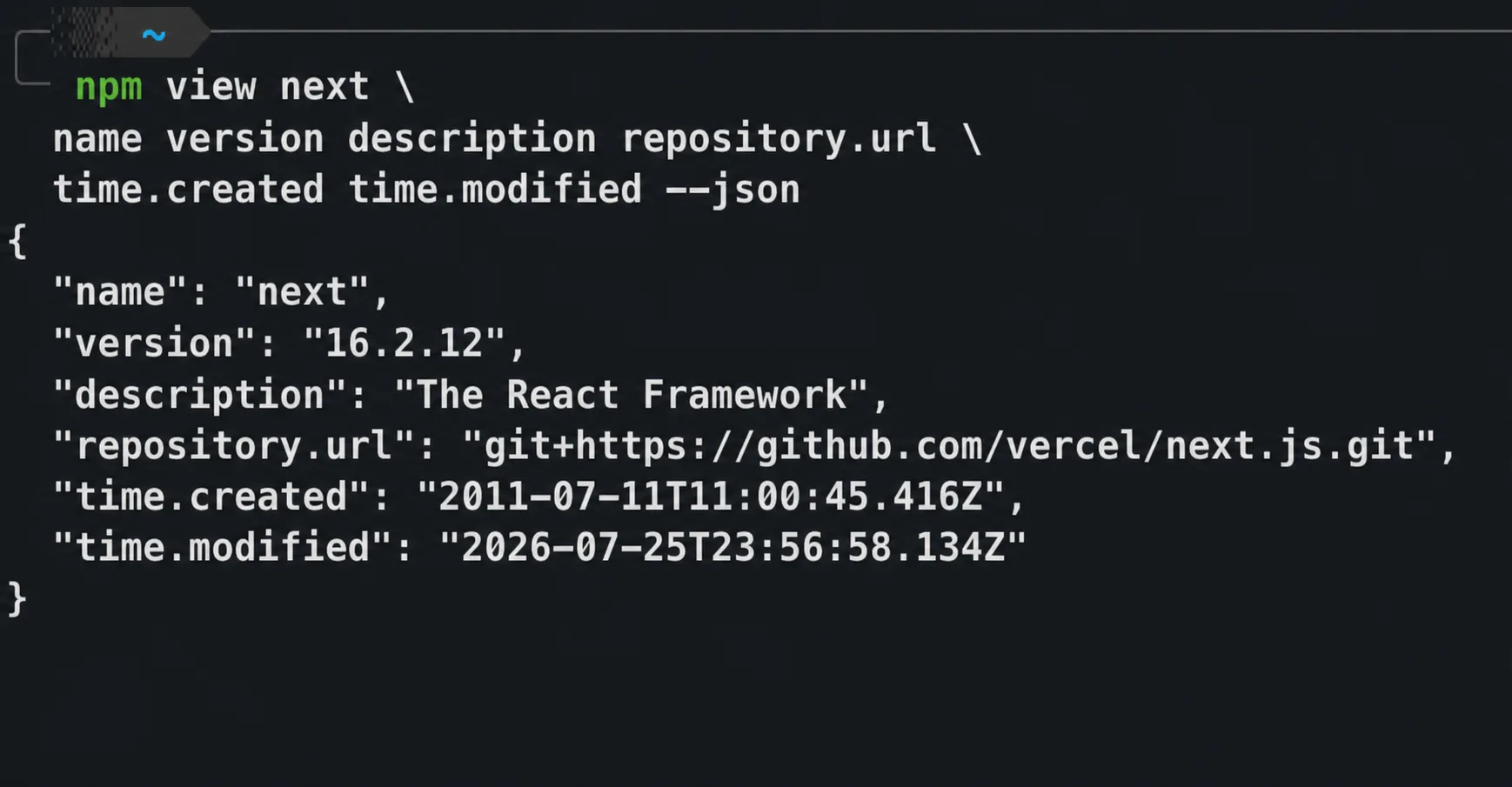
Example of identity and history metadata for a known package. Registry values change over time.
The official npm view documentation describes it as a registry-information command and supports selecting individual metadata fields. The official pip index documentation documents python -m pip index versions PACKAGE_NAME for inspecting versions available from package indexes.
If the exact name is missing, stop. I do not “fix” it by choosing the nearest-looking result unless the official project documentation makes that mapping explicit.
If the name exists, continue. A slopsquatter's package also exists.
3. Prove the Package's Identity
Triangulate between three places:
- The software project's official documentation names the package and install command.
- The registry metadata links to the expected source repository and maintainer organization.
- The source repository links back to the same registry package.
One matching link is a clue. Agreement in both directions is stronger.
Look closely when:
- the registry package points to a personal fork instead of the expected organization;
- the repository URL is missing, newly created, archived, or unrelated to the package description;
- the documentation uses a different package name;
- the maintainer list has no recognizable relationship to the upstream project;
- a new package claims to be the “official,” “faster,” or “fixed” version of a well-known tool.
PyPI's official JSON API exposes project URLs, release files, upload times, ownership roles, hashes, and known vulnerabilities. PyPI also warns that uploaded metadata does not necessarily match the content of the uploaded files. Metadata is evidence to investigate, not proof of benign code.
4. Check Age, Release History, and Maintainer Continuity
A package created yesterday is not automatically malicious, and an old package is not automatically safe. The useful question is whether the history matches the story the package is telling.
For npm, review the time, maintainers, repository, and version fields returned by npm view. For PyPI, inspect the release history, uploaded files, owners, maintainers, and linked source repository.
Pause when a package that claims broad adoption has:
- a first release from the last few days;
- only one tiny or empty release;
- a sudden maintainer or repository change;
- a long dormant period followed by an unrelated new version;
- no issue history, release notes, tests, or source tags matching published versions.
Download volume can add context, but do not use it as an approval rule. The Python Packaging User Guide says PyPI download counts are highly inaccurate and specifically warns that a high count does not make a project good, while a low count does not make it bad. Lanyado's empty package accumulating tens of thousands of downloads makes the same point from the other direction.
5. Inspect What Installation Can Execute
For npm, inspect lifecycle scripts and dependency metadata before installation:
npm view PACKAGE_NAME \
  scripts dependencies optionalDependencies peerDependencies --json

# Report the files npm would pack without writing the tarball locally
npm pack PACKAGE_NAME --dry-run --ignore-scripts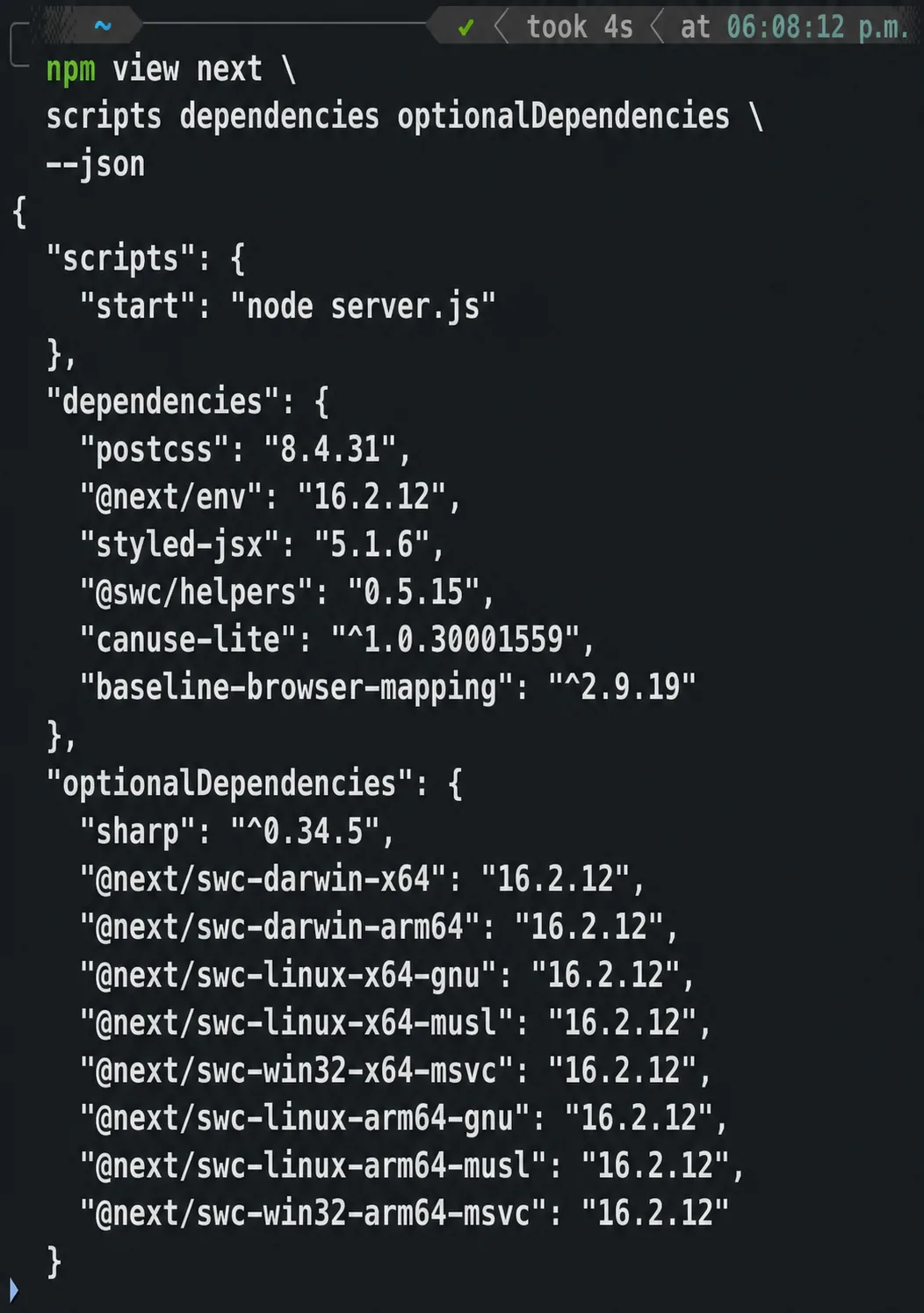
The same read-only registry query reveals lifecycle scripts and the dependency surface before installation.
The official npm pack documentation says --dry-run reports what npm would do without making local changes, and --ignore-scripts prevents package scripts from running for that command.
Treat install hooks, downloaded binaries, obfuscated code, network fetches, and credential discovery as reasons for deeper review. The absence of an install script is not a guarantee: package code can still do damage when the application imports or executes it.
For a high-risk or unfamiliar Python package, download the distribution into an isolated review directory without dependencies and inspect the wheel or source archive before installation. I do not test an unknown package in a workstation or CI runner that holds production credentials.
6. Check Provenance, but Understand Its Limit
Some registries expose attestations connecting a published artifact to a source repository and build identity.
npm's provenance documentation says provenance can establish where and how a package was built. It also states explicitly that provenance does not guarantee the package contains no malicious code.
After npm dependencies have been approved and downloaded, verify registry signatures and available attestations:
npm audit signaturesPyPI's digital attestation documentation describes how attestations bind an uploaded wheel or source distribution to a cryptographic digest and a publishing identity such as a specific GitHub Actions workflow.
Provenance answers “where did this artifact come from?” You still have to decide whether that source and build process are trustworthy.
7. Make the Dependency Change Reviewable
Once the package passes review:
- add an explicit version constraint using the project's normal package manager;
- inspect the manifest and lockfile diff;
- review new transitive dependencies, not only the direct package;
- run tests and security checks in an isolated environment;
- require a human review for every new top-level dependency;
- record why the dependency is needed and which official source established its identity.
Python Virtual Environments and Packaging covers isolation and reproducible dependency files. Secure CI/CD Pipelines explains where software-composition checks and build gates fit after a dependency enters the project.
A Practical Team Policy
The simplest useful policy is:
An AI tool may suggest a dependency. It may not approve its own suggestion or install a new package without a registry and upstream-identity check.
For human-in-the-loop tools, make new dependencies visible in code review. For autonomous coding agents, enforce the rule outside the prompt:
- run agents with package installation disabled by default;
- require approval for changes to manifests and lockfiles;
- use an allowlist or internal registry for unattended builds;
- isolate agent environments from production tokens and developer credentials;
- block merge when an unreviewed direct dependency appears.
Prompt instructions are helpful, but they are not an enforcement boundary. The package manager, sandbox, registry policy, and review workflow are.
What Not to Do
Do not ask the same model whether its package is real
The USENIX researchers found that some models could identify many of their own hallucinations, but self-checking was not perfect. A second confident answer is still generated text. Query the registry and official project documentation.
Do not trust a successful installation
A claimed slopsquatting name will install successfully. That is the attack path, not evidence against it.
Do not treat popularity as identity
Download counts can include CI, mirrors, scanners, caches, and deliberate inflation. They do not prove that a package belongs to the upstream project its name resembles.
Do not hide dependency additions inside a large AI-generated change
A new dependency deserves its own visible review. The smaller the diff, the easier it is to notice a package name that does not belong.
The Short Checklist
Before an AI-suggested dependency reaches a lockfile, confirm:
- the exact package name exists on the registry you intend to use;
- official upstream documentation names that exact distribution;
- registry and source-repository links agree in both directions;
- maintainers, release age, and version history match the package's claims;
- lifecycle scripts and published files have been inspected where risk warrants it;
- provenance or attestations are checked when available, without treating them as a guarantee;
- the direct and transitive dependency diff receives human review;
- installation and testing happen without access to production credentials.
AI coding assistants are useful precisely because they remove friction. Package installation is one place where a little friction is a security control.
Let the assistant suggest the package. Make the registry, the upstream project, and your review process prove it.
Official Documentation and Research
- Lasso Security: Diving Deeper into AI Package Hallucinations
- USENIX Security 2025: We Have a Package for You!
- npm:
npm view - npm:
npm pack - npm: Generating and verifying provenance statements
- pip:
pip index - PyPI: JSON API
- PyPI: Digital attestations
- Python Packaging User Guide: Analyzing PyPI package downloads
- Hugging Face: Command Line Interface