Every rolling deploy on a team I worked with added a strange ten-second pause.
The new container was healthy. The load balancer had stopped sending new requests to the old one. Nothing in the deployment configuration had changed for months. Yet each old container sat there for almost exactly ten seconds before it disappeared.
The number was the clue.
Ten seconds is Docker's default stop timeout for Linux containers. Docker was asking the container to terminate, waiting through the entire grace period, and then forcing it down. The deploy was not slow because Docker needed ten seconds to stop a process. It was slow because the application never completed the graceful part of the shutdown.
The Dockerfile contained this:
CMD ["npm", "start"]It looked correct because it used the JSON-array form. The problem was one layer deeper: the executable Docker started was npm, not the Node.js application. npm then ran the package script through a shell. The application was behind an extra process chain, and the signal sent to the container's main process did not reach the application in the failing setup.
The fix was not a shorter timeout. It was making the process and shutdown path explicit.
If the process model behind this is unfamiliar, Docker Fundamentals explains how a container is built around its main process. Linux Fundamentals covers the difference between SIGTERM and SIGKILL.
The Ten Seconds Is a Timer, Not Work
The official docker container stop documentation describes a two-stage shutdown:
- Docker sends the container's main process its configured stop signal. The default is
SIGTERM. - Docker waits for the configured timeout.
- If the container is still running, Docker sends
SIGKILL.
For Linux containers, the daemon's default timeout is ten seconds when the container has no other stop timeout configured. Docker Compose documents the same ten-second default for stop_grace_period.
That produces a recognizable pattern:
0s                         10s
│                           │
├─ SIGTERM sent to PID 1    └─ SIGKILL sent if still running
└─ grace period begins
This controlled terminal capture isolates that timer. It deliberately uses sleep infinity as PID 1 rather than pretending to be the npm failure: the process remains alive for the full grace period, docker stop takes 10.14 seconds, and the container records exit code 137 after forced termination.
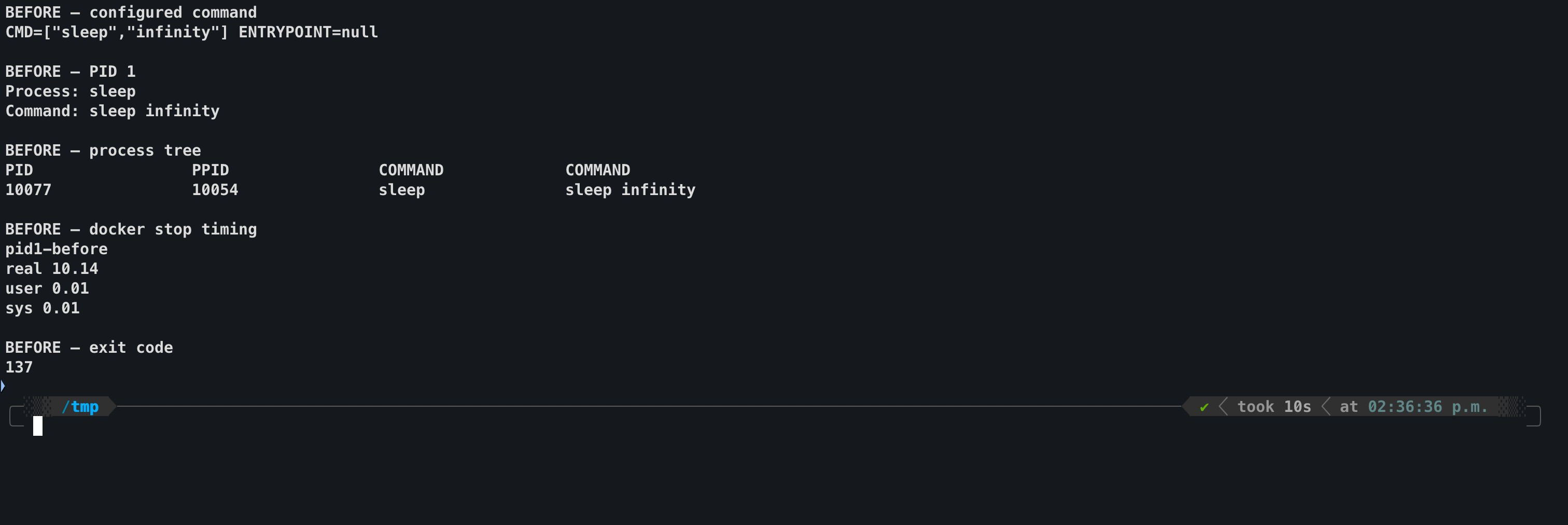
Controlled failing baseline: Docker consumes the full ten-second Linux stop timeout before forcibly terminating PID 1.
SIGTERM is a request. An application can handle it, stop accepting new work, finish in-flight requests, close database connections, flush telemetry, and exit.
SIGKILL is not a request. A process cannot catch it or run cleanup code after it arrives. The kernel terminates the process.
If docker stop consistently takes almost exactly ten seconds, test whether the container is consuming the whole grace period. I do not start by assuming the application needs ten seconds of cleanup.
Ten seconds is not universal
Docker uses a ten-second default for Linux containers and a thirty-second default for Windows containers. Kubernetes uses a thirty-second default Pod termination grace period. The diagnostic pattern is the same, but the number depends on the runtime and deployment configuration.
What Exec Form Actually Guarantees
Docker supports shell and exec forms for CMD and ENTRYPOINT.
Shell form adds a shell:
CMD npm startConceptually, the process tree begins like this:
PID 1  /bin/sh -c npm start
└─      npm
Docker's documentation warns that the shell does not automatically pass signals to the executable it launches. That is why the JSON-array form is normally the right default:
CMD ["npm", "start"]This removes the shell that Docker would otherwise add. It does not turn npm into node.
With the exec form, Docker starts exactly the executable in the array:
PID 1  npm start
└─      shell used for the npm lifecycle script
        └─ node server.js
npm's own documentation says package scripts are passed to /bin/sh on POSIX systems or cmd.exe on Windows. The exact process tree can vary with the operating system, npm version, and script, but the important fact does not: CMD ["npm", "start"] makes npm the container's main process, not the application named inside the start script.
JSON-array syntax solves Docker's implicit-shell problem. It cannot remove a process wrapper that you explicitly put in the array.
Where the Signal Goes
Docker sends the stop signal to the container's main process. In the failing image, that process was npm.
Docker daemon
    │
    │ SIGTERM
    ▼
npm (PID 1)
    │
    └─ shell ── node server.js
                  ▲
                  └─ application shutdown handler never runs
This is why the symptom can be misleading. The Node.js code may contain a perfectly reasonable SIGTERM handler, but that handler only runs if the Node.js process receives SIGTERM.
Node's process documentation confirms that signal events are emitted when the Node.js process receives a signal. It also documents that adding a SIGTERM or SIGINT listener removes Node's default behavior for that signal. Once you install a handler, your code owns the shutdown path and must eventually let the process exit.
There are two separate responsibilities:
- Signal delivery: the application process must receive the stop signal.
- Graceful cleanup: the application must respond by closing its listeners and dependencies before the grace period expires.
Fixing only one is not enough. A direct node process with no cleanup handler may exit quickly, but it has not necessarily drained requests or closed application resources gracefully. A good shutdown handler behind a wrapper is useless if the signal never reaches it.
The Production Dockerfile Fix
For a Node.js service with one application process, run the runtime directly:
# Before: npm is the container's main process
CMD ["npm", "start"]

# After: the application runtime is the container's main process
CMD ["node", "server.js"]
For a compiled TypeScript application, point at the compiled entry file:
CMD ["node", "dist/index.js"]This is also the shape used by Docker's production Node.js guide. npm still belongs in the image build, where it installs dependencies and runs the build:
FROM node:24-alpine AS build
WORKDIR /app
COPY package.json package-lock.json ./
RUN npm ci
COPY . .
RUN npm run build

FROM node:24-alpine AS runtime
WORKDIR /app
ENV NODE_ENV=production
COPY --from=build /app/package.json /app/package-lock.json ./
RUN npm ci --omit=dev
COPY --from=build /app/dist ./dist
USER node
CMD ["node", "dist/index.js"]
The distinction is simple:
- I use npm to install and build.
- I use the runtime to run the production application.
The Application Still Needs a Shutdown Handler
Making Node.js PID 1 ensures it receives Docker's SIGTERM. The application then needs to stop correctly.
For a Node.js HTTP server, server.close() stops the server from accepting new connections and closes connections that are not currently sending a request or waiting for a response. Active requests can complete before the server closes.
import process from 'node:process'
import { createServer } from 'node:http'

const server = createServer((req, res) => {
  res.end('OK')
})
server.listen(3000)

let shuttingDown = false

async function shutdown(signal) {
  if (shuttingDown) return
  shuttingDown = true

  console.log(`Received ${signal}; starting graceful shutdown`)

  const watchdog = setTimeout(() => {
    console.error('Graceful shutdown timed out')
    process.exit(1)
  }, 9_000)
  watchdog.unref()

  server.close(async (error) => {
    if (error) {
      console.error('HTTP server failed to close', error)
      process.exitCode = 1
    }

    try {
      await database.end()
    } catch (databaseError) {
      console.error('Database failed to close', databaseError)
      process.exitCode = 1
    } finally {
      clearTimeout(watchdog)
    }
  })
}

process.once('SIGTERM', () => void shutdown('SIGTERM'))
process.once('SIGINT', () => void shutdown('SIGINT'))
database.end() is a placeholder for the close method provided by the database client in the application. The order is deliberate: stop accepting new HTTP work, let active requests finish, then close the shared database resource.
The corrected terminal capture verifies the complete path, not just a fast exit. node server.js is PID 1, the application log confirms that it received SIGTERM, docker stop completes in 0.11 seconds, and the container exits with code 0.
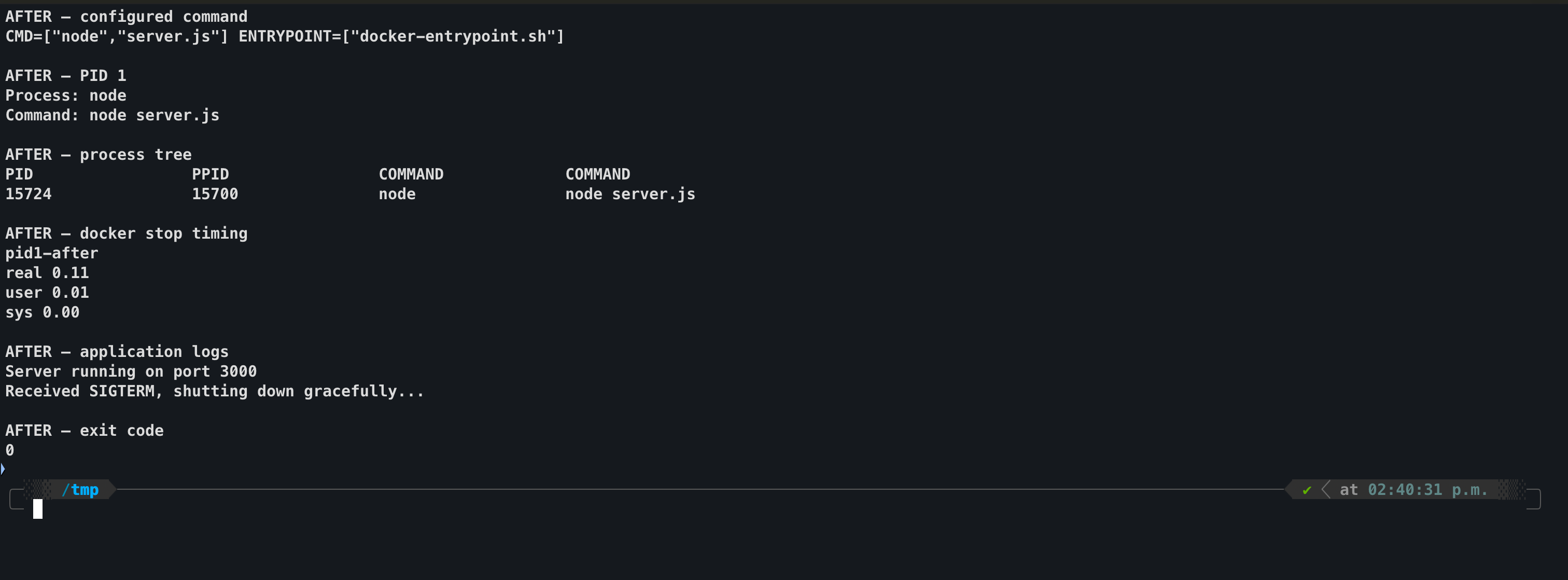
Corrected shutdown: Node receives SIGTERM directly, runs its graceful handler, and exits successfully without Docker escalating to SIGKILL.
The nine-second watchdog is an application choice for a Docker setup with a ten-second stop timeout, not a universal constant. Leave enough margin for the process to exit before Docker escalates to SIGKILL. If legitimate requests can take longer, increase the container's grace period and choose an application deadline that fits inside it.
Do not copy the timeout without checking your platform
Kubernetes defaults to a thirty-second Pod termination grace period, and a deployment can override it. Align the application watchdog with the real platform setting instead of assuming every container receives ten seconds.
If You Need an Entrypoint Script
Some images need a script to render configuration, run a lightweight check, or adjust file permissions before the application starts.
End that script with exec:
#!/bin/sh
set -eu

# Perform required startup work here.

exec "$@"
Pair it with exec-form instructions:
COPY docker-entrypoint.sh /usr/local/bin/
ENTRYPOINT ["docker-entrypoint.sh"]
CMD ["node", "dist/index.js"]
exec "$@" replaces the shell process with the command instead of leaving the application as its child. After startup, the Node.js process occupies the main-process position and receives the stop signal directly.
If the application creates child processes and does not reap them correctly, Docker provides --init:
docker run --init your-imageDocker documents that this inserts a small init process as PID 1 to forward signals and reap child processes. Compose exposes the same behavior:
services:
  api:
    image: your-image
    init: true
An init process is useful, but it is not a reason to keep an unnecessary launcher chain. It forwards to the process it supervises; an arbitrary wrapper can still have its own forwarding behavior. Prefer a direct application command or a wrapper that uses exec, then add an init when the process tree actually needs init-style child reaping.
Prove the Diagnosis Before Changing the Timeout
I inspect what Docker actually started:
docker inspect --format '{{json .Config.Cmd}}' my-container
docker top my-container
The first command shows the configured command. The second shows the running process tree. Look for whether node is the main process or is sitting behind npm and a shell.
Then I I measure the stop:
/usr/bin/time -p docker stop -t 10 my-container
docker inspect --format '{{.State.ExitCode}}' my-container
docker logs my-container
I do not publish a made-up before-and-after number. I run the test against both images in the same environment:
docker build -f Dockerfile.before -t app:pid1-before .
docker build -f Dockerfile.after -t app:pid1-after .

docker run -d --name app-before app:pid1-before
/usr/bin/time -p docker stop -t 10 app-before

docker run -d --name app-after app:pid1-after
/usr/bin/time -p docker stop -t 10 app-after
For the corrected image, confirm the log contains the shutdown message and the process exits before the timeout. That proves signal receipt and cleanup. A fast stop without the shutdown log only proves that the process exited quickly.
The exact times will vary. The useful comparison is whether the failing image clusters around the configured grace period while the corrected image exits as soon as its real cleanup completes.
Why This Multiplies Across a Rolling Deploy
A rolling deployment replaces instances in batches. A ten-second forced-stop delay on one container may be easy to ignore. Repeated across replicas, environments, and deployments, it becomes visible:
10 replicas × a full 10-second stop wait
= up to 100 seconds of cumulative container shutdown waiting
That does not always add 100 seconds to wall-clock deployment time because an orchestrator may terminate several containers in parallel. It still holds resources longer, slows each replacement batch when termination is on the critical path, and turns every shutdown into an ungraceful kill.
The more serious cost is correctness:
- in-flight requests can be cut off;
- database connections do not follow the intended close path;
- buffered logs or telemetry may not flush;
- queue consumers can lose the chance to stop taking work cleanly;
- shutdown defects stay hidden until a deployment or node drain exposes them.
The ten-second pause is therefore both a performance symptom and an operational warning.
What Does Not Fix the Root Cause
Lowering the stop timeout
Changing the timeout from ten seconds to one makes the deploy look faster by sending SIGKILL sooner. It does not make shutdown graceful.
Using JSON-array syntax around the wrong executable
CMD ["npm", "start"] is exec form, but npm is still the executable. Exec form is necessary for avoiding Docker's implicit shell; the executable choice still matters.
Adding a handler that never receives the signal
process.on('SIGTERM', ...) only helps when SIGTERM reaches the Node.js process.
Running Node directly without cleanup code
This removes the forwarding problem, but a quick default exit is not the same as draining traffic and closing dependencies.
Treating --init as a substitute for understanding the tree
An init process provides signal forwarding and child reaping. I inspect the full process tree and make sure the application, not just its nearest wrapper, receives and handles the signal.
A Shutdown Review Checklist
Before the next rolling deploy, check:
CMDorENTRYPOINTstarts the application runtime directly.- Any entrypoint script ends with
exec "$@". - The application handles the platform's stop signal.
- The HTTP server stops accepting new connections.
- In-flight requests have time to finish.
- Database, queue, and telemetry clients close explicitly.
- The application deadline is shorter than the container grace period.
- The grace period is long enough for legitimate shutdown work.
- A timing test proves the process exits before forced termination.
- Logs prove the shutdown handler actually ran.
The useful question is not, "Does the Dockerfile use exec form?"
It is, "Which process is PID 1, which process receives SIGTERM, and what does that process do next?"
Once those three answers are explicit, the mysterious ten-second pause usually stops being mysterious.
References
- Docker Docs - docker container stop
- Docker Docs - Dockerfile reference
- Docker Docs - docker container run
- Docker Docs - Compose services reference
- Docker Docs - Node.js language-specific guide
- npm Docs - Scripts
- Node.js Docs - Process signal events
- Node.js Docs - http.Server.close
- Kubernetes Docs - Pod lifecycle